SSL Certificate Types Explained for Website Owners
By Nick Phillips, Founder
SSL Certificate Types Explained for Website Owners
TL;DR:
- SSL certificates encrypt data and verify a website’s identity, with types differing by validation level and domain coverage. Validation levels include Domain Validation for quick, low-cost control, Organization Validation for verified business presence, and Extended Validation for rigorous legal checks; domain coverage ranges from single domains to wildcards and multi-domain certificates. Proper selection, monitoring, and renewal practices are essential to maintain trust, security, and operational stability over time.
An SSL certificate is a digital credential that encrypts data between a browser and a web server while authenticating the site’s identity. Understanding ssl certificate types explained properly means recognizing that the industry now runs on TLS (Transport Layer Security), the updated protocol that replaced SSL years ago. You’ll still hear “SSL” everywhere, including from certificate authorities like Let’s Encrypt, DigiCert, and Sectigo, because the name stuck. What actually matters for your site is knowing that certificates split into two dimensions: how much identity verification they carry, and how many domains they cover. Get those two dimensions right, and you pick the correct cert every time.
SSL certificate types explained: validation levels
The single most misunderstood fact about SSL certificates is this: all certificate types use identical encryption. The difference between a free cert and a premium one is not how strongly your data is scrambled. The difference is how thoroughly the certificate authority verified who you are before issuing it.
Domain validation (DV)
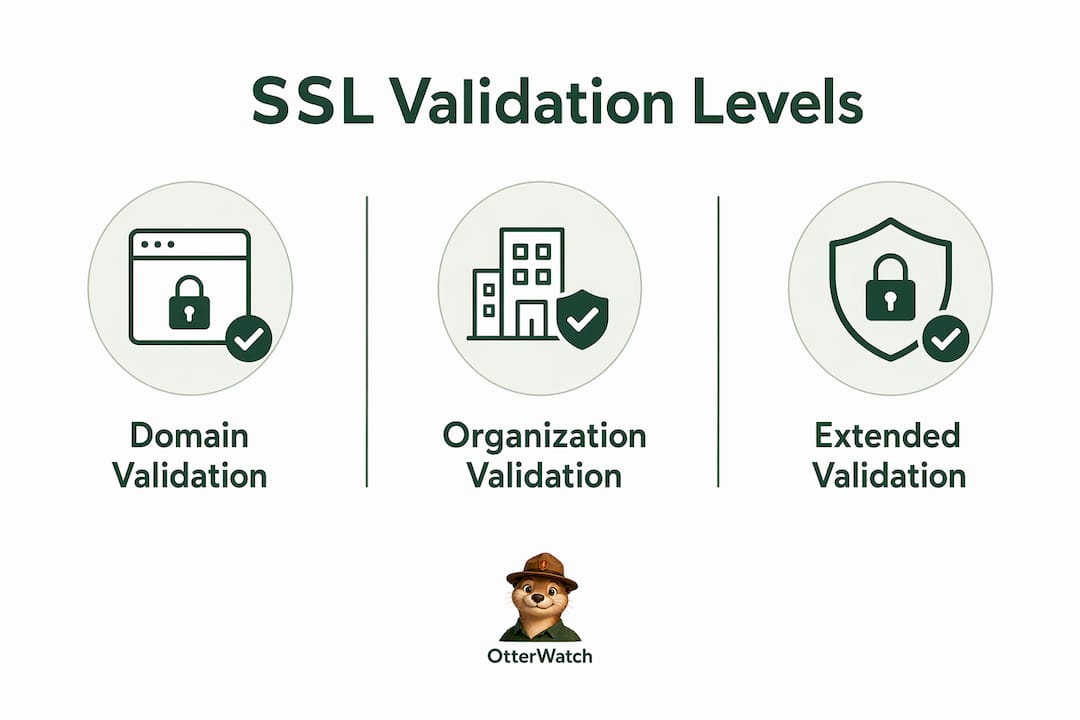
DV certificates are the fastest and cheapest option. The CA confirms only that you control the domain, typically through a DNS record, a file placed on the web server, or an administrative email. DV validation is quick and automatic, making it ideal for blogs, personal projects, and small business sites that need HTTPS without organizational overhead. Let’s Encrypt issues DV certificates for free in minutes. Paid DV certs from Sectigo or DigiCert run roughly the same price range and add some warranty coverage.

Organization validation (OV)
OV certificates require the CA to verify your business identity, not just domain control. The CA checks business registration records, confirms your organization’s physical address, and validates that the domain belongs to that entity. DV certificates are frequently free, while OV and EV certificates cost $35–$300+ annually, with OV issuance taking days rather than minutes. OV certs are the right call for company websites, e-commerce stores, and any site where visitors need confidence they’re dealing with a real, verified business.
Extended validation (EV)
EV certificates carry the strictest vetting. The CA runs a full legal and operational check against your organization before issuing. EV certificates are chosen primarily for brand governance, compliance, and legal assurance, not for stronger encryption. Large financial institutions, healthcare platforms, and regulated industries favor EV for policy compliance and the higher assurance it signals to auditors. Modern browsers no longer display the green address bar with the company name that EV once showed, but the cert still carries that verified identity in its metadata.
Pro Tip: Don’t pay for EV just because it sounds more secure. If your compliance framework or legal team requires it, get it. Otherwise, a properly issued OV certificate covers most business trust needs at a fraction of the cost.
Single-domain, wildcard, or multi-domain: which covers your site?
Validation level tells you how verified a cert is. Domain coverage tells you how many sites one cert protects. These are independent choices, and mixing them up is one of the most common mistakes developers make when setting up certificates.
Comparison of domain coverage types
| Coverage Type | What It Protects | Best For | Example |
|---|---|---|---|
| Single-Domain | One domain or subdomain | Simple sites, single apps | example.com or app.example.com |
| Wildcard | One domain + all first-level subdomains | Sites with many subdomains | *.example.com covers blog.example.com, shop.example.com |
| Multi-Domain (SAN) | Multiple distinct domains | Companies managing many domains | example.com, example.net, myotherbrand.com |
Wildcard certificates secure a single domain plus all first-level subdomains, which simplifies management considerably when you’re running a dozen subdomains under one roof. The catch is that wildcards cover only one level deep. *.example.com covers blog.example.com but not api.staging.example.com. That second level requires either a separate cert or a multi-domain approach.
SAN certificates allow multiple distinct domain names in one certificate, including completely unrelated domains. A company running brandone.com, brandtwo.com, and internal-tool.io can protect all three with a single SAN cert. This is the most flexible option for agencies, enterprises, and developers managing a portfolio of properties.
Pro Tip: If you’re deciding between wildcard and SAN, the choice usually comes down to whether your domains share a root. Same root with many subdomains? Wildcard. Multiple unrelated domains? SAN. For a deeper breakdown, the wildcard vs. SAN comparison on the Otterwatch blog walks through the cost and management tradeoffs in detail.
How to choose the right SSL certificate for your site
Picking the right cert is a four-step decision, not a guessing game. Work through these in order and you’ll land on the right answer for your situation.
-
Identify your trust requirement. Personal blog or portfolio? A free DV cert from Let’s Encrypt is the correct choice. Running an e-commerce store or SaaS product? OV gives customers and search engines the business identity signal they expect. Operating in a regulated industry with compliance mandates? EV may be required by your legal or security team.
-
Map your domain structure. Count your domains and subdomains before buying anything. One domain with a handful of subdomains points to a wildcard. Multiple unrelated domains point to a SAN cert. A single app or site with no subdomains needs only a single-domain cert.
-
Factor in cost versus management overhead. Using wildcard or multi-domain certificates reduces certificate tracking and renewal failures in larger environments. Managing 15 individual single-domain certs means 15 separate renewal deadlines. One wildcard or SAN cert means one renewal event. The math on operational risk favors consolidation.
-
Plan for renewal from day one. The biggest mistake site owners make is treating cert selection as a one-time task. A cert you forget to renew is worse than no cert at all because it actively breaks your site and destroys visitor trust. Build your renewal process before you deploy.
A few common mistakes worth calling out: buying EV for a blog because it sounds more authoritative, purchasing a single-domain cert and then adding subdomains later without updating coverage, and choosing a wildcard when you actually need multi-level subdomain coverage (which wildcards don’t provide).
SSL management and TLS inspection in 2026
Choosing the right cert type is step one. Keeping it healthy over time is where most outages actually happen.
- Certificate expiration is the leading cause of avoidable downtime. Short-lived certificates require proactive monitoring because their fast expiration cycles leave little margin for error. Let’s Encrypt certs expire every 90 days. Miss one renewal and your site goes down hard.
- Automate renewal wherever possible. Tools like Certbot handle Let’s Encrypt renewals automatically via cron jobs or systemd timers. For paid certs, setting up expiry notifications at 60, 30, and 7 days out gives you enough runway to act without panic.
- Certificate revocation matters. If a private key is compromised, the cert must be revoked immediately through the issuing CA. Browsers check Certificate Revocation Lists (CRLs) and OCSP responses to catch revoked certs. A revoked cert triggers the same browser warning as an expired one.
- Root CA trust is non-negotiable. Your cert chain must trace back to a root CA that browsers trust. An intermediate cert missing from your chain causes errors for some visitors even if the cert itself is valid.
On the enterprise side, TLS inspection is worth understanding. Enterprise TLS inspection proxies decrypt and re-encrypt traffic for security scanning, which means corporate networks can read HTTPS traffic passing through them. This is not a malicious attack. It’s a deliberate security control. The proxy presents its own certificate to the browser, signed by a corporate root CA that IT has pre-installed on company devices. Misconfiguration of this setup leads to certificate trust errors that look identical to a real attack, so careful configuration and clear internal documentation are critical.
The importance of SSL certificates goes beyond the padlock. A misconfigured or expired cert actively harms your site’s credibility, search ranking, and user trust in ways that take time to recover from.
For teams running CI/CD pipelines, certificate management belongs in your deployment checklist. Staging and production environments should each have valid, monitored certs. A cert that works in staging but expires in production is a real scenario that has taken down real sites.
Key takeaways
SSL certificate types differ by validation rigor and domain coverage, not by encryption strength, and choosing the wrong type creates either unnecessary cost or gaps in trust and coverage.
| Point | Details |
|---|---|
| Encryption is equal across types | DV, OV, and EV all use identical encryption; differences are in identity verification only. |
| Validation level signals trust | DV suits personal sites; OV fits businesses; EV serves compliance-driven organizations. |
| Domain coverage is a separate choice | Match single-domain, wildcard, or SAN to your actual site structure before buying. |
| Consolidation reduces risk | Wildcard and multi-domain certs cut renewal overhead and lower the chance of expiration outages. |
| Monitoring is not optional | Proactive expiry alerts at 60, 30, and 7 days prevent the most common cause of avoidable downtime. |
The part most articles skip over
I’ve watched developers spend $300 on an EV certificate for a marketing site because they assumed “extended” meant “more secure.” It doesn’t. The encryption is the same as a free Let’s Encrypt cert. What they paid for was a higher level of identity verification that their visitors couldn’t even see in the browser anymore. That’s not a knock on EV certs. They serve a real purpose in regulated industries and enterprise compliance frameworks. But buying one for the wrong reason wastes money and creates a false sense of security.
The other thing that trips people up is wildcard scope. A wildcard covers *.example.com, full stop. The moment you need api.staging.example.com, you’re outside that coverage. I’ve seen this catch teams off guard mid-deployment when they realize their new staging subdomain isn’t covered and the cert order takes three days to process.
The operational side is where I’d focus most of your attention. Picking the right cert type takes 10 minutes once you understand the framework above. Managing it over time, across multiple sites, with renewals coming due at different intervals, is where things quietly go wrong. The website security features conversation always comes back to the same point: a cert you don’t monitor is a liability, not an asset.
Build your renewal alerts before you deploy. Check your cert chain, not just the cert itself. And if you’re managing more than two or three sites, consolidate where you can.
— Nick Phillips
Keep your certificates healthy with Otterwatch
Understanding your cert types is the foundation. Knowing they’re actually valid and not about to expire is what keeps your site running.

Otterwatch watches your SSL certificates around the clock and sends you a plain, friendly heads up well before anything expires. No dashboards to dig through, no wall of red alerts. Otis, the park ranger otter behind Otterwatch, keeps things calm and clear. You can check any certificate right now with the free SSL checker, or start monitoring up to five sites at no cost with Otterwatch’s full monitoring service. Certificates come first, and uptime comes along for the ride.
FAQ
What is the difference between DV, OV, and EV certificates?
DV, OV, and EV certificates differ only in how thoroughly the certificate authority verifies your identity before issuing. All three use identical encryption strength.
Does an EV certificate make my site more secure?
No. EV certificates confirm organizational identity for compliance and trust purposes but do not provide stronger encryption than DV or OV certificates.
What does a wildcard SSL certificate cover?
A wildcard certificate covers one root domain and all of its first-level subdomains (for example, *.example.com) but does not cover deeper subdomain levels like sub.sub.example.com.
How often do SSL certificates expire?
Expiration depends on the certificate type and issuer. Let’s Encrypt DV certificates expire every 90 days, while most paid certificates are issued with one-year validity periods.
What is TLS inspection and does it affect my SSL certificate?
TLS inspection is an enterprise security practice where a corporate proxy decrypts and re-encrypts HTTPS traffic for scanning. It requires a trusted corporate root CA pre-installed on user devices and does not affect your public-facing certificate directly.
Recommended
- SSL Certificate Installation Explained for Small Sites · Otterwatch
- Certificate Expiration Notification Explained for Site Owners · Otterwatch
- SSL vs TLS — what’s actually different, and which one are you using? · Otterwatch
- What Is an SSL Certificate? A Small Business Guide · Otterwatch
Catch the next cert expiry before your users do.
Otterwatch checks your SSL certificates daily and emails you 30 days before they expire. Five sites free.
Start watching →