SSL Certificate Renewal Explained: 2026 Guide
By Nick Phillips, Founder
SSL Certificate Renewal Explained: 2026 Guide
TL;DR:
- SSL certificate renewal involves replacing an expired certificate with a new one to ensure secure website connections. Automation tools like Certbot and Cloudflare handle most renewal steps, but deploying and verifying the new certificate correctly remains essential; failure to reload services or verify can cause outages. From March 2026 onward, maximum certificate validity will decrease to 200 days, requiring more frequent renewals and emphasizing the importance of automation and proper verification.
SSL certificate renewal is the process of replacing an expiring TLS certificate with a new valid one to keep your website’s encrypted connections active and prevent browser security warnings. Starting march 15, 2026, the CA/Browser Forum limits public certificate validity to 200 days maximum, which means renewals happen more often than most small business owners expect. Tools like Certbot and Cloudflare now handle much of this automatically, but the deployment step still trips up a lot of webmasters. This guide covers ssl certificate renewal explained from start to finish, including the new validity rules, automation options, and the mistakes that cause real outages.
How does the SSL certificate renewal process work?
SSL/TLS certificate renewal replaces an expiring certificate with a new one. It does not extend the old certificate’s validity period. The certificate authority (CA) issues a brand new certificate, and you must deploy it to your server for the change to take effect.
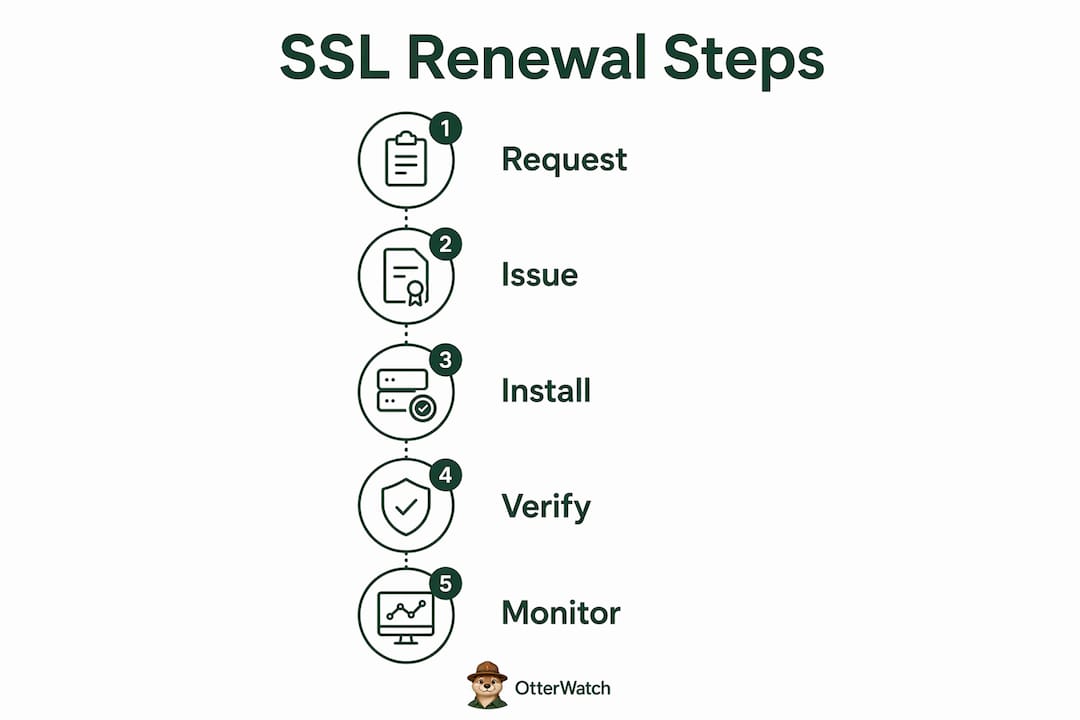
Here is the full renewal sequence:
- Generate a new Certificate Signing Request (CSR). Your CSR contains your domain name, organization details, and public key. You can reuse your existing private key or generate a new one. Most CAs accept either approach.
- Submit the CSR to your CA. This is where you choose your validation level: Domain Validation (DV), Organization Validation (OV), or Extended Validation (EV). Most small business sites use DV, which is the fastest.
- Complete domain control validation. The CA must confirm you control the domain. Domain validation must repeat on every renewal using ACME challenges. HTTP-01 requires an open port 80. DNS-01 works via a TXT record in your DNS zone and is better for wildcard certificates or restricted server environments.
- Download the new certificate and intermediate chain. You need both the end-entity certificate and the full cert chain (intermediate + root). Missing the intermediate causes chain errors in some browsers.
- Install the certificate on your server or gateway. Replace the old cert files with the new ones. Update your web server config (Apache, Nginx, or your load balancer) to point to the new files.
- Restart or reload the relevant service. This step is where many renewals silently fail. The new cert is on disk, but the old one is still being served until the service reloads.
- Verify the new certificate is live. Check the expiration date in your browser or use a command-line tool to confirm the server is presenting the updated certificate.
Pro Tip: Run openssl s_client -connect yourdomain.com:443 | openssl x509 -noout -dates immediately after deployment. It shows the exact validity dates of the certificate your server is currently serving, not just what is on disk.
What are the 2026 SSL certificate validity limits?

The CA/Browser Forum has mandated a phased reduction in maximum certificate lifetime for publicly trusted TLS certificates. These are not optional guidelines. Every major browser vendor, including Google Chrome, Apple Safari, and Mozilla Firefox, enforces them.
| Effective Date | Maximum Certificate Validity |
|---|---|
| Before March 15, 2026 | 398 days |
| March 15, 2026 | 200 days |
| March 15, 2027 | 100 days |
| March 15, 2029 | 47 days |
The reasoning behind these reductions is straightforward. Shorter lifetimes reduce the window of exposure if a private key is compromised. A certificate issued today with a 47-day validity period limits an attacker’s usable window to less than seven weeks, compared to over a year under the old rules.
“Shorter certificate lifetimes mandated by CA/B Forum rules in 2026 demand robust automation and testing strategies to avoid certificate expiration.” — GlobalSign
The practical implication for your website is significant. If you currently renew once a year and set a calendar reminder, that workflow breaks in 2026. By 2029, a 47-day certificate means you need to renew roughly eight times per year. Manual renewal at that frequency is not realistic. Automation stops being a nice-to-have and becomes a requirement. Understanding why SSL certificates expire in the first place helps you build the right renewal habits before the shorter timelines hit.
How can small businesses automate SSL certificate renewal?
Automation is the correct answer to the 2026 validity changes. The good news is that solid, free tools already exist for this.
Certbot is the most widely used open-source ACME client for Let’s Encrypt certificates. Certbot schedules renewal checks twice daily using a systemd timer or cron job and renews any certificate expiring within 30 days. Once installed and configured, it handles the full renewal cycle without manual input.
Key points to know about Certbot automation:
- Port 80 must stay open for HTTP-01 challenges. Closing port 80 after your initial certificate issuance is one of the most common reasons auto-renewal fails silently. If your firewall blocks port 80, switch to the DNS-01 challenge method instead.
- Test before you trust it. Run
certbot renew --dry-runto simulate the renewal process without actually replacing any certificates. Do this after any server or firewall change. - Hook scripts handle deployment. Certbot supports pre and post-hook scripts. A post-hook that runs
systemctl reload nginx(or Apache) means the service reloads automatically after every successful renewal.
Cloudflare managed certificates take a different approach. Cloudflare issues Universal certificates with 90-day validity and controls the renewal process internally. If a renewal attempt fails close to expiration, Cloudflare deploys an alternate valid certificate as a fallback. You do not touch the cert files at all. This is the lowest-friction option for sites already proxied through Cloudflare.
Pro Tip: Even with full automation in place, set up external certificate monitoring. Automation can report success while the deployment reload step silently fails. An external monitor catches the discrepancy because it checks what your server actually serves, not what is on disk.
The role of certificate management tools in your overall security posture goes beyond just renewal. Good tooling tracks expiration dates across all your domains, alerts you before problems occur, and gives you an audit trail.
What common pitfalls occur during SSL renewal and deployment?
Certificate renewal is primarily an operational workflow problem, not a cryptographic one. Most outages happen because of deployment errors, not CA failures or key issues.
The most frequent mistakes webmasters make:
- Renewing without reloading. You download the new certificate, copy it to the right directory, and stop there. The server keeps serving the old certificate until you reload or restart the service. This is the single most common cause of post-renewal outages.
- Incomplete certificate chain. Installing only the end-entity certificate without the intermediate chain causes handshake errors on some clients. Always include the full chain file your CA provides.
- Port 80 blocked after initial setup. Many webmasters lock down port 80 after forcing HTTPS redirects, not realizing this breaks HTTP-01 validation on the next renewal cycle. Check your firewall rules before your next renewal is due.
- Skipping post-renewal verification. Automation can falsely indicate success if the deployment reload step is missing. Always verify the certificate expiration date your server is actually presenting after any renewal.
- Letting domain validation lapse. If your DNS records change or your validation files are removed, the CA cannot complete domain control verification. This is especially common after site migrations or hosting changes.
If you use Let’s Encrypt and suspect your auto-renewal has been failing quietly, the Otterwatch guide on silent Let’s Encrypt failures walks through the exact diagnostic steps.
How to renew SSL certificates manually: a practical checklist
Manual TLS certificate renewal typically takes 15–60 minutes per certificate. Every step matters. An error in the chain installation or the service reload causes failures that are sometimes hard to diagnose after the fact.
Follow this checklist for a clean manual renewal:
- Generate a new CSR with the correct common name and Subject Alternative Names (SANs). Double-check spelling. A typo in the domain name means the certificate is useless.
- Submit the CSR to your CA and select the appropriate validation level. For most small business sites, Domain Validation is sufficient and the fastest to complete.
- Complete domain validation using either HTTP-01 (place a file at a specific URL path) or DNS-01 (add a TXT record to your DNS zone). Confirm the validation file or record is accessible before waiting for CA approval.
- Download the new certificate and the full intermediate chain. Most CAs provide a bundled file. If they provide separate files, concatenate the end-entity cert with the intermediate before installing.
- Replace the certificate files on your server and update your web server configuration to reference the new file paths if they changed.
- Reload or restart the web server. For Nginx,
nginx -s reloadworks without dropping connections. For Apache,apachectl gracefuldoes the same. - Verify the live certificate using your browser’s padlock or a command-line check. Confirm the new expiration date matches what the CA issued.
| Step | Manual Renewal | Automated Renewal (Certbot) |
|---|---|---|
| CSR generation | Manual | Automatic |
| Domain validation | Manual | Automatic (HTTP-01 or DNS-01) |
| Certificate download | Manual | Automatic |
| Service reload | Manual | Via post-hook script |
| Verification | Manual | Requires external check |
The table makes one thing clear: automation removes human error from most steps, but verification still requires an external tool or active check regardless of the method you use.
Key takeaways
SSL certificate renewal requires not just obtaining a new certificate but correctly deploying it and verifying the server is actively serving it.
| Point | Details |
|---|---|
| Renewal replaces, not extends | A renewed certificate is a new issuance; the old one stays active until you redeploy and reload. |
| 2026 validity limit is 200 days | CA/Browser Forum rules cut max certificate lifetime to 200 days starting March 15, 2026. |
| Automation is now required | Certbot and Cloudflare managed certificates handle renewal automatically; manual workflows break at shorter validity periods. |
| Deployment reload is the critical step | Most outages come from skipping the service reload after installing the new certificate. |
| Verify after every renewal | Check the live expiration date your server presents, not just what is on disk. |
The part most articles skip: verification
I have helped a lot of small business owners sort out SSL problems over the years, and the pattern is almost always the same. The renewal itself went fine. The certificate was issued, the files were downloaded, and everything looked correct on paper. The site went down anyway because nobody reloaded the web server.
The second most common pattern: auto-renewal ran, the cron job reported success, and the certificate expired three weeks later because the post-hook script had a typo and the reload never actually happened. The owner found out when a customer emailed to say the site showed a security warning.
My honest recommendation is to treat verification as a non-negotiable step, not an optional check. Set up SSL expiry notifications so you get an alert when a certificate is within 30 days of expiring. If your auto-renewal is working, you will never see that alert. If it is not, you have 30 days to fix it before your visitors see a browser warning.
The 2026 validity changes make this more urgent. At 200-day certificates, a missed renewal cycle costs you more than it used to. At 47 days in 2029, a single failed renewal with no monitoring in place is a real outage risk. The importance of SSL certificates for user trust and search ranking makes that risk worth taking seriously.
Automation handles the renewal. Monitoring catches the failures. You need both.
— Nick Phillips
Keep your certificates in check with Otterwatch
Renewing your SSL certificate correctly is only half the job. Knowing it is actually working after renewal is the other half.

Otterwatch watches your SSL certificates and alerts you well before they expire, so you are never caught off guard by a missed renewal or a failed deployment. Otis, the park ranger otter behind Otterwatch, sends you a plain, friendly heads-up instead of a wall of red alarms. You can check your SSL certificate right now for free, and Otterwatch monitors up to five sites at no cost. If you want calm, continuous coverage across all your domains, Otterwatch’s SSL and uptime monitoring is built exactly for small business webmasters who want one less thing to worry about.
FAQ
What is SSL certificate renewal?
SSL certificate renewal is the process of replacing an expiring TLS certificate with a new valid one to maintain encrypted connections. It requires generating a new certificate, completing domain validation, and deploying the new cert to your server.
How long does an SSL certificate last in 2026?
Starting march 15, 2026, publicly trusted SSL certificates have a maximum validity of 200 days. Further reductions to 100 days in 2027 and 47 days in 2029 are already mandated by the CA/Browser Forum.
What happens if i don’t renew my SSL certificate?
An expired SSL certificate causes browsers like Chrome, Firefox, and Safari to display a security warning page to your visitors. Your site becomes inaccessible to most users until you install a valid certificate.
Can SSL certificate renewal be fully automated?
Yes. Tools like Certbot automate the full renewal cycle using systemd timers and ACME challenges. Cloudflare managed certificates renew internally with no action required. Both require external monitoring to catch deployment failures.
Why does my SSL certificate expire even after renewal?
The most common cause is a missing service reload after installing the new certificate. The server continues to serve the old certificate from memory until it is restarted or reloaded, even if the new cert files are correctly in place on disk.
Recommended
- Blog · Otterwatch
- Certificate Expiration Notification Explained for Site Owners · Otterwatch
- What Is an SSL Certificate? A Small Business Guide · Otterwatch
- SSL Certificate Installation Explained for Small Sites · Otterwatch
Catch the next cert expiry before your users do.
Otterwatch checks your SSL certificates daily and emails you 30 days before they expire. Five sites free.
Start watching →