The Role of Certificate Management Tools in SSL Security
By Nick Phillips, Founder
The Role of Certificate Management Tools in SSL Security
TL;DR:
- Certificate management tools automate the entire lifecycle of digital certificates, reducing manual work and operational risks. They provide centralized discovery, policy enforcement, automated renewal, and monitoring to ensure security compliance and prevent outages. Implementing automated CLM platforms enhances scalability, security, and audit readiness while lowering the likelihood of expired or compromised certificates.
Certificate management tools are software platforms that automate and centralize the entire lifecycle of digital certificates, from discovery and issuance through renewal and revocation, to keep websites secure and operational. The industry term for this discipline is certificate lifecycle management (CLM), and the role of certificate management tools within CLM is to eliminate the manual work that causes outages, compliance gaps, and security breaches. Organizations running dozens or hundreds of SSL/TLS certificates across cloud, on-premises, and hybrid environments cannot reliably track expiry dates, enforce cryptographic policies, or respond to compromised keys without dedicated tooling. IBM, Palo Alto Networks, and the UK’s National Cyber Security Centre (NCSC) all point to automation and centralized visibility as the baseline requirements for managing certificates at any meaningful scale.
What are the key functions of certificate management tools?
CLM tools provide centralized discovery, monitoring, and automated issuance, renewal, and revocation across every environment you operate in. That single capability set covers the four functions that manual processes consistently fail to deliver reliably.

Automated discovery and inventory
Before you can manage a certificate, you need to know it exists. Certificate management tools scan your networks, cloud accounts, and application stacks to build a live inventory of every cert in use. They tag each certificate with ownership data, expiry dates, issuing authority, and cryptographic algorithm. Automated discovery plus ownership mapping prevents the sprawl and reactive workflows that plague teams relying on spreadsheets or calendar reminders.
Policy enforcement
Tools enforce rules on which certificate authorities (CAs) are approved, which key lengths are acceptable, and how far in advance renewals must trigger. This matters because a certificate signed with SHA-1 or a 1024-bit RSA key is a liability, not an asset. Without policy enforcement baked into the platform, individual developers or sysadmins make their own calls, and those calls drift over time.
Automated issuance, renewal, and deployment
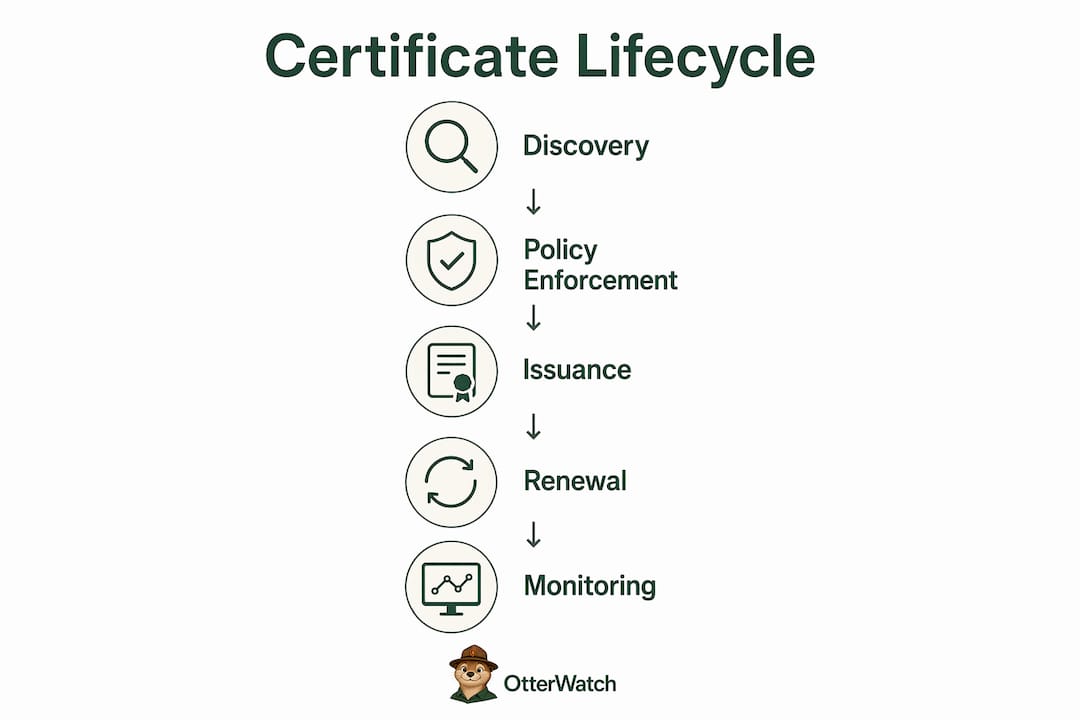
Modern CLM platforms automate certificate lifecycle stages to eliminate human error and free IT resources for higher-value work. Renewal workflows trigger automatically at a configurable threshold (commonly 30 to 60 days before expiry), request a new certificate from the CA, and deploy it to the correct server or load balancer without a ticket being raised.
Monitoring, alerting, and compliance reporting
Continuous monitoring catches certificates that slip through automated workflows, such as a cert on a forgotten subdomain or one that was manually replaced with a self-signed cert. IBM details CLM tools’ capability to create CBOM catalogs covering algorithms, keys, and certificates, which gives compliance teams an auditable record of your cryptographic posture at any point in time.
Pro Tip: Set your renewal alerts at two thresholds, not one. A 45-day warning gives you time to act calmly; a 14-day warning tells you something went wrong with the first attempt. Most CLM platforms support multi-stage alerting out of the box.
How do certificate management tools reduce operational and security risks?
Certificate mismanagement produces two categories of harm: outages and breaches. An expired certificate causes browsers to block connections entirely, which means your customers see a security warning instead of your site. A compromised or weak certificate can enable man-in-the-middle attacks that intercept encrypted traffic without the victim knowing.
“Mismanagement can cause browsers to block connections or, worse, enable attacks. The mitigations are automation and monitoring.” — NCSC guidance on Web PKI
The NCSC is direct: automated provisioning and renewal reduces the risk of expired or cryptographically weak certificates. Manual vigilance, no matter how disciplined, cannot match the consistency of an automated system running checks every few hours across hundreds of endpoints.
Centralized visibility is the other half of the risk equation. When certificates are tracked in a single platform rather than scattered across team wikis, spreadsheets, and individual inboxes, you can detect anomalies early. Monitoring as a primary mitigation means catching a certificate that was issued outside your approved CA list, or one that is about to expire on a server nobody has touched in two years. Early detection shrinks the window between problem and impact.
Policy enforcement adds a third layer of protection. When your CLM platform rejects certificate requests that use deprecated algorithms or untrusted CAs, you stop weak certificates from entering your environment in the first place. Centralized visibility, policy enforcement, and automation together form the operational risk reduction stack that Palo Alto Networks identifies as the core value of certificate management. For context on how certificate risks fit into broader infrastructure security, the data center security practices outlined by InternetPort show how certificate hygiene connects to overall threat posture.
Short-lived certificates, which are increasingly common as certificate authorities push toward 90-day and even 47-day validity periods, make this automation dependency even more acute. You can read more about why short-lived certificates need monitoring and what that means for your renewal cadence.
Manual vs. automated certificate management: what actually changes?
The honest answer is that manual certificate management works fine when you have five certificates and one person who owns them all. It stops working the moment you cross roughly 20 to 30 certificates, add a second team, or move workloads into cloud environments where certificates spin up and down dynamically.
Manual tracking via spreadsheets fails at scale, causing orphaned certificates and missed renewals. The table below shows where the two approaches diverge in practice.
| Feature | Manual management | Automated CLM |
|---|---|---|
| Certificate discovery | Periodic, incomplete, human-driven | Continuous, automated, full-environment scan |
| Renewal process | Calendar reminders, ticket-based, error-prone | Threshold-triggered, auto-deployed, logged |
| Policy enforcement | Ad hoc, inconsistent across teams | Centrally defined, applied at issuance |
| Compliance reporting | Manual export, point-in-time snapshots | Always-on audit trail, CBOM generation |
| Incident response | Reactive after expiry or breach | Proactive alerts before impact |
| Scalability | Breaks above ~30 certificates | Designed for thousands of certificates |
The scalability gap is the most consequential difference. A team managing 300 certificates manually is not just doing more work; they are operating with structural blind spots. Certificates issued by developers for test environments, certificates on third-party integrations, certificates on load balancers that changed hands during a reorganization: none of these reliably make it into a spreadsheet. An automated CLM platform discovers them all because it scans the environment rather than relying on humans to remember to add a row.
Compliance readiness is the second major shift. CLM platforms enable visibility across multi-cloud and on-premises environments, with role-based controls and compliance auditing built in. When an auditor asks for a list of every certificate in your environment, its issuing CA, its expiry date, and who owns it, a CLM platform produces that report in minutes. A spreadsheet produces a weekend of frantic work and a document you cannot fully trust.
What practical benefits do certificate tools offer IT teams and business owners?
The benefits of certificate tools extend beyond avoiding outages, though preventing a certificate expiry that takes down your payment gateway at 2 a.m. on a Saturday is already a compelling case. Here is how CLM platforms deliver value across the operational and business dimensions that matter to IT professionals and owners alike.
-
Reduced downtime. Automated renewal workflows mean certificates are replaced before they expire, not after. For business owners, this translates directly to uptime and customer trust. For IT teams, it means fewer emergency escalations and on-call incidents tied to certificate failures.
-
Stronger security posture. Policy-driven controls block weak algorithms and unapproved CAs at the point of issuance. Certificate management governs lifecycle activities enterprise-wide across teams and systems, which means security standards are applied consistently rather than depending on individual engineers making the right call.
-
Audit readiness. The CBOM (cryptographic bill of materials) capability in platforms like IBM’s CLM offering gives you a structured, queryable record of every certificate and key in your environment. Regulations like PCI DSS, SOC 2, and ISO 27001 all touch on cryptographic asset management, and a CLM platform makes compliance evidence collection straightforward.
-
Cross-team collaboration. Ownership tagging and role-based access mean the security team can see everything while application teams manage only their own certificates. This prevents the “who owns this cert?” conversation that happens every time something breaks.
-
Integration with CI/CD and cloud environments. Modern CLM platforms connect to pipelines built on tools like Jenkins, GitHub Actions, and HashiCorp Vault, and they support certificate management across AWS, Azure, and Google Cloud. For teams running hybrid cloud architectures, centralized certificate visibility across on-premises and cloud workloads is one of the harder problems to solve without dedicated tooling.
Pro Tip: When evaluating CLM platforms, check whether they support ACME protocol integration. ACME is the standard used by Let’s Encrypt and an increasing number of enterprise CAs, and native support means you can automate issuance and renewal without custom scripting. If your renewal silently fails, you want to know why: Let’s Encrypt auto-renewal failures are more common than most teams expect.
Key takeaways
Certificate management tools are the difference between a proactive security posture and a reactive one: organizations that automate discovery, renewal, and policy enforcement prevent outages and breaches that manual processes cannot reliably catch.
| Point | Details |
|---|---|
| Automation is non-negotiable | Manual tracking breaks above roughly 30 certificates; CLM platforms scale to thousands without added headcount. |
| Discovery comes first | You cannot manage what you cannot see; automated inventory with ownership tagging is the foundation of effective CLM. |
| Policy enforcement prevents weak certs | Centrally defined rules block deprecated algorithms and unapproved CAs before they enter your environment. |
| Compliance reporting is built in | CLM platforms generate CBOM catalogs and audit trails that manual processes cannot replicate reliably. |
| Monitoring catches what automation misses | Continuous alerting on expiry thresholds and anomalies closes the gap left by automated workflows. |
Why I think most teams underestimate certificate management until it’s too late
I have watched the same pattern repeat across IT organizations of every size. A team runs fine on manual processes for a year or two, then something changes: a cloud migration, a new product line, a developer who leaves and takes institutional knowledge with them. Suddenly there are 80 certificates tracked across three spreadsheets, two Confluence pages, and one person’s inbox. The first expiry that slips through is usually a low-traffic subdomain. The second one is the payment processor.
The mistake is treating certificate management as a housekeeping task rather than a security control. Continuous compliance verification is necessary as new workloads emerge and cryptographic standards evolve, which means certificate management is not a one-time setup. It is an always-on process that requires tooling to execute reliably.
My practical advice: do not wait until you have a certificate incident to justify the tooling investment. Start with automated discovery to get an accurate count of what you actually have. That number is almost always higher than what the team thinks, and the gap between “what we think we have” and “what we actually have” is where the risk lives. Then layer in renewal automation and policy enforcement. The order matters because you cannot automate what you have not found.
— Nick Phillips
Keep your certificates covered with Otterwatch
If you are not yet running a dedicated CLM platform, the minimum viable step is making sure you have eyes on every certificate’s expiry date right now.

Otterwatch watches your SSL certificates and sends you a calm, plain-language heads-up well before anything expires, while quietly checking that your sites are up at the same time. There are no dashboards to configure, no alarm walls to parse. Otis, the park ranger otter behind the tool, keeps things simple: you get a friendly warning with enough lead time to act, not a 3 a.m. panic. You can check any certificate’s status for free right now, or start monitoring up to five sites at no cost. Certificates first, uptime as the calm bonus.
FAQ
What is certificate lifecycle management?
Certificate lifecycle management (CLM) is the practice of managing digital certificates from issuance through renewal to revocation, using tools that automate and centralize each stage. IBM defines CLM platforms as providing centralized discovery, monitoring, and automated issuance, renewal, and revocation across enterprise environments.
Why can’t you just use spreadsheets to track certificates?
Spreadsheets fail at scale because they depend on humans remembering to update them, and certificates issued in cloud environments or by developers often never get added. Palo Alto Networks identifies manual tracking as a direct cause of certificate sprawl and missed renewals.
How does automating certificate renewal reduce security risk?
Automated renewal eliminates the human error and timing gaps that cause certificates to expire or remain in service past their intended validity period. The NCSC recommends automated provisioning and renewal as the primary mitigation against expired or cryptographically weak certificates.
What is a CBOM and why does it matter for compliance?
A CBOM (cryptographic bill of materials) is a structured catalog of every algorithm, key, and certificate in your environment, generated by CLM platforms like IBM’s offering. It gives compliance teams an auditable record of your cryptographic posture, which is required evidence for frameworks like PCI DSS and SOC 2.
How do I know if my SSL certificate monitoring is working?
The most reliable check is to verify that you receive an alert well before your earliest-expiring certificate reaches its renewal threshold. You can run a quick certificate check to confirm your notification setup is actually firing, and use a tool like Otterwatch to get independent confirmation that your monitoring has not silently stopped.
Recommended
- SSL Certificate Installation Explained for Small Sites · Otterwatch
- Why Short-Lived Certificates Need Monitoring in 2026 · Otterwatch
- 10 Best SSL Certificate Monitoring Tools in 2026 · Otterwatch
- What Is a Certificate Authority? A Small Business Guide · Otterwatch
Catch the next cert expiry before your users do.
Otterwatch checks your SSL certificates daily and emails you 30 days before they expire. Five sites free.
Start watching →