Small Teams: Simple Uptime Monitoring, 5 Minute, Certificate First
By Nick Phillips, Founder
Small Teams: Simple Uptime Monitoring, 5 Minute, Certificate First
The simplest reliable way to watch a website is a monitor that checks HTTP and TLS status from multiple locations, waits for confirmation before it panics, and emails you first instead of blasting your phone. This setup takes minutes to configure, several tools offer it for free, and Otterwatch is one option built around exactly that calm approach.
TL;DR:
- Confirmation logic, such as requiring two consecutive failures, is essential to avoid false alerts caused by brief network issues or regional routing problems.
- Using a monitoring interval of 1 to 5 minutes for critical sites and 5 to 10 minutes for less important pages balances timeliness and quota management.
- Email should be the default alert channel for most situations, reserving SMS for genuine emergencies to prevent alert fatigue.
- Self-hosted monitors require ongoing maintenance and carry the risk of downtime if the monitoring server or status page shares infrastructure with the monitored site.
- Otterwatch offers a free, certificate-first monitoring service focused on calm checks and proactive TLS expiry alerts suitable for small teams and individual operators.
Table of Contents
- What Is Simple Uptime Monitoring, Really?
- How Do You Choose a Simple Uptime Monitor?
- How to Set Up Basic Uptime Monitoring in Five Minutes
- How Do You Keep Uptime Alerts Actionable Instead of Annoying?
- SaaS or Self-Hosted: What Actually Fits a Small Team?
- Otterwatch: A Low-Noise, Certificate-First Option for Simple Uptime Monitoring
- Why Calm, Certificate-Aware Monitoring Beats Alarmism
- Sources
- FAQ
What Is Simple Uptime Monitoring, Really?
Simple uptime monitoring means checking whether a site or API responds correctly, on a schedule, and telling you the moment it stops. That’s the whole job. The complexity that creeps in usually comes from vendors trying to sell you dashboards you don’t need, not from the underlying task.
Four monitor types cover almost everything a small team needs to track:
- HTTP(S) checks hit a URL and confirm it returns the expected status code (usually 200) within a set time window.
- Ping or TCP checks confirm a server or port is reachable, useful for databases, mail servers, or anything without a web front end.
- Cron or heartbeat checks flip the logic: instead of pinging you, your job pings the monitor on a schedule, and silence triggers the alert. This catches backup scripts and scheduled jobs that fail silently.
- TLS/SSL expiry checks watch your certificate’s expiration date, not just whether the site loads. A site can return 200 today and go dark in three weeks when the cert lapses.
That last category gets ignored constantly, and it’s the one that causes the most avoidable outages. A site can pass every HTTP check for months right up until the morning the certificate expires and every browser throws a security warning.
Beyond monitor type, a handful of features separate a genuinely useful tool from a noisy one:
- Multi-location checks confirm an outage from more than one region before alerting, which filters out the false positives caused by your own network hiccup or a regional routing blip.
- Verification policy (sometimes called confirmation rules) requires two or more consecutive failures before it calls something down.
- Uptime history gives you a percentage and a log you can hand to a client or reference during a post-mortem.
- Status pages let you point worried users or teammates at a public page instead of answering the same “is it down for you too?” message five times.
Skip a tool that lacks confirmation logic. A monitor that alerts on a single failed check will cry wolf during every brief network stutter, and you’ll start ignoring it within a week.
How Do You Choose a Simple Uptime Monitor?
Picking a monitor for a small team comes down to four decisions, in this order of importance.
- Independence and confirmation matter more than check frequency. A monitor that checks every 30 seconds but alerts on one failure will wake you up for nothing. A monitor that checks every five minutes but confirms from two locations before alerting will actually let you sleep. Independence means the monitor runs somewhere separate from your own infrastructure, so it doesn’t go blind exactly when your server does.
- Match intervals to criticality. A checkout page or login API deserves a 1 to 5 minute interval. A marketing blog or internal wiki is fine at 5 to 10 minutes. Checking a low-traffic site every 30 seconds just burns your free-tier quota for no benefit.
- Pick alert channels by urgency, not habit. Email should be the default for most alerts because it’s calm and reviewable. Add Slack or a webhook for the team channel. Save SMS for genuine emergencies, since a phone buzzing at 3 a.m. for a five-minute blip trains people to silence it, and then it’s useless for the outage that actually matters.
- Read the free-tier fine print before you commit. Some free plans cap you at five-minute intervals, others limit you to a handful of monitors, and some strip out status pages entirely. Know the ceiling before your project grows into it.
Pro Tip: Set your confirmation threshold to two consecutive failures as a starting default, then loosen it to three for anything on a flaky shared host. Tightening it later, after a false alarm wakes you up, is the wrong order to learn this lesson.
How to Set Up Basic Uptime Monitoring in Five Minutes
You don’t need a weekend project for this. Here’s the fast path.
- Pick a hosted tool over a self-built script, at least to start. A SaaS or lightweight hosted monitor gets you running immediately and, critically, keeps checking even if your own server goes down.
- Add your first HTTP(S) endpoint. Set the interval to 1 to 5 minutes for anything customer-facing and critical, or 5 to 10 minutes for a low-traffic site where a few extra minutes of downtime is tolerable.
- Turn on confirmation before you turn on alerts. Require two consecutive failures, or confirmation from a second location, so a single network blip doesn’t page you. Point the first alert at email, then add one team channel like Slack or a webhook for anything that needs more eyes.
- Add a TLS/SSL expiry check on the same domain, and schedule reminders at 30, 14, 7, 3, and 1 days before expiration. This is the step most guides skip and the one that prevents the worst kind of outage: the one nobody saw coming because everything “looked fine.”
- Test it before you trust it. Temporarily point the check at a URL that returns a 500, or change the expected status code, and confirm both the failure alert and the recovery notification arrive. Google Cloud Monitoring’s documentation walks through this exact force-a-failure workflow, and it applies whether or not you’re using Google’s stack.
Once the test alert lands in your inbox looking the way you expect, the monitor is doing its job. For anything running behind an API gateway rather than a plain web front end, a low-noise, certificate-first monitoring approach for APIs covers the extra wrinkles.
How Do You Keep Uptime Alerts Actionable Instead of Annoying?
Alert fatigue kills monitoring faster than any outage does. Once a team starts muting notifications, the tool is worthless even though it’s technically still running.
A few configuration habits fix most of the noise problem:
- Require two consecutive failures or multi-location confirmation before any alert fires, rather than reacting to the first blip.
- Escalate in stages: quiet email first, a team channel like Slack or a webhook if the outage lasts past a defined window, and SMS only for confirmed, prolonged emergencies.
- Set quiet hours for non-critical monitors so a low-priority internal tool doesn’t page anyone overnight.
- Put diagnostic details in every alert: the status code, response time, and the timestamp of the first failure. That context turns a vague “something’s down” into something you can triage in seconds.
- Stand up a public status page, or at least a shared incident note, so people stop pinging you individually to ask if it’s down.
The pattern behind this comes straight from how minimal monitoring tools are built. Uptime-pulse, a zero-dependency monitor, only sends one notification per confirmed state change (down or recovered) and writes a plain incident log instead of repeating alerts every cycle. That single design choice does more for your sanity than any dashboard feature.
Pro Tip: Make the first alert diagnostic and quiet: an email to the owner with the error code and a direct link. Only escalate to the wider team channel if the outage survives past a defined window, like ten minutes. This preserves sleep and keeps the loud channels meaningful.
SaaS or Self-Hosted: What Actually Fits a Small Team?
The honest answer depends on what you’re monitoring and how much time you want to spend maintaining the thing that watches your other things.
A hosted SaaS monitor runs independently of your own servers, which means it keeps checking and alerting even during a total outage on your end. That independence is the entire point of monitoring: a tool that shares your infrastructure’s fate can go quiet at the exact moment you need it most. SaaS options also mean no patching, no backups, and no “who updates the monitoring server” question six months from now.
Self-hosting trades that independence for control and privacy, which matters for internal tools or anything you’d rather not send to a third party. A few patterns work well here:
- Single-binary monitors, similar in spirit to lightweight self-hosted tools, run on a small VPS or even a Raspberry Pi with minimal overhead.
- Uptime Kuma is a widely used self-hosted option supporting HTTP and TCP checks, certificate info, and multiple notification channels down to 20-second intervals, though it needs its own upkeep, backups, and a place to run.
- Upptime runs entirely on GitHub Actions, creating incidents as GitHub issues and publishing a static status page on GitHub Pages, essentially free for teams already living in GitHub.
Self-hosted setups carry their own maintenance tax: you’re now monitoring the monitor, and if you host the status page on the same infrastructure you’re watching, it can vanish exactly when readers need it most. Hosting the status page somewhere separate avoids that trap.
The simple recommendation: use a SaaS monitor for anything production-critical and customer-facing, where independence matters most. Self-host for internal services, private tools, or situations where data residency rules out sending checks to a third party.
Otterwatch: A Low-Noise, Certificate-First Option for Simple Uptime Monitoring
Most monitoring tools treat uptime as the whole story and bury you in dashboards to prove it. Otterwatch flips the priority: certificates come first, since an expired TLS cert takes down a “working” site just as thoroughly as a server crash, and calm uptime checks run right alongside it.

Otterwatch is free to start, with monitoring for up to five sites at no cost, which fits freelancers, indie founders, and small teams who don’t want to hand over a credit card just to find out if a tool suits them. Alerts arrive by email, written in plain language, with the expiry warnings scheduled well ahead of the deadline rather than the day everything breaks. If certificate expiry is a real risk for your sites and you want alerts you can trust instead of a wall of red, check your first domain for free and see what a quiet monitoring setup actually looks like. For the email cadence specifically, the certificate-first alert schedule guide walks through the 30/14/7/3/1 day timing in more depth.
Why Calm, Certificate-Aware Monitoring Beats Alarmism
Most monitoring advice fixates on speed: check faster, alert instantly, escalate hard. That instinct is backwards for a small team. A monitor that pages you for every 20-second blip trains you to ignore it, and an ignored alert is worse than no monitor at all. The teams who actually catch outages in time are the ones who tuned their tool to be quiet until quiet is no longer appropriate.
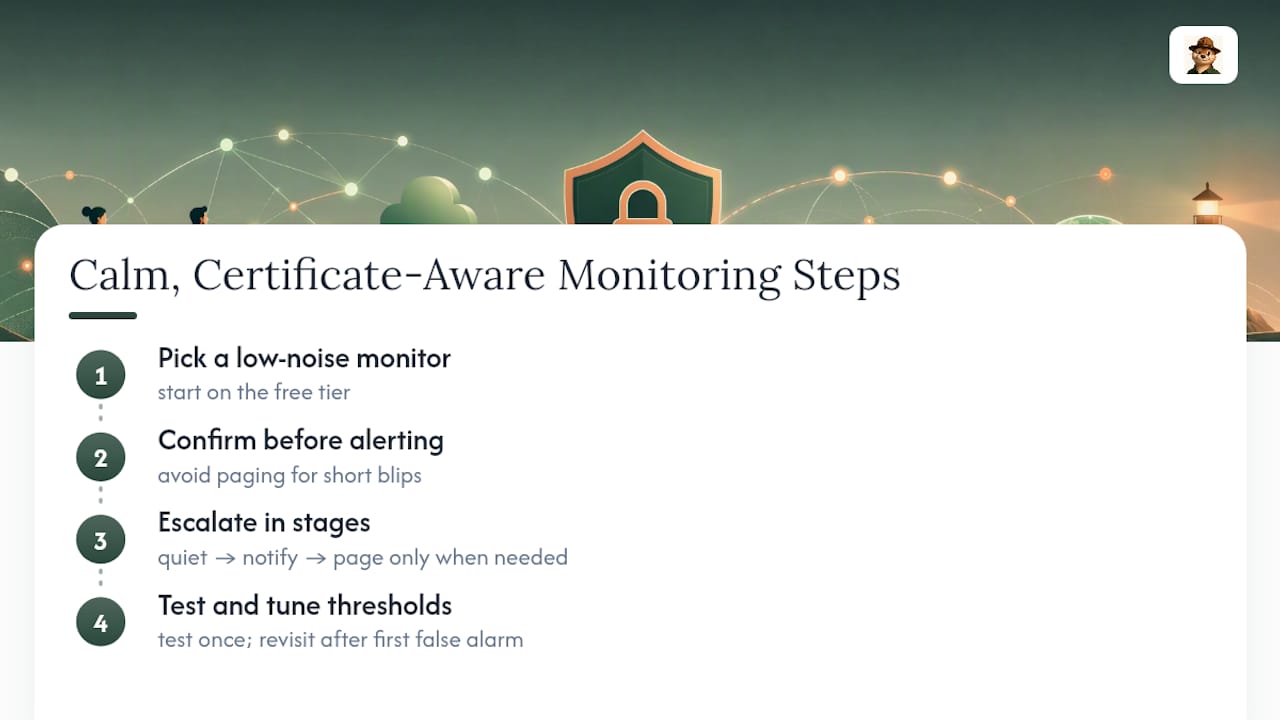
The certificate blind spot deserves more attention than it gets. Servers rarely just die anymore; certificates expire on a schedule everyone forgets until the warning banner shows up in a customer’s browser. If you take one thing from this article, take this: confirm before you alert, escalate in stages, and put certificate expiry on the same priority level as server uptime, not an afterthought.
Start with the free tier of a low-noise monitor, test your alert path once on purpose, and revisit your confirmation thresholds after the first false alarm rather than the tenth.
— Nick Phillips
Sources
For the technical weeds, Cloud Monitoring’s uptime check documentation covers configuring notification channels and testing alert policies step by step. If you’d rather run something yourself, Upptime demonstrates a GitHub Actions based, zero-cost monitoring pattern, while Uptime Kuma shows a full-featured self-hosted alternative. For a broader look at tools in this space, including other self-hosted projects, see the comparison of uptime monitoring alternatives on the Otterwatch blog, and start your own free check at Otterwatch.
FAQ
What Is the Best Tool for Monitoring Uptime?
The best tool depends on your priorities: a SaaS monitor with confirmation checks and email-first alerts suits most small teams, while self-hosted options like Uptime Kuma fit teams that want full control. If certificate expiry is your bigger risk, a certificate-first option like Otterwatch covers both concerns in one place.
What Is a 99.99% Uptime SLA?
A 99.99% uptime SLA allows roughly 52 minutes of downtime per year, a much tighter tolerance than the 8.76 hours allowed under a 99.9% SLA. Most small sites don’t need to chase this figure themselves, but it’s worth knowing when a hosting provider quotes it.
Is UptimeRobot Free to Use?
UptimeRobot offers a free tier with limited monitors and check intervals, similar to how several tools in this space, including Otterwatch, offer free monitoring up to a set number of sites before charging for expanded coverage.
What Is the Best Free Network Monitoring Tool?
For self-hosted network monitoring, Uptime Kuma is a popular free option supporting HTTP, TCP, and ping checks with multiple notification channels. For a zero-maintenance free option that also covers certificate expiry, Otterwatch’s free tier monitors up to five sites at no cost.
How Often Should a Simple Uptime Monitor Check My Site?
Check critical, customer-facing pages every 1 to 5 minutes, and low-traffic or internal sites every 5 to 10 minutes. Frequency matters less than requiring confirmation before an alert fires, since a fast check with no confirmation just produces faster false alarms.
Recommended
- Low Noise Certificate First API Uptime Monitoring for Small Teams
- Stop Chasing False Alerts: Small Team Uptime Monitoring That Puts SSL First
- Small Teams: 3 Quick Checks for Certificate Issuance Alerts
- Small Teams: Set Up Certificate First Email Alerts (30/14/7/3/1 Days)
Catch the next cert expiry before your users do.
Otterwatch checks your SSL certificates daily and emails you 30 days before they expire. Five sites free.
Start watching →