Low Noise Certificate First API Uptime Monitoring for Small Teams
By Nick Phillips, Founder
Low Noise Certificate First API Uptime Monitoring for Small Teams
Here, API uptime monitoring means certificate-first SSL expiry checks combined with basic reachability probes, not developer-grade endpoint observability. The recommended action is simple: turn on daily expiry checks for every domain you run, and set alerts at 30, 14, 7, and 1 day before each certificate expires. That cadence catches renewal failures while there’s still time to fix them, instead of after your site goes dark.
TL;DR:
- The primary focus should be on daily SSL expiry checks with alerts set 30, 14, 7, and 1 day before expiration to catch renewal failures early.
- Essential monitoring includes chain completeness, issuer changes, protocol versions, cipher strength, and reachability to prevent outages caused by misconfigurations or outdated protocols.
- Frequency of checks depends on the purpose: expiry data can be daily, while comprehensive configuration checks should run every 6 to 24 hours, with real-time monitoring for certificate issuance events.
- For small teams, a simple escalation process with notifications tailored to different urgency levels helps prevent missed renewals or unnoticed downtime.
- Monitoring third-party dependencies and using geo-distributed checks improves insight into regional issues that could impact site accessibility.
Table of Contents
- What Does API Uptime Monitoring Actually Cover Here?
- Essential Checks To Run For Every Monitored Endpoint
- How Often Should You Check Certificates and Uptime?
- Setting Up Certificate Monitoring in 15 Minutes
- Why Response Time Still Matters in a Certificate-First Setup
- Tracking Error Rates and Status Codes Without Overbuilding It
- Do You Need Checks From Multiple Locations?
- Watching the Services You Depend On, Not Just Your Own
- Making Alerts Fit How Your Team Actually Works
- What Historical Uptime Data Tells You Over Time
- Why the Boring Approach Is the One That Holds Up
- How Otterwatch Keeps Certificate Monitoring Simple
- Sources
- FAQ
What Does API Uptime Monitoring Actually Cover Here?
Most articles that use this phrase mean something different: tracking latency, error rates, and functional responses across dozens of API endpoints for an engineering team running a distributed system. That’s a real discipline, and it’s not what this guide covers.
This guide covers certificate-first monitoring: watching SSL/TLS certificates for expiry and misconfiguration, plus a basic HTTP(S) reachability check to confirm your site or service actually responds. If you’re a freelancer managing five client sites, or a solo founder running one product, you don’t need a dashboard full of percentile charts. You need to know, well in advance, when a certificate is about to lapse.
The consequences of missing that window are blunt. When a TLS certificate expires, the handshake fails outright, and browsers, curl, and API clients all drop the connection with an error like “certificate has expired.” That failure often doesn’t show up cleanly in server logs, since the server never gets far enough to log anything.
Automation like ACME and Let’s Encrypt has made renewal mostly hands-off, but “mostly” is the operative word. DNS validation can fail silently, a renewal script can choke on a permissions change, or a load balancer can keep serving the old cert after renewal. Monitoring is the check that verifies automation actually did its job.
Essential Checks To Run For Every Monitored Endpoint
A comprehensive setup validates more than just the expiry date. Guides on SSL monitoring generally agree it should check expiry date, chain completeness, issuer changes, protocol versions, and cipher strength together, since any one of them can cause an outage on its own.
Here’s what to enable for each domain you monitor:
- Days-until-expiry (notAfter) check. This is the primary signal. It tells you exactly how many days remain before a certificate stops working, and it’s the one check that prevents the most common, most visible outage.
- Chain completeness and hostname validation. A valid leaf certificate with a broken intermediate chain still fails in many clients, even though it looks fine in a browser that caches the intermediate.
- Issuer change detection. If a certificate suddenly comes from a different certificate authority than before, that’s either a legitimate provider switch or a sign something got reissued without your knowledge.
- Certificate transparency (CT) log monitoring. CT logs record every publicly trusted certificate issued for your domain, so unexpected issuance shows up there before it shows up anywhere else.
- Protocol and cipher checks. Old TLS versions and weak ciphers get deprecated by browsers and API clients on a rolling basis, sometimes breaking connections with no warning.
- HTTP(S) reachability probe. A simple GET request confirms the TLS handshake completes and the server actually answers, which catches problems a certificate check alone would miss.
Pro Tip: Run the reachability probe over HTTPS specifically, not HTTP. A site that responds fine on port 80 can still be completely broken for HTTPS clients if the certificate has quietly expired.
How Often Should You Check Certificates and Uptime?
Frequency matters less than escalation. A daily expiry check is enough for almost every small team, since certificates don’t expire in the middle of the night without warning; the countdown is always visible days or weeks out. Configuration checks (chain, protocol, cipher) can run every 6 to 24 hours, and CT log monitoring works best near real time when your provider supports it; new issuance events post within minutes.
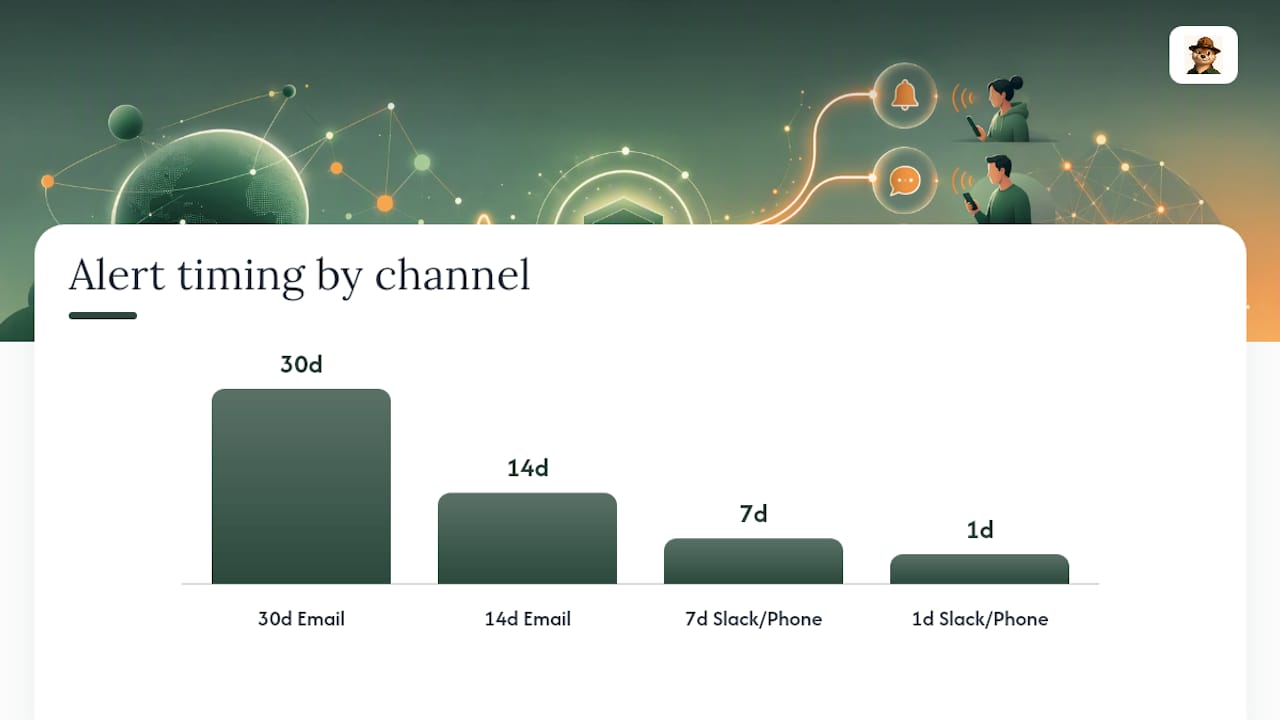
The escalation model that consistently works is the 30/14/7/1 day tier:
- 30 days out: informational. This goes to email, no urgency implied. It’s a heads up, not an alarm.
- 14 days out: still informational, but worth a glance if you haven’t started the renewal yet.
- 7 days out: this should route to whatever channel your team actually checks daily, Slack included, since a renewal that hasn’t happened by now is worth investigating.
- 1 day out: treat this as critical. If you’re still seeing this alert, something in your renewal pipeline is broken, and you have hours, not days, to fix it.
This staged approach is deliberate. Escalating alerts at these four windows gives you multiple chances to catch a stalled renewal before it becomes a customer-facing outage, rather than one single warning that’s easy to miss in a busy inbox.
For a one-person operation, route the 30 and 14 day alerts to email and let them sit. Route the 7 and 1 day alerts somewhere louder, a phone notification or a dedicated Slack channel, so they can’t blend into the noise of everything else competing for your attention.
Setting Up Certificate Monitoring in 15 Minutes
You don’t need a big rollout plan for this. Here’s the sequence that gets a small team from zero to covered in one sitting:
- Inventory every domain and subdomain you’re responsible for. Include client sites if you’re an agency or freelancer, and write down who owns each one, even if that’s just you. This step alone catches the forgotten staging subdomain that nobody’s checked in a year.
- Add each endpoint to a monitoring tool. Some monitoring tools offer free plans that cover a limited number of sites, often sufficient for solo founders and small agencies starting out. Enable expiry checks and reachability checks on each one.
- Set your alert thresholds to 30/14/7/1 days and connect at least two channels: email for the routine stuff, and one faster channel (Slack, SMS) for the 7 and 1 day tiers. If you work with a client whose site you monitor, decide now who actually gets pinged.
- Simulate a near-expiry test if your tool supports it, or just check that a test alert reaches the right inbox and channel. An alert system nobody’s verified isn’t much better than no alert system.
- Put a quarterly review on your calendar. Certificate lifetimes have been shrinking, moving from roughly 200 days toward 47 days in the coming years under upcoming industry timelines, which means renewals happen more often and automated-renewal health deserves a periodic look, not just a “set it and forget it” assumption.
Pro Tip: If you manage sites for clients, name a single owner per domain during the inventory step. “Someone will notice” is how certificates expire on production sites that everyone assumed someone else was watching.
Why Response Time Still Matters in a Certificate-First Setup
Certificate checks catch the hard failures, the ones where a connection drops entirely. Response time monitoring catches the slow failures, the ones where your site technically loads but takes long enough that visitors leave before it finishes. Both matter, and they measure different things.
A basic reachability probe records how long the TLS handshake and initial response take, giving you a rough performance baseline without needing a full observability stack. If that number climbs steadily over a few weeks, it’s often an early sign of a resource problem, a slow database query, an overloaded server, a CDN misconfiguration, well before anything actually goes down.
For a solo founder or small agency, the useful move here isn’t building a performance dashboard. It’s noticing trend, not snapshot. One slow response after a deploy is normal. A response time that’s crept up by 40% over a month, even though nothing “broke,” is worth a look. Pair that trend with your uptime data and you get a much fuller picture of site health than either metric gives you alone, without adding another tool to babysit.
Tracking Error Rates and Status Codes Without Overbuilding It
A reachability check that only asks “did the server respond” misses a category of failure: the server responds, but with a 500 error, a 502 from a misbehaving proxy, or a 403 that shouldn’t be there. Status code tracking closes that gap by recording what code came back, not just whether one arrived at all.
For most small sites, you don’t need granular error-rate percentages segmented by endpoint. You need to know when a normally healthy site starts returning something other than a 200 or 301, and you need that flagged quickly. A spike in 5xx errors right after a deploy is one of the most common patterns, and catching it within minutes rather than hearing about it from a client is the entire point of running this check at all.
Keep the threshold simple. One or two unexpected error codes in a routine check is often just a transient blip, a server restarting, a brief network hiccup. A sustained run of errors across multiple checks is the signal that actually warrants an alert, and it’s worth tuning your tool’s sensitivity so you’re not woken up by noise that resolves itself in thirty seconds.
Do You Need Checks From Multiple Locations?
Sometimes. A single-location check tells you your site is reachable from one point on the internet, which is usually enough for a small business site with a straightforward hosting setup. Geo-distributed checks tell you whether that reachability holds up from multiple regions, and that distinction matters more than it sounds.
DNS propagation delays, regional CDN edge issues, and provider outages in specific regions can all make a site unreachable from one part of the world while it looks perfectly healthy from your own office. If your clients or customers are concentrated in one region, a single check point close to them is often sufficient. If you’re serving a broader audience, or a client’s business does, checking from two or three geographically spread locations catches problems a single vantage point simply can’t see.
The tradeoff for a small team is complexity versus coverage. You don’t need ten global checkpoints to run a reliable monitoring setup, but relying on exactly one checkpoint means you’re blind to an entire class of regional failures. A modest spread, a few checks across different continents, covers the realistic failure modes most small sites and agencies actually encounter, without turning your monitoring setup into its own maintenance project.
Watching the Services You Depend On, Not Just Your Own
Your site’s certificate can be perfectly valid and your server can be perfectly healthy, and you can still go down because a payment processor, a third-party API, or a CDN you depend on has an outage. That’s downstream dependency risk, and it’s easy to overlook when you’re focused on your own infrastructure.
For a small team, full dependency mapping isn’t realistic, and it isn’t necessary. What is realistic: identify the two or three external services your site genuinely can’t function without (payment gateway, authentication provider, image or asset CDN) and add a basic reachability check for each one. If your checkout flow depends on a third-party API, you want to know when that API is down before a customer tells you their payment failed.
This is where a certificate-first approach still earns its keep on someone else’s infrastructure. Many third-party services expose their own status pages, but those pages don’t always update in real time, and they don’t check specifically against your integration. A direct reachability probe against the actual endpoint you call gives you an earlier, more accurate signal than waiting for a status page to catch up.
Making Alerts Fit How Your Team Actually Works
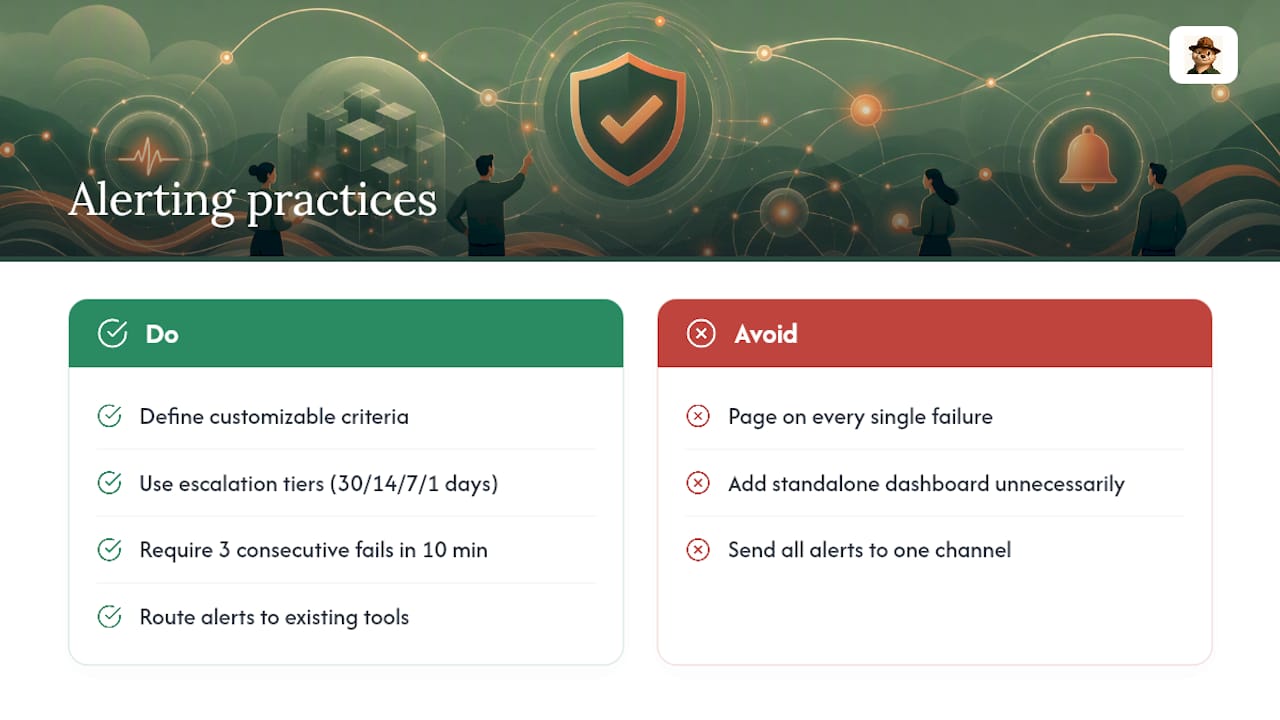
Generic alert settings are how small teams end up either ignoring their monitoring tool entirely or getting paged for things that don’t matter. Customizable alerting criteria means deciding, deliberately, what counts as informational and what counts as urgent, then routing each accordingly rather than sending everything to the same channel at the same volume.
The escalation tiers described earlier for certificates (30/14/7/1 days) are one example of this principle in action, but it extends to uptime and error alerts too. A single failed check is often a blip; three consecutive failed checks across ten minutes is a real problem. Building that distinction into your alert rules, rather than reacting to the first failure every time, cuts a huge amount of unnecessary noise.
For teams already using an incident management or communication tool, connecting your monitoring alerts to that existing workflow matters more than adding another standalone dashboard. Reliability commitments you make to clients are worth communicating clearly, and the same discipline that goes into setting service-level expectations for client-facing work applies just as well to deciding who on your team gets paged for a downstream outage versus who just needs a daily digest. If you’re the only person on the team, the “escalation” is really just deciding which alerts interrupt your day and which ones wait for your morning coffee.
What Historical Uptime Data Tells You Over Time
A single day’s uptime number tells you almost nothing. A month of uptime data tells you whether last Tuesday’s outage was a one-off or the start of a pattern, and that’s the real value of historical reporting.
For freelancers and agencies, historical uptime and certificate renewal history double as a simple, honest way to show clients what’s actually happening with their site, without needing to build a client-facing dashboard from scratch.
SLA compliance tracking matters most when you’ve made a specific promise, whether contractually or informally, about how reliable a client’s site will be. Even without a formal SLA, keeping a running record of uptime and incident history gives you something concrete to point to when a client asks “has this happened before,” and it gives you an early warning if a site’s reliability is quietly trending in the wrong direction month over month.
Why the Boring Approach Is the One That Holds Up
Most of the certificate outages I’ve read post-mortems on share the same shape: a renewal that failed weeks earlier, and nobody found out until customers did. That’s not a sophisticated failure. It’s a monitoring gap, and it’s the single most preventable outage category a small team will ever face.
Focusing on certificates first, before latency percentiles or distributed tracing, isn’t a lesser approach. It’s the one that actually matches the failure modes small teams hit. Automation handles renewal most of the time, but “most of the time” is exactly why monitoring exists: to verify the automation worked, catch it when it didn’t, and give you a quiet heads up instead of a 2 AM phone call from a client. Boring, in this context, is the goal.
— Nick Phillips
How Otterwatch Keeps Certificate Monitoring Simple
Otterwatch is built around the exact problem this article covers: watching certificates before they expire, and confirming your site is actually reachable, without burying you in dashboards designed for engineering teams. It checks expiry dates, validates your certificate chain, watches for unexpected issuer changes, and runs a basic uptime probe alongside all of it, and it’s free to start for up to five sites.
Getting started takes less time than reading this article. Run your domain through the free SSL checker to see exactly where your certificates stand right now, then set up monitoring on your full domain list from there. Alerts commonly arrive by email, with some services planning integrations with tools like Slack and webhooks, and notifications often follow a plain, calm tone rather than alarmist language. If you’re managing sites for clients or just trying to stop worrying about that one certificate you renewed manually last year, this is the fastest way to take it off your plate.
Sources
- SSL Certificate Monitoring: The Complete Guide for 2026 | Alert24
- What Happens When a TLS Certificate Expires: The Full Failure Chain
FAQ
What Is Certificate-First API Uptime Monitoring?
It’s a monitoring approach that treats SSL certificate expiry, chain validation, and change detection as the primary signal, paired with a basic HTTPS reachability check, rather than tracking detailed API endpoint performance metrics.
How Far in Advance Should Certificate Alerts Fire?
The 30/14/7/1 day model gives teams multiple warnings before expiry, with the 1 day alert treated as urgent since a renewal that hasn’t completed by then needs immediate attention.
Can I Monitor Certificates for Free?
Yes. Otterwatch offers a free plan covering up to five sites with expiry alerts and uptime checks included, which fits most freelancers and solo founders without any upfront cost.
Why Do Certificates Expire Even With Automated Renewal?
Automated renewal tools like ACME clients can fail silently due to DNS validation errors, permission issues, or load balancers serving a stale certificate, which is exactly why a separate monitoring check matters.
Do I Need Multi-Location Checks for a Small Business Site?
Not always. A single check point is usually enough for a regionally concentrated audience, but a broader or international customer base benefits from checks run across two or three geographic locations.
Recommended
- SSL certificate monitoring tools, honestly compared
- SSL Certificate Monitoring in Your CI/CD Pipeline
- 10 Best SSL Certificate Monitoring Tools in 2026
- Why Short-Lived Certificates Need Monitoring in 2026
Catch the next cert expiry before your users do.
Otterwatch checks your SSL certificates daily and emails you 30 days before they expire. Five sites free.
Start watching →