SSL Certificate Monitoring in Your CI/CD Pipeline
By Nick Phillips, Founder
SSL Certificate Monitoring in Your CI/CD Pipeline
TL;DR:
- SSL certificate monitoring in CI/CD automates validation of expiry, chain integrity, SAN coverage, and fingerprints to prevent deployment of insecure certificates. It involves comprehensive inventory, dynamic checks, tiered alerts at 30, 14, and 7 days, and regular testing to ensure reliability across all environments. Relying solely on expiry dates is insufficient; full chain verification and internal certificate checks are essential for robust security.
SSL certificate monitoring in a CI/CD pipeline is the practice of automatically checking certificate validity, expiry dates, chain completeness, and SAN coverage at every stage of your deployment workflow. A missed expiry in production does not just break HTTPS. It kills user trust, triggers browser warnings, and can halt API integrations mid-flight. This guide walks you through the tools you need, how to wire automated SSL checks directly into your pipeline, how to troubleshoot the failures that trip most teams up, and how to keep the whole system honest over time.
What tools and prerequisites do you need for SSL certificate monitoring in CI/CD?
SSL certificate lifecycle management starts with knowing what you have. Before you write a single pipeline step, build a complete inventory of every certificate your services depend on. That means public-facing endpoints, internal service-to-service connections, staging environments, and any wildcard or SAN certificates in use. Wildcard and SAN certificates are particularly risky because a single expiry takes down every subdomain or hostname covered by that cert simultaneously.
Once you have the inventory, you need the right tooling. Here is what a solid setup looks like:
- OpenSSL is the most portable CLI option. The command "openssl s_client -connect hostname:443 -servername hostname 2>/dev/null | openssl x509 -noout -dates` gives you expiry in seconds from any shell.
- Smallstep’s
stepCLI is a cleaner modern alternative. It parses certificate fields including SANs and fingerprints with readable output, making it easier to script conditional logic around. - WhoisJSON API and Apixies are REST-based options when you want to query certificate data without installing anything in your pipeline runner. Both return expiry, SAN list, and chain status as JSON, which is easy to parse in any language.
- Let’s Encrypt with ACME protocol handles automated renewal for many teams, but renewal alone is not monitoring. A cert can renew successfully and still be misconfigured, missing intermediates, or scoped to the wrong hostnames.
You also need alerting infrastructure wired up before you start. Slack webhooks, PagerDuty, or email routing through something like SendGrid all work. The point is that your pipeline should have somewhere to send a signal before it fails a build.
Pro Tip: Keep your certificate inventory in a version-controlled file, not a spreadsheet someone updates manually. A YAML or JSON file checked into your repo means your pipeline can read it directly and you always know the list is current.

How to implement automated SSL checks step by step
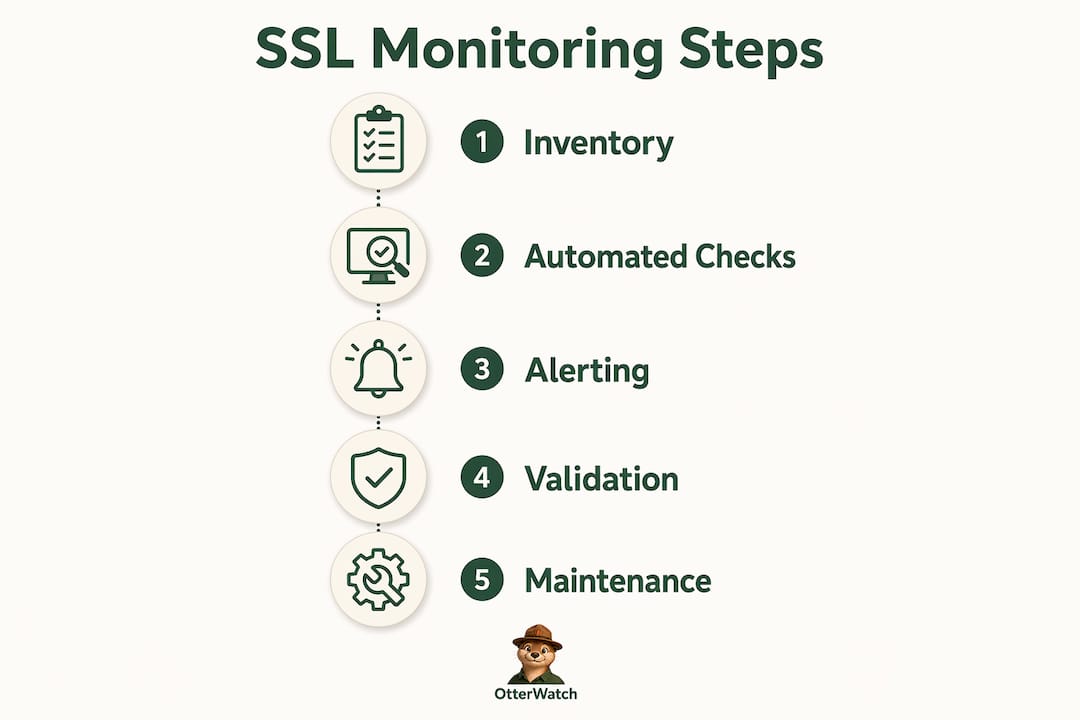
The standard industry term for what most teams call “automated SSL checks” is certificate lifecycle monitoring integrated into deployment gates. The goal is to make your pipeline aware of certificate health at every deployment, not just on a cron job running somewhere in the background.
Here is a practical implementation sequence:
-
Query expiry and chain validity. At the start of your deployment job, run an OpenSSL or
stepcheck against every hostname in your inventory. Capture the expiry date and the number of days remaining. Programmatic checks via CLI or API can query expiry, SANs, and fingerprints with a single call and immediately gate the deployment if something is wrong. -
Apply a non-zero exit code on failure. If the certificate has fewer than 7 days remaining, or if the chain is incomplete, your script should exit with a non-zero code. This halts the pipeline before deployment proceeds. Non-zero exit codes for SSL expiry are a well-established pattern for preventing insecure releases from reaching production.
-
Validate SAN coverage dynamically. Do not assume the cert matches the hostname just because it was valid last week. Dynamic SAN validation gates prevent deployment of certificates that cause browser hostname mismatches, which are a frequent failure point that expiry checks alone will not catch.
-
Compare certificate fingerprints. Store the expected fingerprint for each cert in your inventory file. On each run, compare the live fingerprint against the baseline. Fingerprint comparison detects unexpected certificate replacements, whether from a misconfigured renewal or something more serious.
-
Run a post-deployment verification pass. After the deployment completes, re-run the certificate checks against the live environment. If the cert that just deployed does not match what you expected, trigger a rollback and alert immediately.
-
Schedule daily checks outside deployments. Deployments do not happen every day, but certificates expire on a fixed schedule. A daily cron job running the same checks catches drift between deployments. Daily automated checks using a 30/14/7-day threshold model give you enough runway to act without scrambling.
The alert thresholds that work in practice align with the 90-day certificate lifecycle that Let’s Encrypt and most modern CAs use:
| Days remaining | Alert level | Recommended action |
|---|---|---|
| 30 days | Informational | Log it, notify the team, plan renewal |
| 14 days | Action needed | Verify renewal is scheduled and will succeed |
| 7 days | Urgent | Renew immediately, escalate to on-call |
| 0 days | Critical | Deployment blocked, incident declared |
Pro Tip: Wire your 14-day alert to a different channel than your 30-day alert. If both go to the same Slack channel, the 30-day notice gets ignored and the 14-day notice feels like a surprise. Separation creates the right sense of urgency at the right time.
What common challenges arise in SSL monitoring within CI/CD pipelines?
Most SSL monitoring failures are not expiry failures. They are configuration failures that expiry checks do not catch. Monitoring must include chain completeness, SAN coverage, and TLS protocol support, not just the expiry date, because missing intermediates and wrong SANs cause hard-to-debug errors across different browsers and clients.
Here are the issues that come up most often:
- Missing intermediate certificates. Your cert is valid, but the server is not sending the full chain. Some browsers cache intermediates and hide the problem. Others fail immediately. OpenSSL’s
-showcertsflag reveals whether the full chain is being served. - SAN mismatches. You renewed the cert but the new one does not cover a subdomain the old one did. The expiry check passes. The SAN check fails. Users on that subdomain get a browser warning.
- Multi-edge CDN propagation delays. You deployed a renewed cert, but some CDN edge nodes are still serving the old one. Your pipeline check hits one node and passes. Users on other nodes see the expired cert.
- Internal certificates missed by external probes. Synthetic browser-facing probes miss internal certificates entirely. Tools like Osquery can inspect local certificate stores and validate certs that are never exposed to the public internet, which matters a lot in microservice environments.
- Middlebox SSL inspection breaking chains. Corporate proxies and security appliances sometimes intercept TLS connections and break certificate chains in ways that cause opaque failures. The cert looks fine from outside. Internal clients see errors.
A quick troubleshooting checklist when a certificate check fails unexpectedly:
- Run
openssl s_client -connect hostname:443 -showcertsand count the certificates in the output. You should see at least two (leaf plus intermediate). - Check the SAN field with
openssl x509 -noout -textand grep for “Subject Alternative Name.” Confirm every hostname you need is listed. - Test from inside your network as well as outside. Different results mean a middlebox or CDN propagation issue.
- Compare the fingerprint of the deployed cert against your stored baseline to rule out an unexpected replacement.
How do you validate and maintain your SSL monitoring automation?
Automation that you never test is automation you cannot trust. The most common failure mode for SSL monitoring in CI/CD is not a certificate expiry. It is a monitoring script that stopped working three months ago and nobody noticed because it was not generating alerts.
Run mock alerts on a schedule. Once a quarter, manually trigger your 7-day alert threshold against a test certificate and confirm the notification reaches the right people through the right channels. If your on-call rotation has changed since you set up the alerting, this is how you find out before a real incident.
A few practices that keep monitoring reliable over time:
- Cover all environments, not just production. Staging and internal endpoints expire too. A cert failure in staging blocks your deployment pipeline just as effectively as one in production.
- Build escalation paths into your alert routing. A 30-day notice can go to a team channel. A 7-day notice should page someone directly. Tiered alerting through Slack, email, and on-call rotations measurably improves incident response compared to flat notification setups.
- Integrate results into your observability stack. Push certificate health metrics into Grafana, Datadog, or whatever dashboard your team actually looks at. Certificate days-remaining as a time-series metric gives you trend visibility that point-in-time checks do not.
- Review your certificate inventory quarterly. Services get added and decommissioned. An inventory that was complete six months ago probably has gaps today.
Pro Tip: Add a pipeline step that fails loudly if the monitoring script itself cannot reach the target host. A silent failure where the check just skips is worse than a noisy failure. You want to know when your monitoring is blind, not find out during an incident.
Multi-layered certificate monitoring combining browser synthetic tests and host-level scans is the only approach that catches both external-facing and internal certificate failures. Neither layer alone is sufficient.
Key takeaways
Effective SSL certificate monitoring in a CI/CD pipeline requires combining expiry checks, SAN validation, chain verification, and fingerprint comparison into deployment gates backed by tiered alerting at 30, 14, and 7 days.
| Point | Details |
|---|---|
| Build a full certificate inventory first | Include wildcards, SANs, internal certs, and staging endpoints before writing any pipeline logic. |
| Gate deployments with non-zero exit codes | Scripts should halt the pipeline when certs are expired, misconfigured, or missing intermediates. |
| Validate SANs dynamically on every deploy | Expiry checks alone miss hostname mismatches that cause browser trust failures in production. |
| Use tiered alert thresholds | Send informational notices at 30 days, action alerts at 14 days, and urgent pages at 7 days. |
| Test your monitoring automation regularly | Mock alerts quarterly to confirm notification routing and escalation paths still work as expected. |
Why I think most teams are monitoring the wrong thing
I have seen a lot of CI/CD pipelines that check certificate expiry and call it done. The expiry date is the easiest thing to check, so it becomes the only thing checked. But in my experience, the failures that actually wake people up at 2 a.m. are almost never pure expiry failures. They are SAN mismatches after a renewal, missing intermediates on a new server, or a wildcard that renewed correctly but was not redeployed to one of the services that depended on it.
The “set it and forget it” approach is genuinely risky in 2026, and not just because certificates expire faster now. It is risky because the surface area of what can go wrong has grown. You have CDN edges, internal services, staging environments, and API gateways all with their own certificate dependencies. A single expiry check on your main domain gives you a false sense of coverage.
What I would push every team toward is treating certificate monitoring the same way you treat test coverage. You do not just check that the app starts. You check that it does what it is supposed to do. For certificates, that means checking the full chain, the SAN list, the fingerprint, and the protocol support, not just the date. The SSL certificate monitoring tools compared landscape has matured enough that there is no excuse for stopping at expiry.
The other thing I would stress is monitoring your monitoring. A cron job that silently fails is worse than no cron job, because at least with no cron job you know you have a gap. Build verification into your alerting setup and review it on a real schedule, not just when something breaks.
— Nick Phillips
How Otterwatch fits into your SSL monitoring workflow

If you want a monitoring layer that sits outside your pipeline and catches what your internal checks miss, Otterwatch was built for exactly that. It watches your SSL certificates continuously, validates chain completeness, and sends you a plain heads-up well before anything becomes urgent. No dashboards to configure, no alert fatigue from false positives. Otis, the park ranger otter behind Otterwatch, keeps things calm and clear.
You can check any certificate for free right now to see what your current cert status looks like from the outside. For ongoing monitoring across multiple environments, Otterwatch’s monitoring platform starts free with five sites and scales from there. It pairs well with your existing pipeline gates by giving you an independent external view that your internal scripts cannot replicate.
FAQ
What is SSL certificate monitoring in a CI/CD pipeline?
SSL certificate monitoring in a CI/CD pipeline is the automated process of checking certificate expiry, chain validity, SAN coverage, and fingerprint integrity as part of deployment workflows. It prevents insecure or misconfigured certificates from reaching production by gating deployments on certificate health.
How often should automated SSL checks run in a pipeline?
Run checks on every deployment and also on a daily scheduled job. Daily checks with a 30/14/7-day alert model catch expiry drift between deployments, which matters especially for 90-day certificates from Let’s Encrypt.
What should an SSL check actually verify beyond the expiry date?
A thorough check covers the full certificate chain for missing intermediates, the SAN field for hostname coverage, the certificate fingerprint against a stored baseline, and TLS protocol version support. Checking only expiry misses the SAN mismatches and chain failures that cause most real-world outages.
How do you stop a deployment when a certificate check fails?
Use a non-zero exit code in your check script. When the certificate is expired, near expiry, or misconfigured, the script exits with a code other than zero, which causes the CI/CD runner (GitHub Actions, GitLab CI, Jenkins, CircleCI) to mark the job as failed and halt the pipeline.
Do internal certificates need the same monitoring as public ones?
Yes. Synthetic external probes miss internal certificates used in microservice communication and backend APIs. Host-level tools like Osquery or agent-based checks are needed to cover certs that are never exposed to the public internet.
Recommended
- SSL certificate monitoring tools, honestly compared · Otterwatch
- SSL Certificate MCP Server — Otterwatch
- Why Short-Lived Certificates Need Monitoring in 2026 · Otterwatch
- SSL Expiry Notification Setup: A Practical Guide · Otterwatch
Catch the next cert expiry before your users do.
Otterwatch checks your SSL certificates daily and emails you 30 days before they expire. Five sites free.
Start watching →