Small Teams: 3 Quick Checks for Certificate Issuance Alerts
By Nick Phillips, Founder
Small Teams: 3 Quick Checks for Certificate Issuance Alerts
Certificate issuance alerts tell you, usually within minutes, that a new or reissued TLS/SSL certificate mentioning your domain just landed in a public log. That speed matters because a misissued certificate can power phishing pages or man-in-the-middle attacks before anyone notices. The moment you get one, your job is triage: confirm it’s yours, check the issuer and SANs, and escalate only if something looks wrong.
TL;DR:
- Most certificate issuance alerts arrive within seconds of a certificate being logged, enabling near-real-time detection of potentially malicious or unauthorized certificates.
- Routine renewals from managed providers and staging environments generate many alerts; allowlisting their CAs and deduplicating alerts reduces false positives.
- Always verify if the certificate covers your domain, is issued by a recognized CA, and contains expected SANs before escalating an alert.
- Filtering alerts by SPKI hash and routing them to separate channels prevents alert fatigue and improves incident response accuracy.
- Small teams can effectively use plain-language email or Slack alerts, or integrate with SIEMs for broader security context, without relying on complex monitoring setups.
Table of Contents
- What Certificate Issuance Alerts Actually Monitor
- Reading an Alert: What to Check First
- Your Response Checklist When an Alert Looks Wrong
- Building Monitoring That Doesn’t Cry Wolf
- Feeding Certificate Alerts Into Your SIEM
- Compliance Considerations Around Certificate Monitoring
- Real-Time Streams vs. Daily Summaries
- Why Alerts Get Noisy: Common False Positives
- Why Calm Alerts Catch More Real Incidents
- Get Calm, Plain-Language Certificate Alerts
- Sources
- FAQ
What Certificate Issuance Alerts Actually Monitor
Every publicly trusted certificate has to show up in a Certificate Transparency (CT) log before browsers will fully trust it. These logs are append-only ledgers, cryptographically structured so nobody, not even the certificate authority (CA) that issued the cert, can quietly edit or delete an entry later. RFC 9162 spells out the mechanics: CAs submit a “precertificate” to get a signed certificate timestamp (SCT), then issue the final certificate with that SCT embedded, and the log has a maximum merge delay for folding new entries into its structure.
The practical upshot is speed. Certificates typically appear in CT logs within seconds of being issued, which is what makes near-real-time monitoring possible in the first place. Before CT existed widely, a rogue certificate for your domain could circulate for weeks before anyone spotted it. Now, CT monitoring can cut detection time down to hours instead of the days or months it used to take.
Monitors don’t watch every log by hand. They query aggregated public interfaces:
- crt.sh — a widely used free search tool for browsing CT log entries by domain
- Censys — a broader internet-scanning platform that also indexes certificate data
- CertStream — a real-time feed of newly logged certificates, useful for building your own alerting pipeline
Pro Tip: Bookmark crt.sh for your own domain and check it once, cold, before you ever get an alert. Seeing what “normal” looks like for your certificate history makes a real anomaly jump out immediately.
Reading an Alert: What to Check First
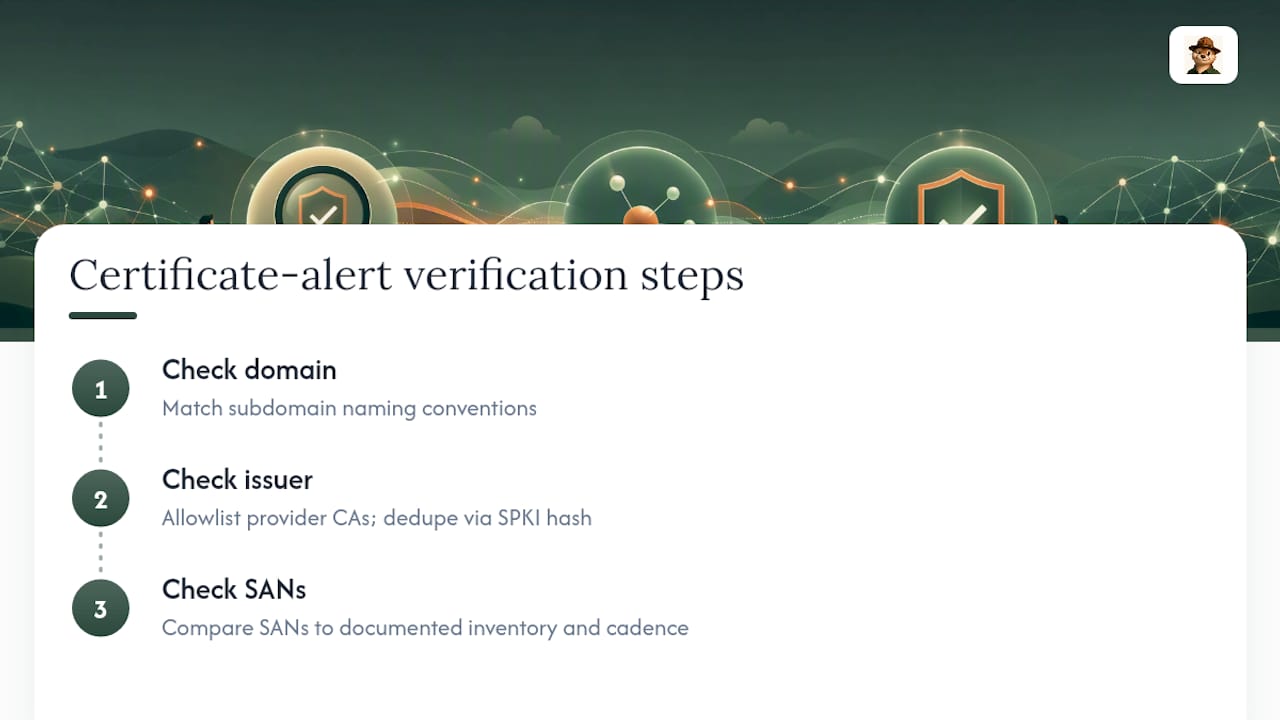
An issuance alert is only useful if you know what to do with it. Every alert boils down to three checks:
- Domain match. Does the certificate actually cover a hostname you own, or is it a close lookalike using a different TLD or a punycode trick?
- Issuer. Is the CA one you recognize, whether that’s your hosting provider, a managed platform, or an authority you’ve used before?
- SANs and validity dates. Do the Subject Alternative Names line up with subdomains you control, and does the validity window make sense for a normal renewal cycle?
Most alerts you get will be routine. A managed hosting provider renewing your certificate, or a CDN reissuing behind the scenes, looks like a new entry but is nothing to worry about. The industry guidance on CT triage is consistent on this: check domain ownership, issuer legitimacy, and the SAN list before you assume anything is wrong.
A few patterns should move an alert straight to the top of your list:
- An unexpected wildcard certificate (
*.yourdomain.com) when you’ve never requested one - An issuer you’ve never used, especially a free or low-friction CA you didn’t authorize
- SANs listing subdomains you don’t recognize, especially ones that look like staging, admin, or payment paths
- A domain that resembles yours but isn’t exactly yours, using homoglyphs or punycode
Your Response Checklist When an Alert Looks Wrong
Speed matters more than thoroughness in the first ten minutes. Work through this in order:
- Glance at the basics. Hostname, issuer, and issue date. Most false alarms die right here.
- Pull the CT log entry. Search crt.sh for the certificate’s serial number or the exact hostname to see the full entry, including all SANs.
- Check what’s actually deployed. Run
openssl s_client -connect yourdomain.com:443 -servername yourdomain.comto see the certificate your server is presenting right now, and compare its fingerprint to the one in the alert. - Confirm who requested it. Ask your hosting provider, CDN, or IT contact whether they triggered the issuance before assuming it’s hostile.
Upon confirming unauthorized certificates, initiate appropriate remediation steps:
- Contact the issuing CA’s abuse or revocation channel and request revocation, citing the certificate’s serial number from the CT log entry
- If a subdomain was compromised to request the cert, work with your registrar or DNS provider to lock down or reclaim that record
- Rotate any credentials (API keys, DNS access tokens, hosting panel passwords) that could have enabled the unauthorized request
- Write down what happened: when the alert fired, what you found, who you contacted, and when it was resolved
That last step feels tedious in the moment, but it’s the difference between handling one incident and handling the same incident three more times because nobody remembers the last fix.
Building Monitoring That Doesn’t Cry Wolf
The biggest reason small teams ignore certificate alerts isn’t apathy. It’s alert fatigue from tools tuned for enterprise security operations centers, not a solo founder checking email between client calls.
Start with check frequency. Real-time streams catch issuance immediately, but it also means you’re parsing noise around the clock. For most small teams, a 15-minute polling interval is close enough to real-time to matter while keeping the volume manageable. Hourly checks are fine for lower-risk domains, but stretch that window and you lose the early-warning advantage that makes CT monitoring worth doing at all.
Noise reduction is where most homegrown setups fall apart. A few things actually work:
- Allowlist the CAs your managed providers use to reduce alerts from routine renewals
- Deduplicate precertificate and final-certificate pairs to avoid duplicate alerts and a naive monitor will alert you twice for one issuance
- Use the certificate’s SPKI hash as a consistent identifier for filtering alerts. Cloudflare’s own CT monitoring rollout leaned on exactly this approach, matching by SPKI to suppress alerts for certs their own infrastructure issued, which kept the security signal intact without burying anyone in routine renewal notices.
Pro Tip: If you manage certificates for multiple clients, route each domain’s alerts to a separate channel or tag. A single shared inbox for fifteen client domains guarantees you’ll eventually skim past the one that matters.
For routing, email works fine for most solo operators and small agencies, plain text over decorated dashboards. Larger teams often want a webhook into Slack for visibility, and only the highest-severity anomalies (unrecognized issuer plus unexpected wildcard, for example) should ever hit a pager.
Feeding Certificate Alerts Into Your SIEM
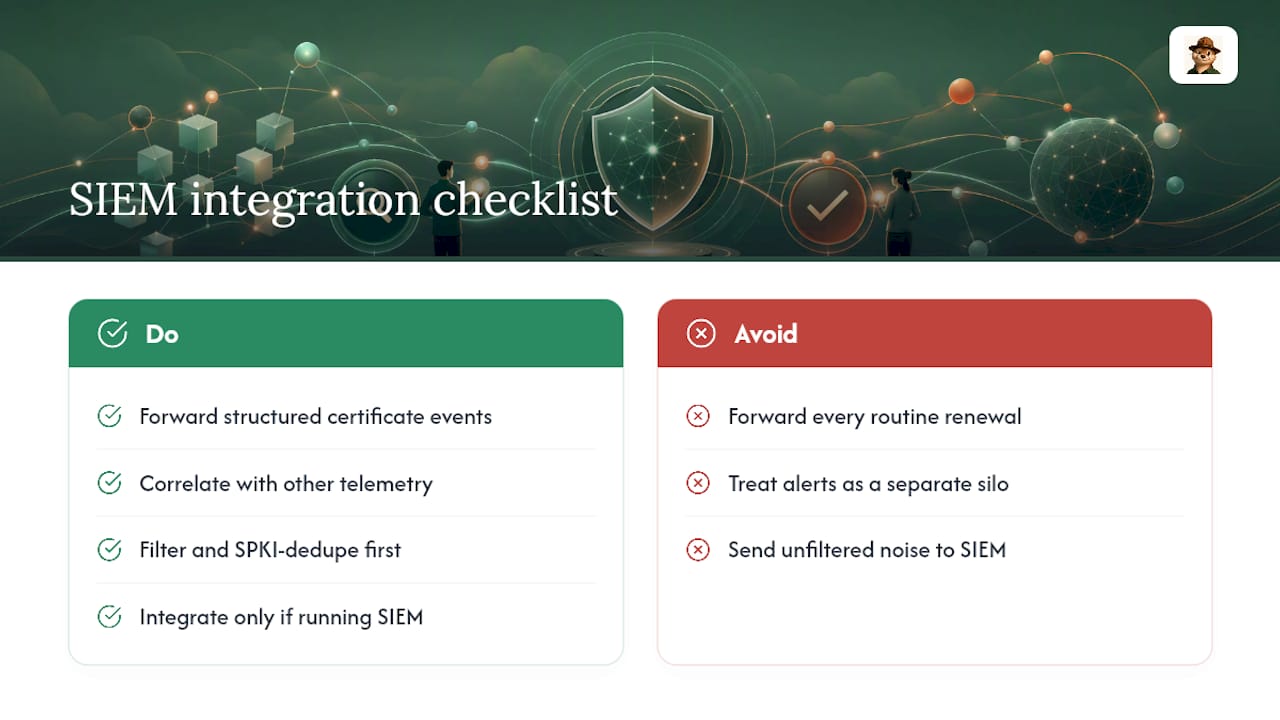
If your organization already runs a security information and event management (SIEM) platform, certificate issuance alerts are worth piping in alongside your other event streams, not treating as a separate silo you check manually.
The integration itself is usually straightforward. Most CT monitoring tools that support webhooks can forward structured alert data (hostname, issuer, SAN list, timestamp, SPKI hash) into a SIEM’s ingestion endpoint as a custom event type. That lets you correlate a suspicious issuance with other signals happening at the same time. A rogue certificate showing up right after unusual DNS changes or a spike in failed login attempts against your domain registrar tells a very different story than the same certificate appearing in isolation.
The main design decision is what counts as an event worth forwarding versus noise the SIEM doesn’t need. Forwarding every routine renewal from your CDN floods your SIEM with low-value entries and buries the anomalies you actually care about. The same filtering logic that keeps standalone monitoring quiet, allowlisted issuers and SPKI-based dedupe, should run before anything reaches the SIEM, not after.
For teams without a dedicated SIEM, this integration step is optional. A small agency managing a dozen client domains doesn’t need enterprise correlation to catch a misissued certificate; a well-tuned email or Slack alert does the job. SIEM integration earns its complexity once you’re already running one for other reasons and want certificate events sitting alongside the rest of your security telemetry instead of living in a separate tool nobody checks.
Compliance Considerations Around Certificate Monitoring
Certificate monitoring intersects with a few compliance frameworks, though the requirements are usually implicit rather than spelled out as “thou shalt monitor CT logs.”
Standards like PCI DSS require organizations handling card data to maintain strong cryptography and monitor for unauthorized changes to their environment. A misissued certificate for a payment subdomain is exactly the kind of unauthorized change that framework is designed to catch, even though the standard doesn’t name certificate transparency monitoring specifically. Similarly, SOC 2’s security criteria expect evidence that an organization detects and responds to security events in a reasonable timeframe. A documented process for triaging issuance alerts, with timestamps showing when you noticed and resolved an issue, is the kind of audit evidence that satisfies that expectation.
For teams under HIPAA or similar data-protection obligations, the logic is the same: an unauthorized certificate for a domain handling protected data is a security incident, and having a monitoring and response process in place is part of demonstrating reasonable safeguards.
None of this means you need a compliance officer to run certificate monitoring. It means the incident log you’re already keeping (what alert fired, what you checked, what you did) doubles as audit documentation if you’re ever asked. Keep it simple: a shared document or spreadsheet with date, domain, issuer, and resolution is usually enough for a small team’s audit trail. The habit of documenting matters more than the format you use to do it.
Real-Time Streams vs. Daily Summaries
Not every certificate issuance alert needs to interrupt your day, and treating them all the same way is how teams end up ignoring the tool entirely.
Real-time alerts fire the moment a new certificate for your domain hits a CT log, typically within seconds of issuance. These make sense for high-value domains, anything handling payments, login credentials, or customer data, where minutes matter if something’s wrong. The tradeoff is volume: if you monitor a dozen subdomains across several managed providers, real-time alerts without good filtering will bury you.
Summary alerts, delivered as a daily or weekly digest, work well for lower-risk domains or for teams that want visibility without the interruption. Summary alerts provide consolidated information for efficient review.
Most small teams land on a hybrid approach without realizing that’s what they’re doing: real-time alerts for the domains that would hurt most if compromised, summary digests for everything else. If you’re setting this up yourself, decide domain by domain rather than picking one mode for your entire portfolio. Your marketing landing page probably doesn’t need the same urgency as your customer login page.
Why Alerts Get Noisy: Common False Positives
The fastest way to kill a monitoring habit is a tool that cries wolf. A few patterns account for most of the false alarms small teams see.
Managed-provider renewals are the biggest source. If you’re behind a CDN or a managed hosting platform, that provider is renewing certificates on your behalf on its own schedule, and every renewal shows up in CT logs as a “new” issuance even though nothing changed on your end. The fix is allowlisting the CAs those providers use, so routine renewals stop generating alerts.
Precertificate duplication is the second-biggest. Because CT logs the precertificate and the final certificate separately, a monitor that doesn’t deduplicate will alert you twice for a single issuance event. Matching by SPKI hash, rather than by the certificate’s serial number, collapses these pairs into one alert.
Test and staging certificates from services like Let’s Encrypt’s staging environment or internal CI/CD pipelines can also surface in public logs if they’re issued by a publicly trusted CA rather than a private one. If your team runs frequent staging deployments, expect a trickle of these and build a quick mental filter for your own subdomain naming conventions.
Wildcard renewals sometimes look alarming to someone unfamiliar with your own infrastructure, especially if a new engineer or contractor is the one checking alerts and doesn’t yet recognize which wildcards are expected. Documenting your normal certificate inventory, which CAs, which SANs, which renewal cadence, solves this faster than any tooling change. When in doubt, the review always comes back to the same three checks: domain, issuer, SANs.
Why Calm Alerts Catch More Real Incidents
Alert fatigue isn’t a minor annoyance. It’s the reason real incidents get missed. A small team that gets bombarded with red banners for routine renewals learns, fast, to skim past everything, including the one alert that actually matters.
The fix isn’t more alerts. It’s better ones. A useful certificate issuance alert answers four questions in the first line: what happened, which hostname, which issuer, and what to do next. No jargon, no siren graphics, just enough information to make a five-second decision about whether to look further.
That’s the design principle behind how Otterwatch approaches certificate monitoring: plain-language notices instead of a wall of red. When an alert doesn’t require decoding before you can act on it, you’re far more likely to actually read the next one.
— Nick Phillips
Get Calm, Plain-Language Certificate Alerts
Some monitoring tools provide CT-based issuance monitoring, deduplication, and plain-language alerts, so you don’t have to wire crt.sh queries and SPKI filtering together yourself. These tools watch domains for new or changed TLS/SSL certificates, check that sites are still reachable, and send a clear email when something’s worth a look, avoiding dashboards full of red you have to decode.

It’s built for the reader this article is written for: solo founders juggling client sites, freelancers who can’t babysit a security console, and small agencies that need certificate health across multiple domains without hiring anyone to watch it. Setup takes a few minutes: add your domains, and monitoring starts tracking issuance and uptime immediately, with some free monitoring offered at no cost.
If you want to see what a certificate looks like right now before you commit to anything, run a domain through the free SSL certificate checker first. If you like what you see, sign up and let Otis keep watch from there.
Sources
- Certificate Transparency - Wikipedia
- Certificate Transparency Monitoring is now generally available | Cloudflare Blog
- TLS/Certificate Transparency (InfoQ)
FAQ
What Are Certificate Issuance Alerts?
They’re notifications, usually delivered by email, telling you that a new or reissued TLS/SSL certificate mentioning your domain has appeared in a public Certificate Transparency log.
How Fast Do Certificate Issuance Alerts Arrive?
Certificates typically show up in CT logs within seconds of issuance, so a well-configured monitor can notify you in near-real-time rather than hours or days later.
What Should I Check First When I Get an Alert?
Verify three things: the certificate covers a domain you actually own, the issuer is one you recognize, and the SANs and validity dates match what you’d expect from a normal issuance.
How Do I Reduce False Positives From My Certificate Monitor?
Allowlist the certificate authorities your managed providers already use, deduplicate precertificate and final-certificate pairs, and match by SPKI hash rather than serial number, an approach Cloudflare uses in its own CT monitoring product.
Can Otterwatch Send Me Certificate Issuance Alerts?
Yes. Some services monitor Certificate Transparency logs for your domains and send plain-language email alerts when a new or changed certificate appears, alongside uptime checks, often free for a limited number of sites.
Do I Need a SIEM to Use Certificate Issuance Alerts?
No. A SIEM integration is useful once you’re already running one for broader security monitoring, but most small teams and freelancers get full value from email or Slack alerts alone.
Recommended
- Certificate Expiration Check Script: A Practical Guide
- Common Certificate Deployment Errors: IT Troubleshooting Guide
- Why Short-Lived Certificates Need Monitoring in 2026
- SSL Certificate Expiry Alert Types: 2026 Guide
Catch the next cert expiry before your users do.
Otterwatch checks your SSL certificates daily and emails you 30 days before they expire. Five sites free.
Start watching →