2 Checks to Prevent Let's Encrypt Expiry for Small Teams
By Nick Phillips, Founder
2 Checks to Prevent Let’s Encrypt Expiry for Small Teams
Let’s Encrypt shut off its expiration notification emails for good, effective June 4, 2025. If you were relying on those reminders, the fix is straightforward: add an external endpoint check that watches your certificate’s expiry date from the outside, and pair it with a renewal heartbeat that confirms your server actually reloaded the new cert. Do both, and you’ll catch a failing renewal days before anyone notices a browser warning.
TL;DR:
- Relying solely on Let’s Encrypt expiration emails is no longer viable after June 4, 2025, so external monitoring and renewal checks become essential.
- Shorter certificate lifespans, now down to 47 days industry-wide by 2029, leave less margin for renewal failures and increase the importance of outside verification.
- Combining external expiry checks with renewal heartbeat monitoring helps detect silent failures, ensuring certificates are both renewed and properly reloaded.
- Regularly running dry-run renewals and verifying deploy hooks are crucial practices to confirm actual certificate reloads and avoid service outages.
- Using layered, simple monitoring tools like Otterwatch provides small teams with affordable, effective oversight that minimizes alert fatigue and prevents expiration surprises.
Table of Contents
- Why Did Let’s Encrypt Stop Sending Expiry Alerts?
- Why Losing Email Reminders Raises Your Risk
- How Do You Monitor Let’s Encrypt Certificates Without Emails?
- What Alert Thresholds and Channels Actually Work?
- Your Certificate Recovery Checklist
- Handling Rate Limits and Common Let’s Encrypt Errors
- Setting Up Automatic Renewal With Certbot and Other ACME Clients
- Understanding the Let’s Encrypt Certificate Lifecycle
- What Usually Breaks a Let’s Encrypt Renewal?
- How Do You Verify a Renewal Actually Worked?
- The Case for Boring, Layered Monitoring
- Try Otterwatch’s Free Certificate Monitoring
- Primary Sources and Further Reading
- Sources
- FAQ
Why Did Let’s Encrypt Stop Sending Expiry Alerts?
Let’s Encrypt first signaled the change on January 22, 2025, when it announced it would end expiration notification emails on June 4, 2025. The service went dark right on schedule, and the follow-up post confirmed the shutdown, including the deletion of email addresses tied to certificate issuance.
The reasoning wasn’t just “we got tired of sending emails.” Let’s Encrypt cited a few specific pressures:
- Privacy concerns tied to storing millions of subscriber email addresses linked to issuance records.
- Operational cost of running a notification system at the scale of hundreds of millions of active certificates.
- Infrastructure complexity that pulled engineering time away from the core certificate authority work.
The organization pointed site owners toward third-party monitoring as the replacement, and its own documentation on expiration emails still explains the old behavior for context. If you want the primary source rather than someone else’s summary, those two announcement posts are the ones to bookmark.
Why Losing Email Reminders Raises Your Risk
Let’s Encrypt certificates last 90 days, and Certbot’s default renewal window kicks in around day 60, roughly a third of the certificate’s life left. That was already a tight margin. It’s about to get tighter: the CAB Forum’s Ballot SC-081v3 sets an industry-wide schedule that shrinks maximum public TLS certificate validity down to 47 days by March 15, 2029. Shorter lifetimes mean less room for anything to go wrong before it becomes visible to a user.
Auto-renewal fails silently more often than people expect. A few common ways it happens:
- A firewall or load balancer change blocks the ACME HTTP-01 or DNS-01 challenge without anyone touching the cert config.
- A cron job silently stops running after a server migration or OS upgrade.
- The certificate renews on disk, but the web server or reverse proxy never reloads it.
- A rate limit or DNS propagation delay causes one renewal attempt to fail, and nobody retries it.
That last failure mode is the sneaky one. Internal logs might show a renewal attempt was made. They won’t tell you whether the live, public-facing endpoint is actually serving the new certificate. Only a check from outside your network, hitting the real port over TLS, confirms what a visitor’s browser will see. That gap between “the renewal ran” and “the site is actually serving the new cert” is exactly where silent failures hide.
How Do You Monitor Let’s Encrypt Certificates Without Emails?
You have four practical layers to choose from, and most setups end up combining at least two of them.
-
External endpoint expiry checks. A monitoring service connects to your domain on port 443, reads the certificate served during the TLS handshake, and tracks the expiry date. This is the most important layer because it sees exactly what the public sees, including SNI mismatches, incomplete cert chains, or a stale cert still being served after a botched reload.
-
Renewal heartbeats. Instead of watching the certificate itself, a heartbeat watches the renewal process. Wire it into your Certbot
deploy-hook(which fires only on a successful renewal, right before or after the reload) rather than a genericpost-hookthat runs regardless of outcome. The hook pings a monitoring endpoint; if the ping doesn’t arrive on schedule, you know the renewal job didn’t complete, even before the certificate itself is close to expiring. -
DIY scripts. A common pattern uses
openssl s_clientto connect to a host and pull the certificate’snotAfterdate, then compares it against today’s date in a cron job. It works fine for one or two servers. The pitfalls show up at scale: scripts that don’t handle SNI correctly report the wrong cert on multi-domain servers, and a script running on the same box it’s checking won’t tell you anything if that box loses network access entirely. -
Observability integrations. Teams already running Prometheus commonly deploy a black-box exporter that scrapes TLS expiry across many endpoints, then chart it in Grafana alongside other infrastructure metrics. This fits well if certificate health needs to live next to your existing dashboards rather than in a separate tool.
Pro Tip: Run the external check and the renewal heartbeat side by side and watch what happens when they disagree. If the heartbeat is green but the external expiry date isn’t moving, your renewal is succeeding but your reload isn’t. That single discrepancy points straight at a deploy-hook problem instead of a certificate problem, which saves you from debugging the wrong layer.
A solo maintainer with two or three sites can get by on a script and a cron job. A small team managing a dozen production hosts is better served by a hosted expiry checker plus heartbeats, since nobody has time to babysit cron output across a dozen boxes. A platform team running certificates across many services usually wants both a hosted or Prometheus-based expiry layer and heartbeats wired into deployment pipelines, so a renewal failure surfaces in the same place as every other infrastructure alert.
What Alert Thresholds and Channels Actually Work?
Alert fatigue is the real enemy here. A single 30-day warning to a Slack channel that fifteen people ignore is worse than useless. A staged approach works better:
- 30 days out: informational notice, low urgency, fine for a shared channel or dashboard.
- 14 days out: a real warning, sent to whoever owns the domain or service.
- 7, 3, and 1 day out: escalating urgency, sent directly (email plus a second channel), not buried in a group feed.
- Immediate alert on any renewal failure event, regardless of how many days remain, sent to whoever’s on call.
That schedule assumes a 90-day certificate. If you’re already on 47-day or shorter certs under the CAB Forum schedule, shift every threshold earlier proportionally. A 7-day warning on a 47-day cert leaves far less buffer than the same warning on a 90-day one.
| Days remaining | Severity | Suggested channel |
|---|---|---|
| 30 | Info | Dashboard or low-priority channel |
| 14 | Warning | Email to service owner |
| 7 / 3 / 1 | Critical | Direct email plus a second channel |
| Renewal failure | Critical, immediate | On-call channel, regardless of days left |
Route by domain owner where you can rather than blasting every alert to one inbox. A marketing microsite dying quietly is annoying; your API gateway’s certificate expiring is an outage. They should not compete for attention in the same alert stream.
Your Certificate Recovery Checklist
If you’re staring at an expiring certificate right now, or you just realized you have no monitoring at all, work through this in order.
- In the next 60 minutes: Add an external expiry check on every production hostname, especially ones with unusual DNS setups or load balancers in front of them.
- Same hour: Wire a renewal heartbeat into your Certbot
deploy-hookfor at least your critical hosts, so a failed renewal pings you instead of waiting for the expiry check to notice. - Within 24 hours: Run a dry-run renewal (
certbot renew --dry-run) on every host to confirm the ACME client can still complete a full handshake. - Within 48 hours: Confirm your deploy hooks actually reload the web server process, not just write the new files to disk.
- Within 72 hours: Cross-check your monitoring against your actual DNS records; add any hostname that’s live in production but missing from your checks.
- Ongoing, monthly: Audit your full domain list against what’s actually being monitored, and test that your alert channels still fire correctly.
- Ongoing: Review any warning alerts from the past month, even ones that resolved themselves, since a renewal that “fixed itself” on retry is often masking an intermittent problem.
Handling Rate Limits and Common Let’s Encrypt Errors
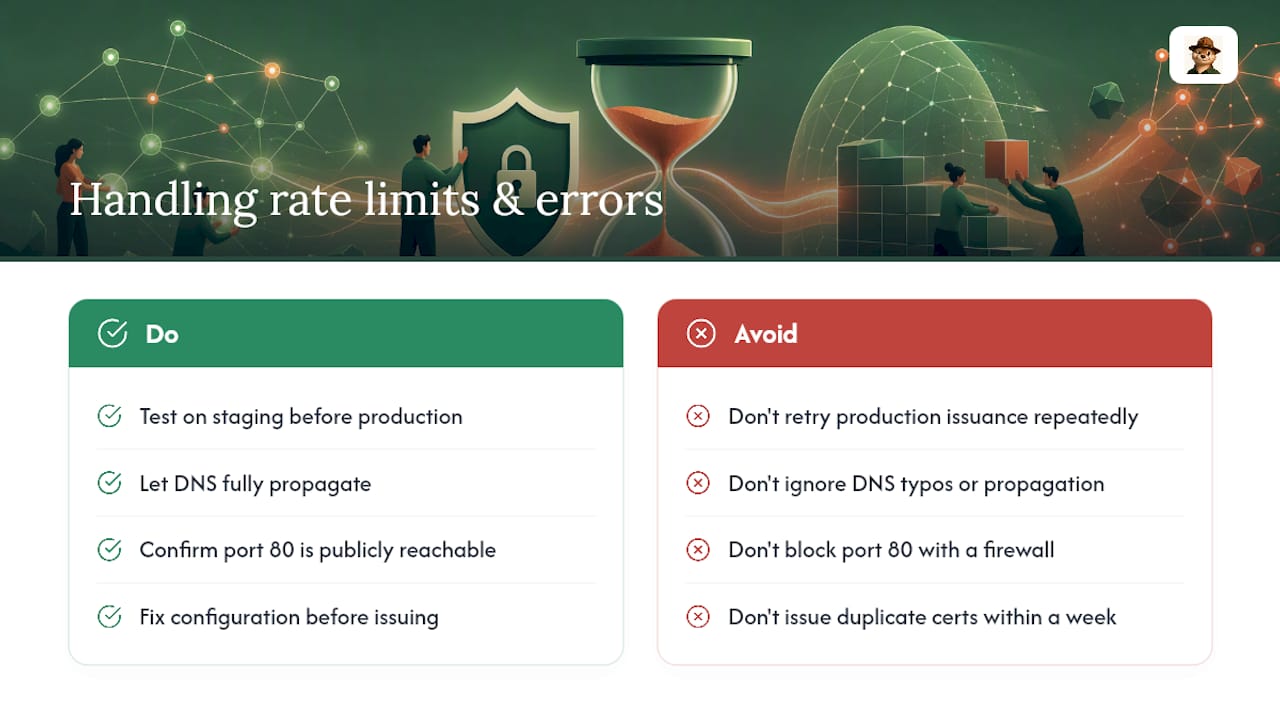
Rate limits catch people off guard more than any other Let’s Encrypt failure mode. The most common trip wire is the limit on duplicate certificate issuance for the same set of hostnames within a week, which bites teams that re-run issuance repeatedly while debugging a broken config instead of fixing the config first. If you hit it, the fix isn’t to keep retrying. Use the staging environment to test your setup, then only issue against production once staging succeeds.
A few other errors show up constantly in support threads. A “DNS problem: NXDOMAIN” during an HTTP-01 or DNS-01 challenge almost always means the domain isn’t pointing where the ACME client expects, often because of a typo or a DNS record that hasn’t propagated yet. A “Connection refused” error during HTTP-01 validation usually means a firewall or security group is blocking port 80, even if port 443 is wide open. And “too many failed authorizations” errors stack on top of rate limits when repeated validation failures pile up in a short window.
The practical fix for most of these is patience plus staging. Let DNS propagate fully before retrying, confirm port 80 is reachable from the public internet if you’re using HTTP-01, and always validate your configuration against the staging endpoint before burning a production issuance attempt. None of these errors are mysterious once you know which layer they’re pointing at: DNS, network access, or issuance volume.
Setting Up Automatic Renewal With Certbot and Other ACME Clients
Certbot remains the most widely used ACME client, and its default installation adds a systemd timer or cron job that runs certbot renew twice a day. That job only actually renews certificates within the 30 day window before expiry, so seeing it run without a renewal happening is normal, not a bug.
The setup that actually matters is the deploy-hook. This flag runs a script only after a successful renewal, which makes it the right place to reload your web server and to fire a heartbeat ping to your monitoring service. A pre-hook runs before the renewal attempt, useful for temporarily stopping a service that’s binding port 80. Mixing these up, using a generic post-hook that fires whether or not the renewal succeeded, is a common source of the “renewed but not reloaded” failure mode.
Other ACME clients, including acme.sh and lego, follow the same basic model: a scheduled renewal attempt, a hook system for reload actions, and a staging environment for testing changes safely. Whichever client you use, the setup checklist is the same: confirm the renewal schedule is actually running (check your systemd timer or crontab, don’t assume), confirm the deploy hook fires on success, and confirm the hook actually reloads the service rather than just touching a file on disk.
Understanding the Let’s Encrypt Certificate Lifecycle
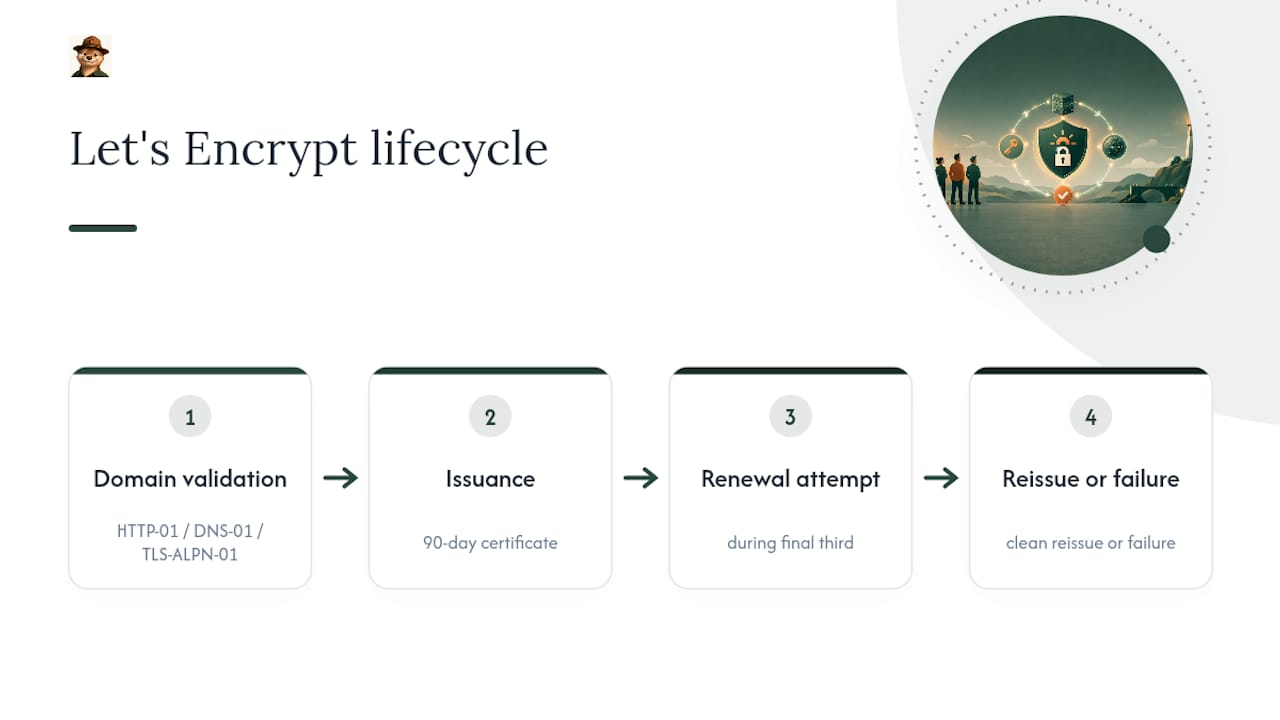
Every Let’s Encrypt certificate follows the same arc: a domain validation challenge (HTTP-01, DNS-01, or TLS-ALPN-01), issuance of a 90-day certificate, a renewal attempt inside the final third of that lifespan, and either a clean reissue or a failure that starts the countdown toward expiry.
The 90-day window itself is a deliberate design choice, not a limitation. Shorter lifetimes reduce the damage window if a private key is ever compromised, and they force automation instead of manual renewal, which is safer at scale. That same logic is why the industry is moving further in this direction: the CAB Forum’s Ballot SC-081v3 schedule steps validity down in stages, eventually capping public certificates at 47 days by March 2029.
What that means practically is that the “renewal window” you’re used to keeps shrinking. On a 90-day cert, Certbot’s default 30-day renewal trigger leaves you a comfortable margin even if the first attempt fails. On a 47-day cert, that same 30-day trigger leaves roughly two weeks of buffer, which is a lot less room for a stuck DNS propagation or a rate limit issue to resolve itself before things get urgent. Teams that build monitoring habits now, rather than after their first outage, are the ones who won’t scramble when shorter lifetimes become the default.
What Usually Breaks a Let’s Encrypt Renewal?
Most renewal failures trace back to one of a small handful of root causes, and they’re almost never Let’s Encrypt’s fault.
Configuration drift is the biggest one. A server gets migrated, a load balancer gets swapped, or a reverse proxy config changes, and the ACME client’s challenge path no longer matches what’s actually being served. The renewal job runs exactly as scheduled and fails exactly as consistently, because nothing about the client changed. Something around it did.
DNS issues are close behind, especially for anyone using DNS-01 validation for wildcard certificates. A TTL that’s too long, a delegated subdomain that changed nameservers, or an API credential for a DNS provider that expired quietly, all produce the same symptom: a validation challenge that can’t complete.
Cron and scheduler failures are the quiet killer. A cron job that depends on a specific user account, and that account gets locked or removed during a server hardening pass, stops running with zero error output anywhere obvious. Nobody notices until the certificate is already expired.
And permission or storage issues round it out. Certbot needs write access to its configuration directory and the ability to bind or proxy port 80 or 443 depending on the validation method. A permissions change from an unrelated security audit can silently break renewal months later.
How Do You Verify a Renewal Actually Worked?
Running certbot renew --dry-run confirms your ACME client can complete a full challenge and mock-issue a certificate without touching your live cert. It’s the single best low-effort test, and it’s worth running any time you change server config, DNS settings, or firewall rules.
That test alone isn’t enough, though, because a dry run doesn’t touch your deploy hook or confirm your server actually reloads. Manually forcing a renewal in staging, then confirming the live endpoint serves the new certificate afterward, closes that gap. Compare the certificate’s serial number before and after; a mismatch confirms the reload actually happened rather than just appearing to.
The most reliable long-term check is exactly the layered approach covered earlier: an external endpoint monitor that watches the live expiry date, plus a heartbeat tied to the deploy hook. If the two ever disagree, you’ve found a reload problem before a user did. It’s also worth confirming your DNS records stay healthy alongside your certificate checks, since a broken DNS-01 challenge path looks identical to a renewal failure until you dig into the logs.
The Case for Boring, Layered Monitoring
The instinct after reading Let’s Encrypt’s shutdown announcement is to go build something elaborate: a dashboard, a status page, maybe a whole internal tool. That instinct is usually wrong. What actually prevents outages is boring and layered: one check that watches the certificate from outside, one heartbeat that watches the renewal process, and alert thresholds early enough to fix a problem before a deadline forces your hand.
The conventional advice treats certificate monitoring as an uptime problem, bolted onto whatever generic tool a team already uses for server health. That’s backwards for most small teams. A certificate expiring is a different failure mode than a server going down; it’s slow, predictable, and entirely preventable with the right lead time, which is exactly why it deserves its own calm, dedicated attention rather than getting lost in a wall of infrastructure alerts.
Otterwatch was built around that certificate-first idea deliberately: watch expiry and reachability together, but keep certificates the priority, and skip the dashboards and red alarm language that make people tune out. A friendly heads-up two weeks before expiry gets acted on. A red klaxon buried among fifty other alerts usually doesn’t.
— Nick Phillips
Try Otterwatch’s Free Certificate Monitoring
Otterwatch handles the exact layered approach this article recommends: an external check on your certificate’s expiry date, paired with a reachability check, delivered as a plain, friendly email instead of a dashboard full of red numbers. There’s no separate heartbeat tool to configure and no alert-routing system to learn. You add your domains, and Otis (the park ranger otter behind the whole thing) watches them and lets you know well before anything actually expires.

It’s free for up to five domains with no credit card required. This covers most solo maintainers and small teams outright. If you manage more than that, or want deeper certificate monitoring and change detection, the Pro plan runs $15 per month. Want a quick gut check on a single domain right now, before you set up ongoing monitoring? Run it through the free SSL certificate checker and see exactly what’s being served today.
Primary Sources and Further Reading
- Ending Support for Expiration Notification Emails, the original January 2025 announcement from Let’s Encrypt.
- Expiration Notification Service Has Ended, confirming the June 4, 2025 shutdown.
- Ballot SC-081v3, the CAB Forum’s schedule for shorter certificate validity periods.
- Let’s Encrypt Monitoring: Automate Renewal and Avoid Outages, a practical guide to layered renewal monitoring.
Sources
- Expiration Notification Service Has Ended — Let’s Encrypt
- Ending Support for Expiration Notification Emails — Let’s Encrypt
- Ballot SC-081v3 — CAB Forum
- Let’s Encrypt Monitoring: Automate Renewal and Avoid Outages — WizStatus
FAQ
What Is the Expiry Period for Let’s Encrypt Certificates?
Let’s Encrypt certificates are valid for 90 days from issuance. Under the CAB Forum’s Ballot SC-081v3 schedule, that maximum validity shrinks in stages across the industry, reaching 47 days by March 15, 2029.
Why Doesn’t Everyone Use Let’s Encrypt?
Some organizations need extended validation certificates, longer validity periods for internal compliance reasons, or vendor support contracts that a free automated certificate authority doesn’t provide. Others simply haven’t automated renewal and prefer a paid certificate authority’s manual issuance and support process.
How Do I Check a Certificate’s Expiry Date?
The fastest method is running openssl s_client from a terminal, which returns the exact expiration timestamp. For ongoing checks without touching a command line, a free tool like Otterwatch’s SSL certificate checker shows the same information instantly.
How Often Do Let’s Encrypt Certificates Renew?
Certbot’s default automation runs twice a day and only actually issues a new certificate once you’re within 30 days of expiry on a standard 90-day certificate.
Does Otterwatch Replace the Old Let’s Encrypt Expiration Emails?
Otterwatch covers the same core need with an external expiry check on your domains, plus a reachability check, delivered as a plain email alert well ahead of expiration. It’s free for up to five domains, with no credit card required to start.
Recommended
- Small Teams: Set Up Certificate First Email Alerts (30/14/7/3/1 Days)
- Small Teams: Detect Rogue Certificates With CT and an Authorize List
- 5 Checks to Prevent Missed SSL Expiry Webhook Alerts for Small Teams
- Small Teams: 3 Quick Checks for Certificate Issuance Alerts
Catch the next cert expiry before your users do.
Otterwatch checks your SSL certificates daily and emails you 30 days before they expire. Five sites free.
Start watching →