How to Avoid SSL Expiration Warnings: 2026 Guide
By Nick Phillips, Founder
How to Avoid SSL Expiration Warnings: 2026 Guide
TL;DR:
- Maintaining SSL certificates requires layered monitoring, automated renewals, and practiced emergency procedures.
- External live handshake checks and multi-stage alerts help prevent expiration outages and maintain site security.
An SSL expiration warning is a browser error that fires the moment your site’s TLS certificate passes its validity end date. Avoiding SSL expiration warnings is not a one-time task. It requires a layered system of certificate inventory, multi-stage alerts, automated renewal, and live monitoring. When that system breaks down, expired certificates cause full HTTPS failure, killing API connectivity, mobile app updates, and website access. This guide gives you the exact steps to prevent that from happening, using tools like Certbot, Cert-manager, and Otterwatch.
What do you need in place before preventing SSL expiry?
Before you can prevent SSL certificate expiry, you need a clear picture of every certificate your infrastructure uses. Most teams underestimate how many certs they actually have. A single domain can carry separate certificates for the root domain, multiple subdomains, a CDN edge layer, and a load balancer. Missing any one of them is how outages happen.
Start with a full certificate inventory. Cover every point where TLS terminates:
- Web servers (Apache, Nginx, IIS): the primary cert most teams track
- Load balancers (AWS ALB, HAProxy, F5): often configured separately from the web server
- CDN edges (Cloudflare, Fastly, CloudFront): certificates here can differ from origin
- Internal services: API gateways, internal dashboards, and microservice endpoints all use TLS
- Wildcard and SAN certs: a single cert may cover dozens of hostnames; track the cert and all names it covers
Next, know your validity periods. Let’s Encrypt issues 90-day certificates. Commercial certificate authorities like DigiCert and Sectigo typically issue 1-year certificates, though the industry is moving toward shorter lifespans. The shorter the cert, the tighter your renewal window, and the less room for error.
One thing that trips teams up: trusting auto-renewal logs as proof of success. Auto-renewal often fails silently due to configuration drift, and the renewal log shows success while the live certificate on your server is still the old, expiring one. You need external monitoring to verify what is actually deployed.

Finally, decide on your alert channels before you configure anything else. Email alone is not reliable enough. You need a real-time channel your team actually watches.
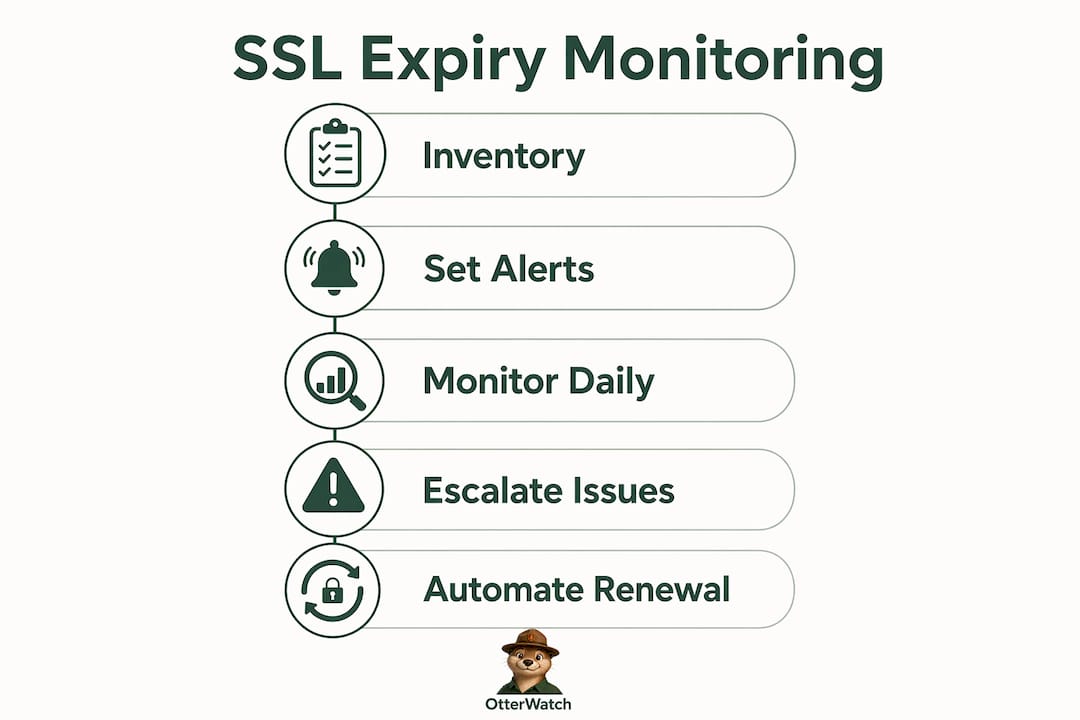
How to set up layered SSL certificate expiry monitoring
Layered alerting is the single most effective structure for SSL expiration notifications. The idea is simple: you send alerts at multiple thresholds so that a missed first warning does not become a crisis.
Industry best practice sets three alert thresholds:
- 30 days out: A heads-up notification. No urgency yet, but the renewal window is open. This is the right time to schedule the renewal and confirm your automation is configured correctly.
- 14 days out: Action required. If auto-renewal has not fired, trigger a manual renewal now. Do not wait to see if the system catches up.
- 7 days out: Emergency escalation. At this point, treat it as an incident. Page the on-call engineer, notify your manager, and start the emergency runbook.
The gap between thresholds matters. A 30-day window absorbs DNS propagation delays, staging test cycles, and the occasional weekend. A 7-day window gives you time to recover from a failed manual attempt before users see a warning.
Pro Tip: Set your monitoring frequency to match your cert lifespan. For 90-day Let’s Encrypt certificates, check daily. For 1-year commercial certs, weekly checks are sufficient, but daily is never wrong.
Do not rely on a single monitoring source. Your renewal tool’s internal logs are not a substitute for an external service that makes a live TLS handshake to your domain and reads the actual expiration date from the deployed certificate. Alerts should integrate into Slack, PagerDuty, or Telegram rather than relying on email, which gets buried or filtered. For a practical walkthrough of configuring multi-stage notifications, the Otterwatch expiry notification guide covers real-world setups in detail.
Configure escalation logic too. If the 14-day alert fires and no one acknowledges it within 24 hours, the system should automatically escalate to a secondary contact. Most monitoring platforms support this natively.
What are the best practices for automating SSL certificate renewal?
Automation is the right answer for SSL certificate renewal. Manual renewal is a liability. Certificate management requires continuous operational attention, and no team can sustain that manually across dozens of certificates.
The two most widely used tools are Certbot (for Let’s Encrypt, typically on Linux servers) and Cert-manager (for Kubernetes environments). Both use the ACME protocol, which automates the challenge-response process that proves you control the domain. Certbot handles Apache and Nginx directly. Cert-manager integrates with Kubernetes ingress controllers and stores certificates as secrets.
Common causes of auto-renewal failure include:
- Expired DNS API tokens: If you use DNS-01 challenges, the API token Certbot uses to write DNS records can expire independently. This is one of the most common silent failure causes.
- Firewall rule changes: HTTP-01 challenges require port 80 to be reachable. A firewall update that blocks inbound port 80 will silently break renewal.
- Disk space exhaustion: Certbot writes new certificate files during renewal. A full disk causes the process to fail without a clear user-facing error.
- Hook script permission changes: Post-renewal hooks that reload your web server require execute permissions. A system update or permission audit can quietly revoke them.
Auto-renewal failures commonly result from these environmental changes, which is why weekly renewal path testing in a staging environment is not optional. Run certbot renew --dry-run on a schedule and alert on any non-zero exit code.
Deployment hooks are equally critical. Renewal must include deployment hooks that reload your web server gracefully. A hard stop and restart drops active connections. A graceful reload (using nginx -s reload or systemctl reload apache2) swaps the certificate without interrupting live traffic.
Pro Tip: Monitor the expiration date of the live deployed certificate, not just the renewal log. A successful Certbot run does not guarantee the new cert is actually serving. Make a live TLS handshake check after every renewal to confirm.
For a deeper look at renewal mechanisms and deployment patterns, the SSL renewal 2026 guide on the Otterwatch blog covers both Certbot and Cert-manager workflows.
How to fix SSL expiration warnings quickly when they occur
Even with good automation, certificates expire. When they do, speed is everything. False confidence in automation causes many expired certificate incidents, so your team needs a runbook ready before the emergency happens.
Follow these steps when an SSL warning fires:
- Confirm the expiry. Run
openssl s_client -connect yourdomain.com:443 </dev/null | openssl x509 -noout -datesto read the actual expiration date from the live certificate. Do not assume the monitoring alert is accurate without verifying. - Trigger immediate renewal. For Certbot, run
certbot renew --force-renewal. For Cert-manager, delete and recreate the Certificate resource to force a new issuance cycle. - Verify the new certificate is deployed. Run the same
openssl s_clientcommand again and confirm thenotAfterdate reflects the new certificate. Check all subdomains covered by the cert separately. - Reload the web server gracefully. Use
nginx -s reloador the equivalent for your stack. Graceful reloads maintain active connections without downtime. A hard restart risks dropping live requests. - Communicate the incident. Notify your team via Slack or your incident channel. If users were affected, post a brief status update. Transparency builds trust faster than silence.
Emergency rule: If manual renewal fails twice, escalate immediately. Do not spend more than 30 minutes troubleshooting a failed renewal during an active outage. Switch to a backup certificate or contact your CA’s support line.
The most common mistake during emergency renewal is skipping the deployment verification step. Teams run Certbot, see a success message, and close the incident. The browser warning persists because the web server is still serving the old cert from cache or because the hook script failed silently.
Key takeaways
Preventing SSL certificate expiry requires layered monitoring, tested automation, and a practiced emergency runbook, not just a renewal cron job.
| Point | Details |
|---|---|
| Build a full cert inventory | Track every certificate across web servers, load balancers, CDNs, and internal services. |
| Use three alert thresholds | Set expiry notifications at 30, 14, and 7 days to absorb delays and escalate emergencies. |
| Test automation weekly | Run dry-run renewal checks in staging and alert on any failure, not just production outages. |
| Monitor live deployed certs | Verify the actual TLS handshake after every renewal, not just the renewal tool’s log output. |
| Keep a runbook ready | Practice emergency renewal steps before a crisis so your team can act in minutes, not hours. |
SSL management is an operational discipline, not a checkbox
I have seen teams with excellent automation still get burned by expired certificates. The pattern is almost always the same: someone set up Certbot two years ago, it worked fine, and then an infrastructure change quietly broke the renewal path. Nobody noticed because the logs still showed green. The certificate expired on a Saturday night.
The uncomfortable truth is that automation without monitoring is not a safety net. It is a false one. The only reliable safeguard is an external service making a live TLS handshake to your domain every day and alerting you when the expiration date gets close, regardless of what your renewal logs say.
Treat SSL certificate management the way you treat database backups. You do not just set up the backup job and forget it. You test restores. You verify backup files. You get paged when a backup fails. SSL deserves the same discipline. Build a runbook, run a quarterly drill where someone on your team practices emergency renewal from scratch, and make sure your alert channels are ones people actually see. The consequences of expired SSL certificates go well beyond a browser warning. They break APIs, kill mobile app connectivity, and destroy user trust in ways that take time to rebuild.
— Nick Phillips
Otterwatch keeps an eye on your SSL certificates so you do not have to
Otterwatch was built for exactly this problem. It watches your SSL certificates around the clock, makes live TLS handshake checks against your actual deployed certificates, and sends you a plain, friendly heads-up well before anything expires. No dashboards to configure, no walls of red alerts.

You get multi-stage expiry notifications at the thresholds that matter, delivered to the channels your team actually uses. Otterwatch also quietly monitors uptime at the same time, so you get two layers of coverage from one calm tool. Start with the free SSL certificate checker to see your current certificate status in seconds, then connect your sites to Otterwatch monitoring to keep them covered going forward. Five sites are free, no credit card required.
FAQ
What causes SSL expiration warnings?
An SSL expiration warning appears when a site’s TLS certificate passes its validity end date. Browsers reject expired certificates immediately, blocking user access.
How often should I check SSL certificate status?
Check daily for 90-day certificates like those issued by Let’s Encrypt. Weekly checks are sufficient for longer-lived commercial certificates, though daily is always safer.
Why does auto-renewal sometimes fail silently?
Auto-renewal fails silently due to environmental drift such as expired DNS API tokens, firewall changes, or broken hook script permissions. The renewal log reports success while the old certificate remains deployed.
What is the fastest way to fix an expired SSL certificate?
Run certbot renew --force-renewal, then verify the new certificate is live using openssl s_client, and reload your web server gracefully. The full process takes under 10 minutes with a prepared runbook.
How many alert thresholds should I set for SSL expiry notifications?
Set three thresholds: 30 days for planning, 14 days for action, and 7 days for emergency escalation. This structure gives your team time to respond at each stage without panic.
Recommended
- SSL Certificate Renewal Explained: 2026 Guide · Otterwatch
- Certificate Expiration Notification Explained for Site Owners · Otterwatch
- Blog · Otterwatch
- SSL Expiration Consequences Explained for Site Managers · Otterwatch
Catch the next cert expiry before your users do.
Otterwatch checks your SSL certificates daily and emails you 30 days before they expire. Five sites free.
Start watching →