SSL Expiration Consequences Explained for Site Managers
By Nick Phillips, Founder
SSL Expiration Consequences Explained for Site Managers
TL;DR:
- Expired SSL certificates immediately revoke website trust, causing security risks, revenue loss, and SEO damage.
- Automation and continuous verification are essential as certificates’ validity periods shorten to 47 days by 2029, making manual management unfeasible.
An expired SSL certificate is defined as a TLS credential that has passed its validity end date, causing browsers to immediately revoke trust and block visitor access without any grace period. The ssl expiration consequences explained here affect every layer of your site: security, revenue, search rankings, and user trust. 56% of organizations have experienced business disruptions from certificate outages, which means this is not a rare edge case. It is a predictable failure that hits teams who are not watching closely enough.
What security and functional risks does SSL expiration cause?
SSL certificate expiration breaks two things at once: encryption and identity verification. When a certificate lapses, the TLS handshake fails, and the browser can no longer confirm that your server is who it claims to be. That is the moment your site stops being trustworthy in any technical sense.

Browsers show hard security warnings the instant a certificate expires, and most users do not click through them. Chrome, Firefox, and Safari all display full-screen interstitial warnings with language like “Your connection is not private.” Visitors leave. The damage is immediate and measurable.
Beyond the browser warning, the ssl certificate risks extend into your backend infrastructure:
- Encryption loss. Without a valid cert, data in transit is no longer protected. Passwords, payment details, and session tokens are exposed to interception.
- Man-in-the-middle vulnerability. Expired certificates increase MITM attack risk because identity verification breaks down entirely, giving attackers a window to intercept or spoof traffic.
- API and microservice failures. Services that communicate over mTLS (mutual TLS) stop trusting each other when a certificate expires. Internal mTLS certificate expiry causes cascading failures that are hard to trace because the error surfaces far from the actual cert problem.
- Payment and checkout outages. A major commerce platform suffered a 2-hour outage when a payment API rejected requests due to an expired certificate. The cost was over $1 million in lost revenue across 97 minutes of blocked checkout traffic.
The most dangerous part of an expired certificate is not the browser warning your users see. It is the silent failure inside your infrastructure that nobody notices until a service goes dark.
The what happens when ssl expires picture is worse than most site managers expect, because the failure is rarely just one thing. It is a chain reaction.
How does an expired certificate affect search rankings and reputation?
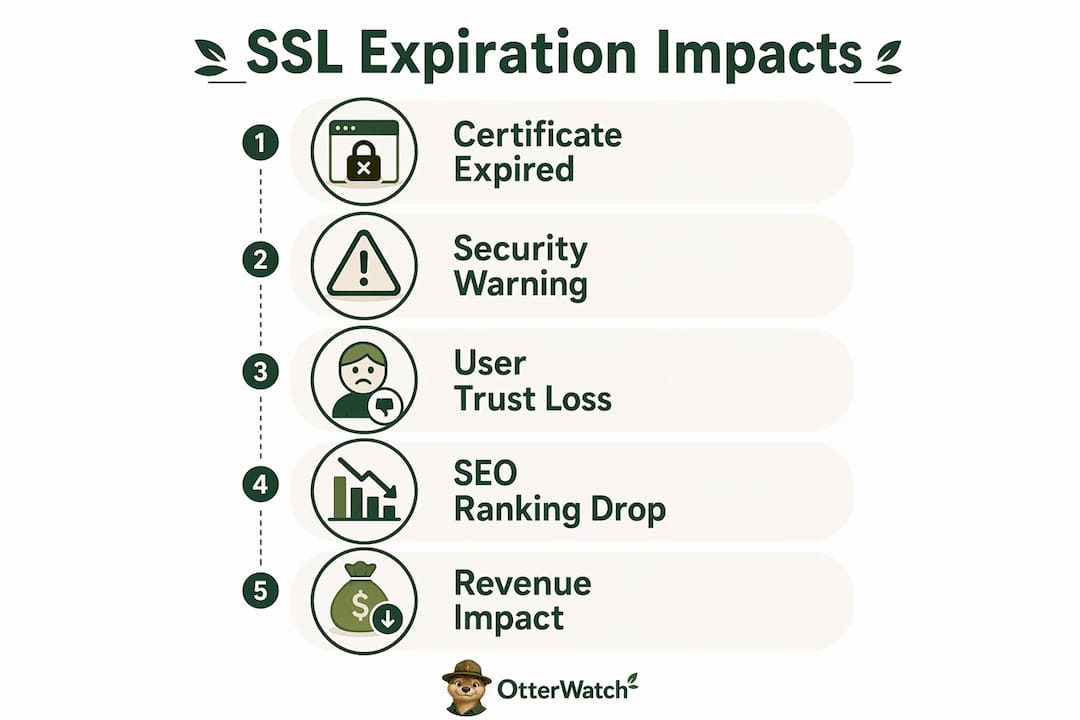
Google confirmed HTTPS as a ranking signal, which means losing it has direct SEO consequences. Sites lose ranking benefits when their certificate expires, and recovery is not instant after renewal. Search engines need time to re-crawl and re-evaluate your site, so the ranking dip can persist for days or weeks after you fix the cert.
The reputation damage compounds the SEO hit. Consider what a browser warning communicates to a first-time visitor: your site is not safe. That impression sticks even after the certificate is renewed, because users who bounced once rarely return.
The business impact of ssl expiration effects on reputation includes:
- Bounce rate spikes. Users who hit a security warning leave immediately. That spike in bounces signals poor user experience to Google, reinforcing the ranking drop.
- Brand trust erosion. Enterprise buyers and security-conscious users will flag your domain internally. A single expiration incident can cost you deals that were already in progress.
- Recovery lag. Renewing the certificate fixes the technical problem, but Google’s crawl schedule means your HTTPS signal may not be restored for several days. During that window, competitors rank above you.
- Social and review damage. Users who encounter the warning sometimes post about it publicly. Screenshots of “Not Secure” warnings circulate on social media and review platforms faster than you can respond.
The consequences of expired ssl on your brand are not proportional to how long the cert was expired. Even a few hours of exposure can generate lasting negative associations, particularly if the outage hits during a high-traffic period like a product launch or sale event.
Why do SSL certificates expire, and how are validity periods changing?
SSL and TLS certificates expire by design. The expiration forces regular re-validation of domain ownership and cryptographic key freshness, which limits the damage window if a private key is ever compromised. A certificate that never expires would be a permanent liability if the key were stolen.
The current standard lifespan for publicly trusted certificates is approximately one year (398 days). That is already shorter than the two-year maximum that was phased out in 2020. The industry is not stopping there. The CA/Browser Forum has approved a schedule that makes manual renewal tracking unviable within a few years.
| Year | Maximum certificate validity | Domain control reuse |
|---|---|---|
| 2025 | 398 days | 398 days |
| 2026 | 200 days | 200 days |
| 2027 | 100 days | 100 days |
| 2029 | 47 days | 10 days |
Validity periods drop to 47 days by 2029, which means you will need to renew roughly every six weeks. That is not a calendar reminder task. That is an automated pipeline task. Tools like Certbot and ACME-based issuers from Let’s Encrypt already support automated renewal, but automation alone is not enough if you are not verifying that the renewal actually deployed correctly.
Pro Tip: Set up a post-renewal check that reads the live certificate from your server (not just the file on disk) and confirms the new expiry date. Automated renewal systems can fail silently if deployment hooks do not reload the web service after writing the new cert.
The 90-day certificate implications are already visible in how teams need to rethink their renewal workflows today, not in 2029.
What operational failures cause SSL expiry incidents?
SSL certificate expiration is the most predictable infrastructure failure in existence. You know the exact date it will happen from the moment you install the cert. Yet repair times remain high because of a specific set of operational gaps that trip up even experienced teams.
Here are the most common failure patterns, in order of how often they cause real outages:
-
Calendar drift and ownership gaps. Someone set a reminder 30 days out, then left the company. The reminder fired to an inbox nobody reads. No one renewed. This is the most common cause of expiration incidents in small and mid-size teams.
-
Silent automation failures. Certbot or another ACME client runs on a cron job, renews the certificate file, but the web server (Nginx, Apache, or a load balancer) never reloads. The old cert keeps serving until it expires. Automated renewal can fail silently if deployment hooks do not correctly reload the service, and no error is logged.
-
Monitoring blind spots. Many teams rely on uptime monitors that check HTTP status codes. Those tools can report a site as “healthy” even when the certificate has expired, because the server is still responding. Effective monitoring requires direct TLS handshake checks that read the actual certificate expiry date from the live connection.
-
Multi-domain and SAN complexity. A single server may host dozens of domains, each with its own cert or a shared SAN certificate. Tracking expiry across all of them manually is error-prone. One forgotten subdomain can break a critical API endpoint.
-
Internal certificate blind spots. Internal mTLS certificates for microservices and service meshes often live outside the visibility of standard monitoring. Internal cert expiry causes cascading failures that surface as application errors rather than certificate errors, delaying diagnosis by hours.
Pro Tip: Do not rely on a single alert. Set multiple alert thresholds starting 30 days before expiry, then again at 14 days, 7 days, and 1 day. At 7 days, escalate manually regardless of whether automation is in place. That 7-day manual check has saved more sites than any automated script.
You can check ssl expiration dates using five different methods, from browser inspection to command-line OpenSSL queries, but the goal is to get that check running continuously, not just when you remember to look.
Key takeaways
Expired SSL certificates cause immediate, measurable harm across security, revenue, SEO, and user trust, and the industry’s move to 47-day validity by 2029 makes continuous automated monitoring the only viable defense.
| Point | Details |
|---|---|
| Expiration breaks trust instantly | Browsers block access the moment a cert expires, with no grace period for visitors. |
| Financial risk is real | A single 2-hour outage from an expired payment API cert cost one commerce platform over $1 million. |
| SEO recovery takes time | Google’s ranking signal for HTTPS is lost on expiration and takes days to restore after renewal. |
| Automation alone is not enough | Renewal scripts can fail silently; post-deployment verification of the live cert is required. |
| Validity periods are shrinking fast | Certificate lifespans drop to 47 days by 2029, making manual tracking operationally impossible. |
Why I stopped trusting “set it and forget it” renewal
I have seen the same incident play out more times than I care to count. A team sets up Certbot, confirms it runs on a cron job, and considers the problem solved. Six months later, the cert expires on a Saturday morning because the cron job was running on a server that got rebuilt, and nobody updated the job on the new instance.
The uncomfortable truth about SSL certificate management is that automation creates a false sense of security if you are not verifying the output. Renewing a cert file and serving that cert are two separate operations. The gap between them is where outages live.
My advice for any team managing more than three or four domains: treat your certificate expiry dates as a live metric, not a calendar event. Check the actual TLS handshake from outside your network, on a schedule, with alerts that escalate through multiple channels. A single Slack notification is not a monitoring strategy. It is a single point of failure.
The ssl certificate renewal process also needs an owner, not just a tool. Someone on your team should be accountable for certificate health the same way someone is accountable for uptime. When that ownership is diffuse, renewals fall through the cracks. I have watched it happen at companies with dedicated DevOps teams and six-figure monitoring budgets.
The industry’s move toward 47-day certificates is actually a forcing function here. You cannot manually manage a cert that renews every six weeks across 20 domains. The teams that build proper automation and verification pipelines now will be in good shape. The teams that wait will face a very stressful 2029.
— Nick Phillips
Keep your certificates from catching you off guard

Otterwatch watches your SSL certificates continuously and sends you a plain, friendly heads up well before anything expires. There are no dashboards to configure and no walls of alerts to decode. Otis, Otterwatch’s park ranger otter, checks your cert’s actual TLS handshake from outside your network and flags problems before your visitors ever see a warning screen. Uptime monitoring runs alongside it at no extra cost. You can check any certificate now for free, or start monitoring up to five sites at no cost. No credit card, no setup complexity.
FAQ
What happens the moment an SSL certificate expires?
The browser immediately stops trusting the certificate and displays a full-screen security warning. There is no grace period, and most users leave rather than proceed past the warning.
How does SSL expiration affect SEO?
Google treats HTTPS as a ranking signal, so an expired certificate removes that signal and can cause a ranking drop. Recovery takes additional time after renewal because search engines need to re-crawl and re-evaluate the site.
Can automated renewal still result in an expired certificate?
Yes. Renewal tools like Certbot can write a new certificate file but fail to reload the web server, meaning the old expired cert continues to serve. Verifying the live TLS handshake after every renewal is the only reliable check.
How do I check when my SSL certificate expires?
You can inspect the certificate directly in your browser’s padlock menu, run an OpenSSL command against your domain, or use a dedicated tool. Otterwatch’s free SSL checker reads the live cert from your server and shows the exact expiry date.
How short will SSL certificate validity periods get?
The CA/Browser Forum has approved a schedule that reduces maximum certificate validity to 200 days in 2026, 100 days in 2027, and 47 days by 2029. At 47-day validity, manual renewal tracking becomes operationally unworkable for most teams.
Recommended
- What actually happens when your SSL certificate expires · Otterwatch
- SSL Expiry Notification Setup: A Practical Guide · Otterwatch
- Blog · Otterwatch
- Why do SSL certificates expire? · Otterwatch
Catch the next cert expiry before your users do.
Otterwatch checks your SSL certificates daily and emails you 30 days before they expire. Five sites free.
Start watching →