Small Teams: Detect Rogue Certificates With CT and an Authorize List
By Nick Phillips, Founder
Small Teams: Detect Rogue Certificates With CT and an Authorize List
Start Certificate Transparency (CT) monitoring on every domain you own and pull its issuance history first. If you see an issuer you didn’t request, a SAN list that doesn’t match your inventory, or a Not Before date that’s suspiciously fresh, treat it as rogue until proven otherwise. Automate the alert, freeze judgment, and start your investigation workflow immediately.
TL;DR:
- Monitoring should focus on unexpected issuers, SAN lists, and non-standard validity periods, especially if they deviate from your established issuance patterns.
- Comparing CT log records with your documented renewal schedules helps identify certificates issued outside normal windows, indicating potential rogue activity.
- Prioritize inspecting issuer chains, SAN lists, and validity durations, as combinations of anomalies in these fields are highly indicative of malicious or misissued certificates.
- Automate alerting with risk tiers based on issuer trustworthiness and usage status, and incorporate active scans to verify real-time deployment of suspicious certificates.
- Act quickly by gathering evidence, confirming active use, and reporting to the issuing CA while implementing immediate containment measures like revocation and key rotation.
Table of Contents
- What Is a Rogue Certificate and How Do You Detect It?
- Quick Detection Checklist: Immediate Steps and Triage
- Which Certificate Fields Actually Signal a Rogue Issuance?
- Monitoring Approaches: CT Logs, Active Scanning, and APIs
- How Do You Automate Alerts Without Causing Fatigue?
- What to Do After You Find a Suspicious Certificate
- How Otterwatch Fits Into a Detection Workflow
- Where to Verify These Detection Methods Yourself
- A Small Team’s Priority List for Rogue Certificate Detection
- Get Certificate Monitoring That Won’t Bury You in Alerts
- Sources
- FAQ
What Is a Rogue Certificate and How Do You Detect It?
A rogue certificate is a technically valid X.509 certificate that passes every client-side check a browser runs, yet was never authorized by the domain owner. That’s what makes them dangerous: revocation checks and chain validation won’t flag them, because the problem isn’t cryptographic. It’s contextual. A Microsoft Research paper on detecting rogue certificates frames it plainly: the maliciousness only shows up when you compare the certificate’s metadata and issuance context against what should have happened, not against whether the signature verifies.
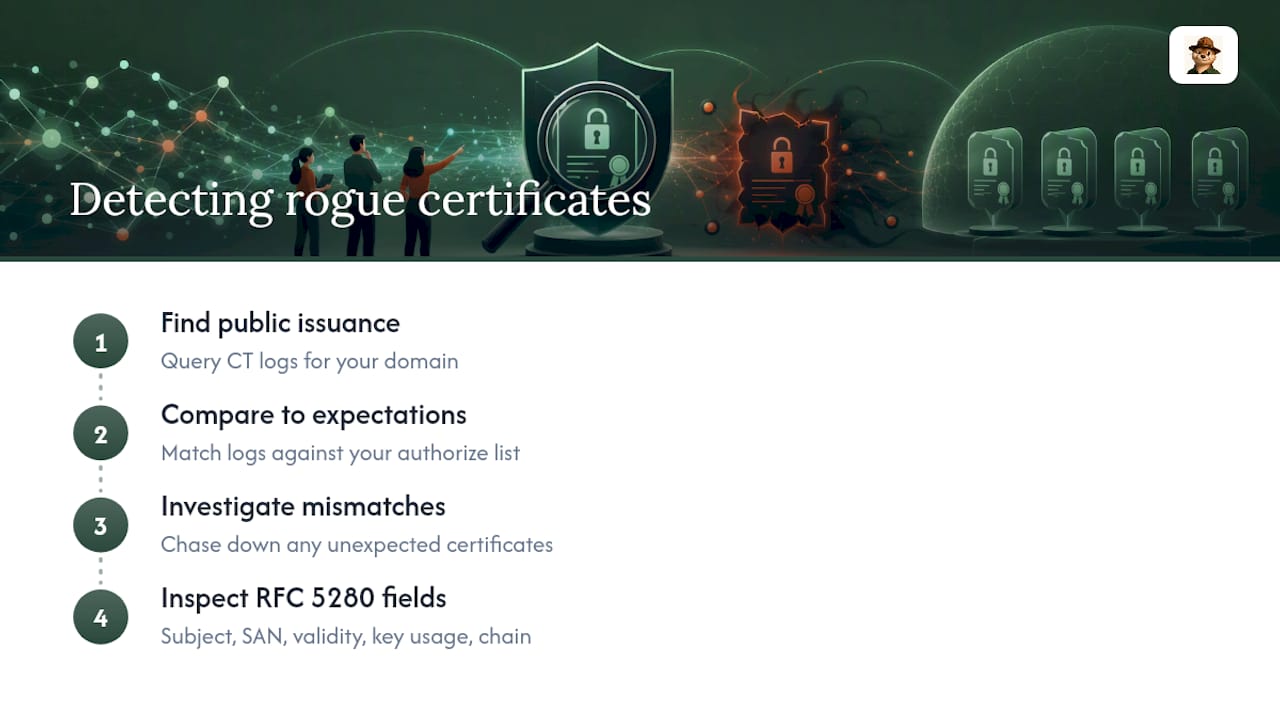
That’s the whole reason CT logs exist. Since 2013, most publicly trusted certificate authorities have been required to publish every certificate they issue into append-only, publicly auditable logs. If you know how to query them, you can see every certificate ever issued for your domain, including the ones nobody on your team requested. Detecting a rogue certificate, in practice, comes down to comparing that public issuance record against what you expected, then chasing down the gap.
The standard industry term for the validation rules a certificate has to satisfy is defined in RFC 5280, the IETF specification for X.509 public key infrastructure. Every indicator discussed below traces back to fields RFC 5280 defines: Subject, Subject Alternative Name (SAN), validity period, key usage, and the certificate chain. Knowing the standard matters because it tells you exactly which fields are worth inspecting and which are cosmetic.
Quick Detection Checklist: Immediate Steps and Triage
When something looks off, work through this sequence before you do anything else:
- Run a CT lookup for the domain and compare every issuance timestamp against your known renewal calendar. A certificate issued outside your normal renewal window is the first red flag.
- Pull the certificate’s PEM and compute its SHA-256 fingerprint. You’ll need this for blocking, revocation requests, and matching against future sightings.
- Check revocation status through OCSP and CRL. Neither is airtight. OCSP responders can soft-fail (many clients treat a non-response as “valid” rather than blocking), and OCSP stapling gaps mean a server can present a cached “good” response that’s already stale.
- Contain short-term. Block the fingerprint at your TLS terminator or load balancer, rotate any private keys that might be exposed, and isolate hosts that served or requested the suspicious certificate.
Speed matters more than certainty at this stage. You don’t need to prove malice to start containment. You need enough signal to justify a temporary block while the investigation runs in parallel.
Pro Tip: Keep a running spreadsheet or ticket template with columns for fingerprint, issuer, SAN list, and CT log timestamp. When you’re triaging at 2 a.m., having a structured place to drop facts beats trying to remember what you already checked.
Which Certificate Fields Actually Signal a Rogue Issuance?
Not every unusual certificate is a threat, and not every threat looks unusual at first glance. The trick is knowing which X.509 fields carry real signal versus which ones just look scary to someone who hasn’t dealt with a live incident before.
Inspect these fields in order of reliability:
- Issuer and issuing CA chain. An unexpected certificate authority, or a subordinate CA you’ve never seen in your chain history, is the strongest single signal.
- Subject Alternative Name (SAN) list. Legitimate certificates for a service typically cover a tight, predictable set of hostnames. A SAN list bundling your domain with several unrelated ones is a documented pattern from real incidents.
- Validity window. Certificates with unusually short lifespans compared to your normal issuance pattern warrant a second look, especially paired with a very recent Not Before date.
- Subject country and organization fields. A mismatch between the subject’s stated country and where your organization actually operates is a recurring tell.
- Key usage and signature algorithm. Anything using a deprecated algorithm or an unexpected key usage extension deserves scrutiny.
These aren’t theoretical. The 2014 compromise of India’s Controller of Certifying Authorities (India CCA) produced rogue certificates for Google domains, and researchers later found the fraudulent certificates shared a distinct fingerprint: subject country mismatches, unusually broad SAN entries, and shorter-than-normal validity windows compared to historical baselines. No single field proved malice on its own. It was the combination that gave it away.
That combination is also what makes automated detection viable. The Microsoft Research team built a deep neural network trained on historical X.509 features extracted from known-good and known-rogue certificates, and it correctly classified the India CCA certificates as anomalous using exactly the pattern of features described above. You don’t need a research team to benefit from this insight. Even a basic rules engine that scores certificates against three or four of these fields together, rather than alerting on any single anomaly, will cut your false positive rate substantially. Reviewing every self-signed test certificate your dev team spins up is how alert fatigue starts.
Monitoring Approaches: CT Logs, Active Scanning, and APIs
Three detection methods cover almost every practical scenario, and each has a different job.
Passive CT monitoring is your backbone. CT logs record every issuance event from a publicly trusted CA, so a watcher subscribed to the logs sees a rogue certificate the moment it’s issued, often before it’s ever deployed anywhere. Open-source CT monitors modeled on tools like Cert Spotter parse log entries and alert against a watchlist, but the parsing has to be careful. The Cert Spotter documentation notes that monitors need to defend against null-prefix attacks, where an attacker embeds a null byte in an identifier to trick naive string matching into missing a match.
Active TLS scanning answers a different question: is this certificate actually in use? CT logs tell you a certificate exists. They don’t tell you whether it’s sitting on a live server intercepting traffic. Correlating scan results with DNS resolution and IP telemetry is how you tell “someone issued a test cert and never deployed it” from “someone is actively running a man-in-the-middle.” Certificate discovery platforms that combine CT issuance data with active TLS scans and DNS resolution exist precisely because neither signal alone tells the full story.
CT lookup APIs fill the retrospective gap. If you only started watching a domain last month, you have no visibility into what was issued before that. Shodan’s Certificate Transparency developer API lets you query the full issuance history for a domain, including certificates issued years before you enrolled it in monitoring.
- Use CT monitoring for real-time detection on domains you already track.
- Use active scanning when you need to confirm live usage or catch shadow infrastructure CT alone won’t reveal.
- Use lookup APIs when onboarding a new domain or auditing an acquisition’s certificate history.
The tradeoff is resource cost. A full historical re-scan across CT logs can mean downloading hundreds of millions of certificate records and can take several days to complete. Plan for that lag rather than assuming a backfill finishes overnight.
Pro Tip: If you’re onboarding a domain you inherited through an acquisition, run the retrospective CT re-scan before you promise leadership a clean bill of health. Old, forgotten certificates from a prior IT team are one of the most common surprises in that scan.
How Do You Automate Alerts Without Causing Fatigue?
The single biggest reason certificate monitoring programs die within six months is alert fatigue. Every routine renewal looks identical to a rogue issuance until you build a system that knows the difference.
- Build an authorize list. Pre-register the fingerprints and issuers you already trust. An authorize workflow suppresses alerts for expected renewals and lets you focus attention on genuinely novel issuances, which is the whole point of monitoring in the first place.
- Tier alerts by risk. A renewal from your known CA with a matching SAN list is a low-tier notice. An unknown issuer on a production domain is a page-someone-now event. Bake the triage steps from earlier into the alert payload itself so whoever’s on call doesn’t have to reconstruct the checklist from memory.
- Wire alerts into your existing workflow. Route them to your ticketing system, gate CI/CD deployments on unexpected issuance, and push webhook events to whatever your team already checks. An alert that only lives in an inbox no one reads isn’t a detection system.
- Schedule periodic CT re-scans. Watchlists only catch issuance that happens after enrollment. A recurring re-scan catches anything that slipped in before your monitoring existed, and closes that historical blind spot for good.
Pro Tip: Review your authorize list quarterly. Fingerprints that no longer match anything in production are exactly the entries an attacker would love to quietly reuse or spoof.
What to Do After You Find a Suspicious Certificate
Finding the certificate is the easy part. What you do in the next hour determines whether this becomes a footnote or a breach report.
- Gather evidence first. Pull the CT log record, the certificate’s PEM and fingerprint, and any server logs or telemetry that show whether the certificate was ever presented to a real client.
- Determine if it’s actively in use. Run active TLS probes against likely hosting infrastructure and check client-side telemetry for connections that negotiated this specific certificate. A rogue certificate sitting unused in a CT log is a mis-issuance. One actively serving traffic is a live man-in-the-middle scenario, and the response escalates accordingly.
- Contact the issuing CA immediately. File a formal incident report and request revocation. Reputable CAs treat confirmed mis-issuance reports as high priority, and most have a documented abuse or incident-reporting channel for exactly this.
- Mitigate in parallel with the CA process. Block the fingerprint at your TLS terminator, rotate any keys that might be compromised, and review your CAA DNS records to restrict which CAs can legally issue for your domains going forward.
Don’t wait for the CA to finish processing your report before you contain the risk on your own infrastructure. Revocation propagation isn’t instant, and OCSP soft-fail behavior means some clients will keep trusting a revoked certificate anyway.
How Otterwatch Fits Into a Detection Workflow
Otterwatch was built around the same principle this whole guide is built on: watch the certificate, not just the padlock icon. It tracks your SSL certificates and reachability together, and when something changes, including an issuance you didn’t expect, you get a plain-language heads up instead of a dashboard you have to interpret under pressure.
The service offers a free tier covering a limited number of sites with core expiry and uptime alerts, which supports small teams in building issuance history instead of discovering gaps the hard way. Alerts arrive by email today, with Slack and webhook support planned, so the automation and tiered-alert practices covered above have somewhere real to plug in. It won’t replace a full CT monitoring stack for large enterprises, but for teams who need reliable signal without a dashboard to babysit, it does the core job calmly and well.
Where to Verify These Detection Methods Yourself
Query issuance history directly through the Shodan CT developer API documentation. For the validation rules every certificate must satisfy, read RFC 5280 directly rather than a summary of it. For the machine-learning detection approach referenced throughout this guide, the full Microsoft Research paper walks through the feature engineering in detail.
A Small Team’s Priority List for Rogue Certificate Detection
Most noisy alert programs trace back to one thing: nobody did domain and subdomain discovery first. You can’t monitor what you haven’t inventoried, and a forgotten subdomain is exactly where a rogue certificate hides longest. Build the authorize list early, it pays for itself within a week. And skip the internet-wide crawl. CT monitoring plus a handful of targeted active scans covers what a small team actually needs.
— Nick Phillips
Get Certificate Monitoring That Won’t Bury You in Alerts
Otterwatch is the calmer alternative to running your own CT-parsing scripts or paying for an enterprise dashboard you’ll only half use. It watches your certificates and uptime together, and when an issuance looks off or an expiry is coming, you get one plain message, not a wall of red.

You can start applying the checklist from this guide right now: run your domain through the free SSL certificate checker to see its current issuer, SAN list, and expiry at a glance, no signup required. If it looks clean, add the domain to Otterwatch and the free tier will track up to five sites with real expiry and uptime alerts going forward. From there, build out your authorize list and connect alerts to whatever workflow your team already lives in.
Sources
- Detection of Rogue Certificates from Trusted Certificate Authorities Using Deep Neural Networks — Microsoft Research
- Shodan: Certificate Transparency developer APIs
- Cert Spotter README (SSLMate)
- Elastic Docs: certificate fingerprints
FAQ
How Can I Detect Rogue or Unauthorized Devices Issuing Certificates?
You can’t directly detect the device, but you can detect its output: query CT logs for any certificate issued for your domain and cross-reference the issuer and fingerprint against your known infrastructure. An unexpected issuer or fingerprint traces back to unauthorized access, whether that’s a compromised CA account, a misconfigured internal CA, or a stolen credential.
How Can I Check if a Certificate Is Valid?
Check three things together: the chain validates back to a trusted root per RFC 5280, the certificate falls within its Not Before and Not After dates, and it hasn’t been revoked according to OCSP or CRL. Tools like the Otterwatch certificate checker run this check in seconds and show you the full chain and expiry at a glance.
How Do I Check if a Certificate’s Chain Is Legitimate?
Inspect every certificate in the chain, not just the leaf: confirm each issuer field matches the subject of the certificate one level up, and that the chain terminates at a root your system already trusts. An unfamiliar subordinate CA appearing partway through the chain is one of the strongest indicators from real-world incidents, including the pattern documented in the India CCA compromise.
What’s the Difference Between OCSP and CRL for Checking Revocation?
OCSP asks a live responder whether one specific certificate is still valid, while a CRL is a downloadable list of every revoked certificate from that CA. OCSP is faster for a single check but can soft-fail, meaning some clients treat no response as “still valid” instead of blocking the connection, so neither method alone gives you complete certainty.
Does Otterwatch Detect Unexpected Certificate Issuance?
The service monitors certificates and flags meaningful changes, including issuance and expiry events, and sends a plain-language alert instead of a raw log dump. A limited free tier is available, which makes it a practical starting point for small teams building out the detection habits covered in this guide.
Recommended
- Small Teams: 3 Quick Checks for Certificate Issuance Alerts
- 200 Days of Renewals: Track Certificate Issuers for Small Teams
- Small Teams: Set Up Certificate First Email Alerts (30/14/7/3/1 Days)
- Common Certificate Deployment Errors: IT Troubleshooting Guide
Catch the next cert expiry before your users do.
Otterwatch checks your SSL certificates daily and emails you 30 days before they expire. Five sites free.
Start watching →