Expiry Alert Escalations Small Teams Can Run With Email Templates
By Nick Phillips, Founder
Expiry Alert Escalations Small Teams Can Run With Email Templates
An expiry alert escalation is the process that decides who gets pinged when a certificate is about to lapse, how loud that ping gets over time, and who’s on the hook if nobody answers. The recommended practice is simple: short timeouts (3 to 5 minutes) for imminent expiry or failed renewals, longer windows (10 to 30 minutes) for routine warnings, and channels that match the stakes, voice and SMS for the emergencies, Slack and email for everything else. Some monitoring tools build this logic into their free monitoring, so small teams don’t have to wire it up from scratch.
TL;DR:
- Short timeouts of 3 to 5 minutes are essential for imminent expiry or failed renewals, especially outside business hours, to ensure quick acknowledgment and response.
- Assigning clear ownership, severity tiers, and matching channels to alert urgency prevents outages caused by ignoring or mishandling warnings.
- Routine reminders should escalate gradually from email at 30 days to SMS or Slack at 3 days, reserving urgent channels for certificates within 48 hours of expiry.
- Testing your escalation setup, including webhooks and notification channels, is crucial to verify that alerts reach the right person and trigger properly under real conditions.
- Otterwatch automates staged expiry warnings, reachability checks, and plain-language alerts, making small-team SSL certificate monitoring more reliable without complex setup.
Table of Contents
- What Does an Expiry Alert Escalation Policy Need?
- Setting Timeouts, Tiers, and Channels That Hit Your Response Target
- Three Escalation Recipes You Can Copy Today
- A Minimum Viable Playbook for Small Teams
- Why Fewer, Earlier Alerts Beat Louder, Later Ones
- Otterwatch Handles the Escalation Logic So You Don’t Have To
- Documentation and Templates Referenced
- Sources
- FAQ
What Does an Expiry Alert Escalation Policy Need?
An escalation policy exists to make sure an expiry warning reaches a human who can act, before the certificate actually lapses and takes your checkout page or client dashboard down with it. That’s the whole job. Everything else, the tiers, the timeouts, the channel rules, is just scaffolding to make that handoff reliable instead of accidental.
A workable policy, even a minimal one for a two-person team, needs five pieces:
- An owner for each certificate or domain group, someone who actually knows what breaks if it expires.
- Severity tiers that separate “expires in 30 days” from “expires in 48 hours” from “renewal just failed.”
- Timeouts that define how long to wait before nudging the next person if the first one doesn’t respond.
- Channels matched to urgency, so a routine reminder doesn’t wake anyone up and a real emergency doesn’t get buried in an inbox.
- A workflow or ticket so the response leaves a trail instead of living only in someone’s memory.
The distinction that trips people up most is acknowledging versus resolving. Acknowledging an alert pauses the escalation and stops further notifications, but it does not close the incident. If your on-call engineer taps “acknowledge” at 2 a.m. and then falls back asleep without actually renewing the cert, the alert stays open and the clock is still running toward an outage. Treat acknowledgment as “someone has seen this and started working,” not “this is handled.” Only a completed renewal, or the monitor confirming the new cert is live, should close the loop.
Severity is where most small teams get lazy, and it costs them. An expiry warning 30 days out is informational. A failed renewal attempt three days before expiry is urgent. A certificate that’s been unexpectedly revoked, whether from a CA compliance issue or a misconfigured ACME client, is an emergency regardless of how many days are technically left on the clock. Treating all three the same way, usually by ignoring the notification email until it’s too late, is exactly how outages happen.
Setting Timeouts, Tiers, and Channels That Hit Your Response Target
Start from your target response time and work backward, not forward. If you want a P1 expiry issue acknowledged within 10 minutes, your first-tier timeout has to be considerably shorter than that, because you need room for at least one escalation step before the deadline arrives. Working backward from a mean-time-to-acknowledge goal is how you avoid setting timeouts that sound reasonable on paper but never actually get hit.
Here’s a template you can adapt rather than copy blindly, since your team’s size and risk tolerance will shift the numbers:
- P1, imminent expiry or failed renewal: 3 to 5 minute timeout per tier, escalate immediately if unacknowledged.
- P2, renewal attempted but unverified, or expiry inside 7 days: 10 to 15 minute timeout, one escalation step before going quiet.
- P3, routine 14 or 30 day warnings: 30+ minute timeout, or no escalation at all, just a channel that gets checked once a day.
Channel choice should follow the same logic, as explained in What SmishAlert features matter for SOC teams. Voice calls and SMS make sense for P1 issues outside business hours, because that’s the only combination reliably built to interrupt someone. During the day, a push notification or SMS is often enough for P2. P3 belongs in Slack or email, somewhere you check on your own schedule rather than one that reaches into your pocket. Escalation platforms like Grafana’s alerting system build in wait steps, repeat notifications, and business-hours routing specifically so P1 behavior at 3 a.m. doesn’t look the same as P3 behavior at 2 p.m.
Repeat-notify and parallel-notify are the two patterns worth knowing. Repeat-notify pings the same person again after a short delay, useful when someone might have missed a single SMS. Parallel-notify fires to two people at once, which is the right move when a P1 alert has gone unacknowledged past its first timeout, escalate to the on-call engineer and their manager simultaneously rather than waiting through a second solo attempt. If your team runs a rotation, document handoffs with a short on-call handoff note (OCHON), even a two-line Slack message covering “what’s currently in flight” prevents a dropped renewal from slipping through a shift change.

Pro Tip: Set your P1 timeout shorter than feels comfortable, then test it. Teams almost always guess too long the first time, because a 10 minute window sounds urgent until you realize the certificate might already be down by minute six.
Three Escalation Recipes You Can Copy Today
These three configurations cover the situations that actually matter for a small team running its own SSL monitoring. None of them require a dedicated on-call platform, though the logic maps directly onto one if you already use PagerDuty or Grafana.
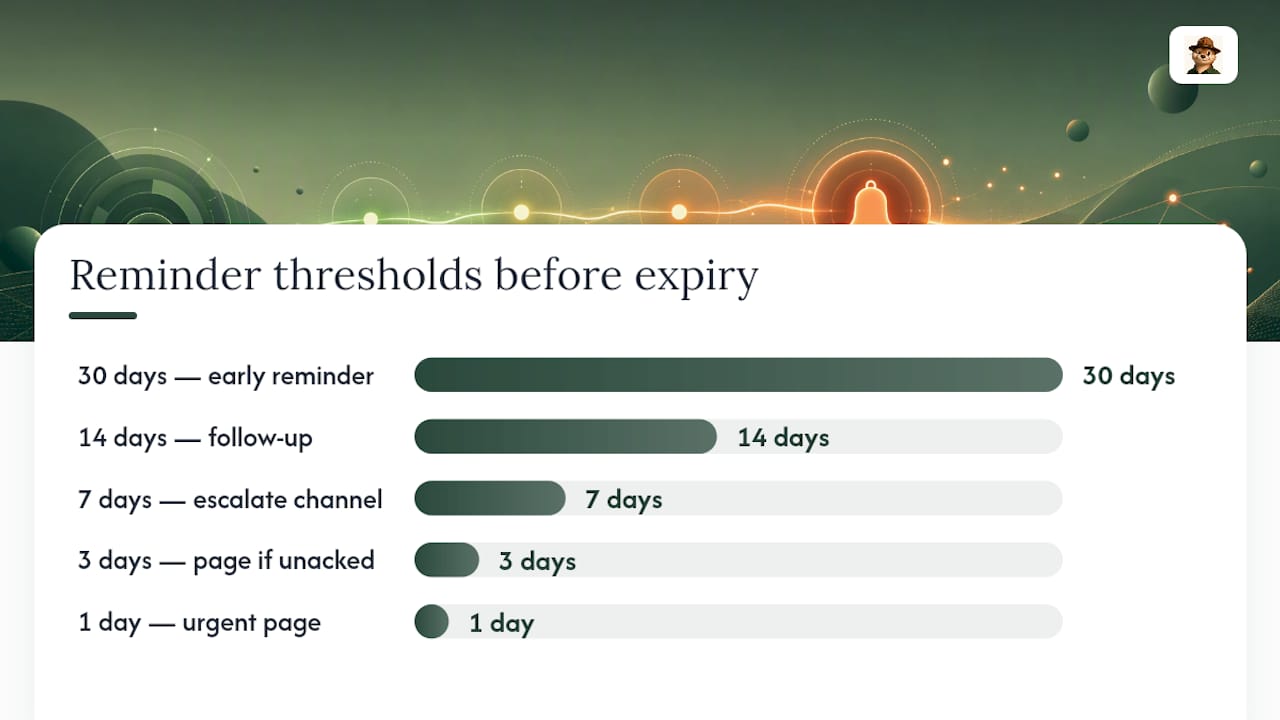
Recipe A: routine expiry reminders. Fire warnings at 30, 14, 7, 3, and 1 days before expiry. A staged, multi-threshold approach like this, similar to the pattern documented by the open-source tool ExpiryGuard, keeps early warnings low-key (email only, no escalation) while the 3 and 1 day marks step up to SMS or Slack and add a single escalation tier if unacknowledged. Nobody needs to be paged over a 30-day warning; somebody absolutely needs to be paged over a 1-day warning that’s still open.
Recipe B: after-hours imminent expiry. Anything inside 48 hours with no successful renewal in progress is a P1, regardless of the hour. Voice call plus SMS to the primary owner, repeat every 5 minutes, escalate to a backup contact after two missed attempts. This is the one scenario where waking someone up is the correct call.
Recipe C: renewal failure or unexpected issuance event. A failed automated renewal, or a certificate transparency log showing an issuance you didn’t request, should page immediately with the relevant renewal runbook attached in the alert itself. Don’t make the responder go dig for the steps at 1 a.m.
Test all three before you trust them. That means:
- Running a dry-run alert through each severity tier to confirm the right person gets the right channel.
- Simulating an unacknowledged P1 to verify the escalation actually fires.
- Checking webhook delivery end-to-end rather than assuming it worked because the request returned a 200.
- Confirming the monitor re-triggers correctly after a renewal, so you don’t get stuck in a stale “still expiring” state.
Grafana’s own guidance on escalation chains recommends testing with non-production alerts specifically because misconfigured escalation steps are invisible until the one night you actually need them.
A Minimum Viable Playbook for Small Teams
You don’t need an incident-management platform to run this well. You need a short checklist you actually follow.
- Assign one owner per domain or certificate group, written down somewhere everyone can see.
- Set two timeout tiers: fast for imminent expiry, slower for routine warnings.
- Pick your channels in advance, voice/SMS for emergencies, email/Slack for everything else, so nobody’s improvising at the worst moment.
- Check your expiry dashboard weekly, even if nothing looks wrong.
- Verify contact info quarterly. Phone numbers and Slack workspaces change more often than teams remember to update escalation configs.
- Confirm webhook delivery is actually landing, not just firing. A handful of practical checks can catch a silently broken integration before it costs you a renewal window.
For the reminder cadence itself, Otterwatch’s guide to setting up 30/14/7/3/1 day email alerts walks through the exact staging from Recipe A above, and its downtime email templates save you from drafting customer-facing language while you’re also trying to fix the actual problem.
Pro Tip: Give expiry alerts their own dedicated channel or inbox rule. Mixing them into a general alerts stream is the single fastest way to end up ignoring the one message that mattered.
Why Fewer, Earlier Alerts Beat Louder, Later Ones
Most escalation advice assumes you’re running a large ops team with dedicated on-call rotations. Small teams don’t have that luxury, and the honest fix isn’t more alerting, it’s earlier, calmer alerting that rarely needs to escalate at all. A certificate flagged at 30 days almost never needs a phone call. One flagged at 48 hours, unacknowledged, absolutely does.
The uncomfortable trade-off is that tighter response targets mean someone occasionally gets woken up. That’s worth it exactly once: when a certificate is genuinely about to fail and nobody has started fixing it. It’s not worth it for a reminder that could have been handled calmly three weeks earlier. The teams that get this backward end up with alert fatigue on one end and midnight outages on the other, which is the worst version of both problems at once.
— Nick Phillips
Otterwatch Handles the Escalation Logic So You Don’t Have To
Building all of this yourself, tiers, timeouts, channel rules, is doable with the recipes above, but it takes real setup time most small teams don’t have. Otterwatch bakes the certificate-first version of this playbook directly into its monitoring: staged expiry warnings, reachability checks running alongside them, and plain-language alerts from Otis instead of a wall of red text that trains you to ignore it.

A free tier may cover multiple sites with expiry logic similar to Recipe A, without requiring a credit card or trial period. If you want to see where your current certificates actually stand before configuring anything, run them through the free SSL certificate checker first. If you’re ready to put a real escalation system behind your domains, the full Otterwatch monitoring platform is the next step, and it’s still boring in exactly the way certificate monitoring should be.
Documentation and Templates Referenced
Escalation mechanics above draw on PagerDuty, Atlassian, Grafana, and Otterwatch’s own alert templates.
Sources
- Escalation policies for effective incident management | Atlassian
- Incident lifecycle and acknowledgement behavior | PagerDuty Support
- Escalation chains | Grafana
- ExpiryGuard — secret expiration tracker (GitHub)
FAQ
What Is an Expiry Alert Escalation?
It’s the automated process of notifying an owner about a certificate nearing expiry, then alerting additional people or channels if nobody acknowledges the first warning within a set timeout.
What’s the Difference Between Acknowledging and Resolving an Alert?
Acknowledging pauses further notifications and signals someone has started working the issue, but only a completed fix or a cleared monitor actually resolves it.
How Long Should an Escalation Timeout Be?
For a P1 imminent expiry or failed renewal, 3 to 5 minutes per tier is a reasonable starting point; routine 14 or 30 day warnings can wait 30 minutes or skip escalation entirely.
Which Channel Should Handle Urgent Expiry Alerts?
Voice calls and SMS are the only channels reliable enough to interrupt someone outside business hours; Slack and email work fine for routine warnings.
Does Otterwatch Support Escalation-Style Expiry Alerts?
Otterwatch sends staged expiry warnings at multiple thresholds through plain-language email alerts, covering the routine reminder side of an escalation policy for up to five sites on its free tier.
Recommended
- Small Teams: 3 Quick Checks for Certificate Issuance Alerts
- SSL Certificate Expiry Alert Types: 2026 Guide
- SSL Expiry Notification Setup: A Practical Guide
Catch the next cert expiry before your users do.
Otterwatch checks your SSL certificates daily and emails you 30 days before they expire. Five sites free.
Start watching →