Why Expired SSL Kills Sales on Your E-Commerce Site
By Nick Phillips, Founder
Why Expired SSL Kills Sales on Your E-Commerce Site
TL;DR:
- An expired SSL certificate causes immediate revenue loss and long-term trust damage that can persist.
- Setting up automated renewal and monitoring tools can prevent these costly outages and restore customer confidence.
An expired SSL certificate is the single fastest way to empty your checkout page. The moment a certificate lapses, browsers like Chrome, Firefox, and Safari throw up a full-screen red warning that tells your customers the site is not secure. Research shows 72% to 90% of customers abandon transactions the instant that warning appears. That is not a bounce rate problem. That is a revenue shutoff. Understanding why expired SSL kills sales means understanding that SSL is fundamentally about trust, and trust evaporates in seconds.
Why expired SSL kills sales the moment a certificate lapses
SSL, which stands for Secure Sockets Layer (now technically TLS, or Transport Layer Security), is the protocol that encrypts data between your site and your customers. When the certificate expires, that encryption handshake fails. The browser cannot verify your site’s identity, so it blocks the connection and warns the visitor.
Here is what actually breaks the moment your certificate expires:
- Browser access. Chrome, Firefox, and Safari display a red “Not Secure” warning with no easy way past it. Most customers never click through.
- Checkout and login flows. HTTPS connections to payment pages and account portals fail immediately, making purchases impossible.
- Payment gateways. Stripe, PayPal, and similar processors require valid SSL on the merchant side. An expired cert breaks the entire payment flow.
- APIs and third-party integrations. Expired certificates disrupt APIs, background jobs, and microservices, causing cascading failures that go far beyond the visible warning page.
- Email deliverability. Domains with expired SSL get flagged by security filters, and enterprise clients may find your outbound email blocked entirely.
Pro Tip: Set a calendar reminder 60 days before your certificate’s expiry date. Most certificate authorities send renewal notices, but those emails get buried. A manual reminder is your backup.
SSL certificates expire by design. Certificate authorities enforce expiration to validate domain ownership and ensure encryption standards stay current. That is a good thing for the web overall. The problem is not expiration itself. The problem is when it catches you off guard.

How much revenue does an expired SSL certificate actually cost?
The financial impact of an expired certificate sales decline is not abstract. Small e-commerce sites lose $500 to $2,000 per day when SSL expires. Mid-sized stores lose $2,000 to $8,000 per day, not counting wasted paid ad spend. That daily loss compounds fast.
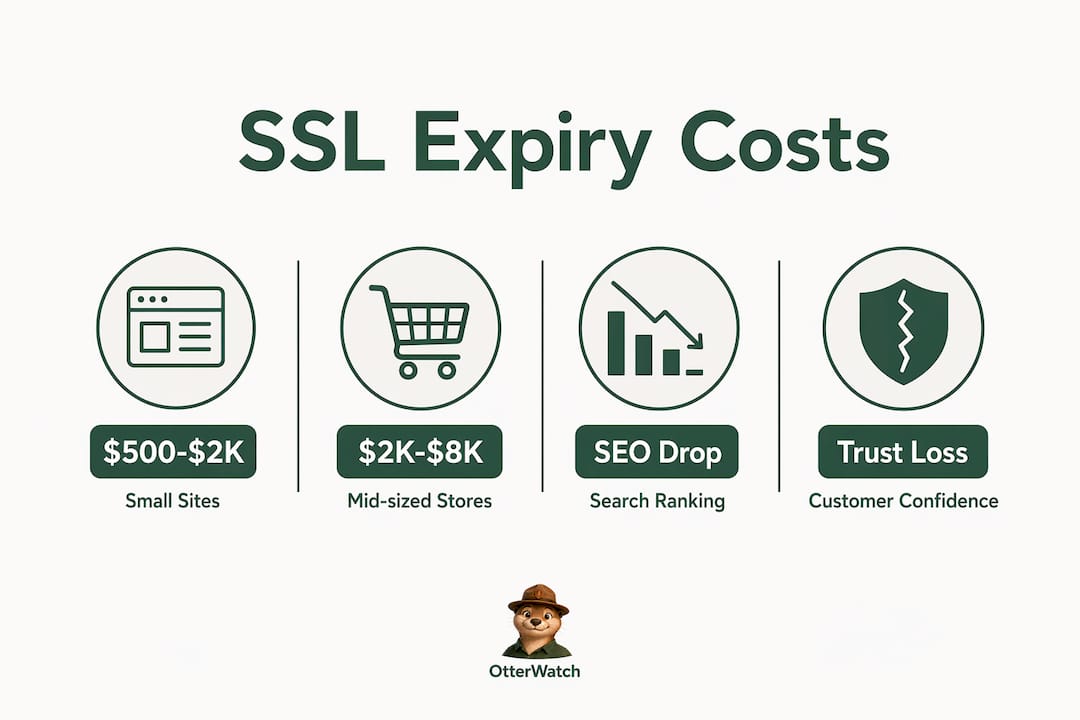
| Business size | Daily revenue loss | Additional impact |
|---|---|---|
| Small site (under $10K/month) | $500 – $2,000 | Wasted ad spend on broken landing pages |
| Mid-sized site ($10K–$100K/month) | $2,000 – $8,000 | Lost repeat customers, SEO ranking drops |
| Large site (over $100K/month) | $8,000 – $11,000+ | Enterprise client disruption, email blocking |
Paid advertising makes the damage worse. If you are running Google Ads or Meta campaigns and your SSL expires mid-flight, every click you pay for lands on a broken, untrusted page. You spend the budget. You get zero conversions. That wasted ad spend is a direct, unrecoverable cost on top of the lost organic revenue.
SEO takes a hit too. Google drops rankings for sites with SSL errors because Googlebot cannot crawl HTTPS pages that throw certificate errors. Sites typically see ranking recovery take one to three weeks after renewal, depending on domain authority. Three weeks of reduced organic traffic is a long tail of lost sales that most owners never fully account for.
The expired SSL effects on sales are not limited to the hours the certificate is actually expired. The damage runs longer than the outage itself.
Does an expired SSL certificate cause long-term trust damage?
The short answer is yes, and the mechanism is psychological. Customers who see a browser security warning do not think “the certificate probably just lapsed.” They think the site has been hacked or their data is at risk. That perception is hard to undo.
“SSL is fundamentally about trust, not just encryption. Customers seeing expired certificate warnings often interpret it as a breach, causing lasting damage even post-renewal.” — SSL Guides
Even after renewal, trust erosion persists. Customers who encountered the warning hesitate to return. A portion of them churn permanently. They found a competitor during the outage, or they simply do not trust the brand anymore. You fixed the technical problem, but the customer’s mental model of your site did not update automatically.
Here is what that long-term damage looks like in practice:
- Repeat purchase rates drop. Customers who saw the warning are less likely to return, even after the issue is resolved.
- Brand credibility takes a hit. Reviews and word-of-mouth reflect security concerns. A single “this site said it wasn’t secure” comment in a review thread can deter future customers.
- B2B relationships suffer. Enterprise buyers and procurement teams flag vendors with SSL issues. Getting removed from an approved vendor list is a slow, painful process to reverse.
- Social proof erodes. Customers who had a bad experience are more likely to leave a negative review than customers who had a smooth one.
The relationship between SSL and website credibility is direct. A padlock in the browser bar is a baseline expectation now, not a differentiator. Losing it, even briefly, signals to customers that you are not paying attention to your own site.
What are the best strategies to prevent expired SSL sales drops?
SSL expiration is fully preventable with the right systems in place. The goal is to never let a certificate get within 30 days of expiry without someone on your team knowing about it.
-
Set up automated renewal where possible. Let’s Encrypt certificates renew automatically via ACME clients like Certbot. If you are on a managed host like WP Engine or Kinsta, check whether auto-renewal is enabled by default. Do not assume it is.
-
Use a dedicated SSL monitoring tool. Certificate management tools track expiry dates across all your domains and send alerts well before the deadline. Otterwatch, for example, monitors your SSL certificates and sends a plain, friendly heads-up before anything goes wrong, with no dashboards to dig through.
-
Integrate SSL checks into your CI/CD pipeline. If your team deploys regularly, add a certificate expiry check as part of your deployment validation. A failed cert check should block a release the same way a failed unit test does.
-
Monitor all subdomains, not just the root domain. A wildcard certificate covers subdomains, but not always every one. Your checkout subdomain (checkout.yourdomain.com) or API endpoint may run on a separate cert. Check them all. The SSL expiration consequences for a broken checkout subdomain are identical to a broken root domain.
-
Keep a certificate inventory. List every domain and subdomain you own, the certificate authority for each, and the expiry date. Review it monthly. This sounds basic, but most teams do not have one.
Pro Tip: Renew certificates at 60 days out, not 30. Certificate authorities allow early renewal without changing the expiry timeline, so you lose nothing by acting early and gain a comfortable buffer.
How SSL affects conversions is not just about the certificate being valid. It is about the entire trust signal chain working correctly. A valid cert, a proper redirect from HTTP to HTTPS, and a clean cert chain all need to be in place for browsers to show the padlock without warnings.
Key Takeaways
An expired SSL certificate causes immediate, measurable revenue loss and long-term trust damage that persists well after the certificate is renewed.
| Point | Details |
|---|---|
| Immediate revenue loss | Small sites lose $500–$2,000 per day; mid-sized stores lose up to $8,000 per day. |
| Bounce rates spike sharply | Browser warnings cause 72%–90% of customers to abandon transactions immediately. |
| SEO rankings drop | Google cannot crawl SSL-broken pages; ranking recovery takes one to three weeks post-renewal. |
| Trust damage outlasts the outage | Customers associate security warnings with breaches and are slow to return even after renewal. |
| Prevention is straightforward | Automated monitoring and early renewal eliminate the risk entirely with minimal ongoing effort. |
The part most e-commerce owners miss until it’s too late
I have talked with a lot of site owners after an SSL expiry event, and the story is almost always the same. The certificate expired on a Tuesday night. Nobody noticed until Wednesday afternoon when a customer emailed to say the site looked broken. By then, twelve to eighteen hours of traffic had bounced, paid campaigns had burned through budget on a broken page, and the team was scrambling to renew under pressure.
The frustrating part is that the renewal itself takes about ten minutes. The damage takes weeks to recover from. That asymmetry is what makes SSL expiration such a costly mistake relative to how simple it is to prevent.
The other thing that trips people up is assuming their hosting provider handles it. Some do. Many do not, or they handle it inconsistently across plans. I have seen sites on major managed WordPress hosts expire because auto-renewal was enabled on the primary domain but not on a staging subdomain that shared the same checkout flow. The assumption that someone else is watching is exactly how these events happen.
The business case for monitoring is not complicated. You spend a few minutes setting up alerts, and you never have to think about it again. The alternative is a Tuesday night expiry that costs you thousands of dollars and a week of SEO recovery. That is not a close call.
— Nick Phillips
Otterwatch keeps your SSL from becoming a sales problem
SSL monitoring does not need to be complicated or expensive. Otterwatch watches your certificates and sends you a calm, plain-language heads-up before anything expires, so you can renew on your schedule instead of in a panic.

You can check your SSL certificate for free right now and see exactly when it expires and whether anything looks off. Otterwatch monitors up to five sites at no cost, covering both SSL expiry and uptime in one quiet, unobtrusive service. No dashboards, no red alerts, no noise. Just Otis the otter sending you a friendly note before your certificate becomes a problem. If you want a broader look at what the service covers, the Otterwatch homepage walks through everything.
FAQ
What happens to my site the moment SSL expires?
Browsers immediately display a full-screen security warning blocking access to your site. Checkout flows, login pages, and payment gateways stop working at the same time.
How much revenue can an expired SSL certificate cost per day?
Small e-commerce sites typically lose $500 to $2,000 per day. Mid-sized stores can lose $2,000 to $8,000 per day, not including wasted paid ad spend on broken landing pages.
Does Google penalize sites with expired SSL certificates?
Yes. Google cannot crawl HTTPS pages that throw certificate errors, which causes ranking drops. Recovery typically takes one to three weeks after the certificate is renewed.
Will customers come back after I fix an expired SSL certificate?
Some will not. Customers who saw the security warning often associate it with a hack or data breach. A portion will churn permanently even after the certificate is renewed and the site is fully functional again.
How do I prevent my SSL certificate from expiring?
Set up automated renewal through your certificate authority or hosting provider, and use an SSL monitoring tool like Otterwatch to receive alerts at least 30 to 60 days before expiry. Maintain a certificate inventory covering all subdomains, not just your root domain.
Recommended
- SSL Expiration Consequences Explained for Site Managers · Otterwatch
- Why SSL Affects Website Credibility: A Clear Guide · Otterwatch
- What actually happens when your SSL certificate expires · Otterwatch
- E-Commerce SSL Requirements Explained for 2026 · Otterwatch
Catch the next cert expiry before your users do.
Otterwatch checks your SSL certificates daily and emails you 30 days before they expire. Five sites free.
Start watching →