What Is a Free SSL Certificate? A Clear Guide
By Nick Phillips, Founder
What Is a Free SSL Certificate? A Clear Guide
TL;DR:
- Free SSL certificates provide the same encryption strength as paid ones and are widely issued at no cost. They use ACME protocols for automated issuance and renewal, but shorter lifetimes require reliable automation and active monitoring. They are ideal for personal projects and small sites, while paid certificates offer additional validation, support, and warranties for enterprise needs.
A free SSL certificate is a publicly trusted TLS certificate issued at zero cost that secures HTTPS communication between a browser and your web server. Let’s Encrypt, a nonprofit certificate authority, now issues certificates to over 700 million websites and has made free SSL the default expectation for any site on the web. Cloudflare Universal SSL and ZeroSSL follow the same model: verify that you control the domain, then issue a trusted certificate automatically. If your site still runs on plain HTTP, browsers flag it as “Not Secure,” and that warning costs you visitor trust before a single word is read.

What is a free SSL certificate and how does it work?
A free SSL certificate is a Domain Validated (DV) TLS certificate that a certificate authority (CA) issues after confirming you control the domain. No payment changes hands. The CA checks domain ownership, signs the certificate, and your server presents it during the TLS handshake so browsers show the padlock.
The process runs on the ACME protocol. ACME v2 is the current standard, and it handles the full certificate lifecycle through two challenge types:
- HTTP-01 challenge: Your ACME client places a token at a specific URL on your domain. The CA fetches it to confirm you control the server.
- DNS-01 challenge: Your client adds a TXT record to your domain’s DNS. The CA queries it. This method works for wildcard certificates and servers not exposed to the public internet.
Once the challenge passes, the CA issues the certificate and your ACME client installs it automatically. The same client handles renewal on a schedule, so you never touch it manually if everything is configured correctly.
How to get a free SSL certificate: step by step
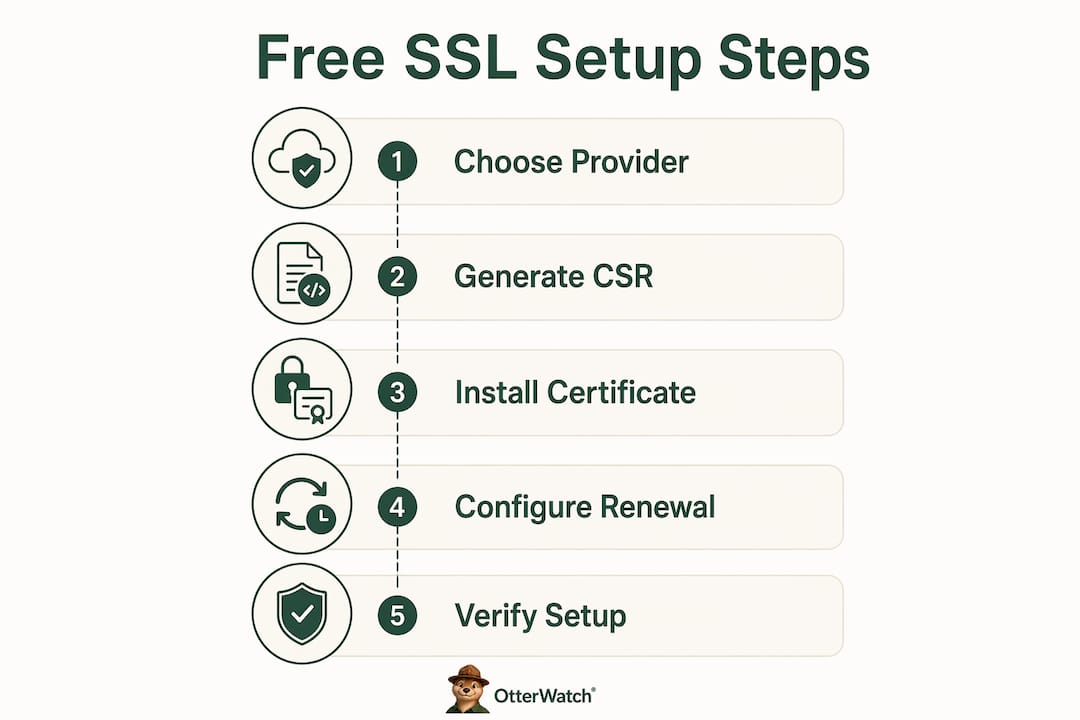
- Choose a provider. Let’s Encrypt, Cloudflare Universal SSL, and ZeroSSL are the three most widely used free SSL providers. Let’s Encrypt and ZeroSSL use ACME clients like Certbot or acme.sh. Cloudflare Universal SSL activates automatically when you proxy your domain through Cloudflare.
- Install an ACME client. Certbot is the most common choice for Apache and Nginx servers. acme.sh is a lightweight shell script that works on almost any Linux environment.
- Run the issuance command. For Certbot on Nginx, that is
certbot --nginx -d yourdomain.com. The client handles the HTTP challenge, fetches the certificate, and configures your server. - Verify HTTPS is working. Load your site over
https://and confirm the padlock appears. You can also run a quick check with Otterwatch’s free SSL checker to see the certificate details and expiration date. - Confirm auto-renewal is scheduled. Certbot installs a systemd timer or cron job automatically. Check it with
systemctl list-timers | grep certbot.
Pro Tip: Run certbot renew --dry-run after setup to confirm your renewal configuration works before the certificate actually needs renewing. It takes 30 seconds and saves a lot of headaches later.
Free SSL vs. paid SSL: what actually differs?
The encryption is identical. Free DV certificates and paid certificates use the same cryptographic strength. The difference is in what the CA verifies before issuing, and what extras come with the certificate.
Validation depth is the real distinction. DV certificates confirm domain control only. Organization Validated (OV) certificates require the CA to verify your legal business identity. Extended Validation (EV) certificates go further, checking business registration, physical address, and operational status. For a personal blog or a developer staging environment, DV is perfectly sufficient. For a bank or a large e-commerce checkout, EV or OV adds a layer of verified identity that some customers and compliance teams expect.
Here is how the main certificate types compare:
| Feature | Free DV (Let’s Encrypt) | Paid OV | Paid EV |
|---|---|---|---|
| Encryption strength | Same | Same | Same |
| Validation level | Domain only | Domain + organization | Domain + full business |
| Certificate lifetime | 90 days (45 days from 2028) | 1–2 years | 1–2 years |
| Automation support | Full ACME automation | Partial | Partial |
| Warranty | None | Varies | High (up to $1M+) |
| Cost | Free | $50–$300/year | $150–$1,000+/year |
| Browser trust | Full | Full | Full |
A few things worth calling out from that table:
- The warranty on paid certificates covers financial losses from a CA mis-issuance. For most sites, this is theoretical. For financial services, it matters.
- EV certificates no longer display the green company name bar in Chrome or Firefox. That visual indicator was removed years ago, so the trust signal is subtler than it used to be.
- Paid certificates often come with dedicated support. If your cert chain breaks at 2 a.m. before a product launch, having a phone number to call has real value.
For a deeper look at certificate types explained, the differences between DV, OV, and EV are worth understanding before you commit to a certificate type.
Managing free SSL certificates: the challenges that trip people up
Short certificate lifetimes are the biggest operational challenge with free SSL. Let’s Encrypt certificates currently have a 90-day validity period. That drops to 64 days in 2027 and 45 days in 2028. More frequent renewals mean more opportunities for something to go wrong.
The most common failure mode is a renewal script configured to run every 60 days. That works fine with 90-day certificates. When lifetimes drop to 45 days, renewing every 60 days will fail because the certificate expires before the next renewal attempt. The fix is to renew at roughly two-thirds of the certificate’s lifetime, not at a fixed calendar interval.
Other issues that catch developers off guard:
- DNS propagation delays can cause DNS-01 challenges to fail if your ACME client does not wait long enough after adding the TXT record.
- Cloudflare Universal SSL covers root domains and first-level subdomains automatically, but deeper subdomains or custom origin certificates require separate configuration. Cloudflare’s edge certificates terminate TLS at the edge, not at your origin server. Your origin may still be serving plain HTTP behind the scenes.
- Firewall rules blocking port 80 will break HTTP-01 challenges even if your site runs on port 443. The ACME client needs port 80 open briefly during validation.
- Wildcard certificates require DNS-01 challenges and a DNS provider with an API that your ACME client can call automatically. Manual DNS updates do not scale.
Pro Tip: Do not rely solely on your hosting panel to tell you when a certificate is expiring. Set up independent SSL expiration monitoring so you get a heads-up days before the cert goes stale, not after your site starts throwing security errors.
The shift toward shorter certificate lifetimes is a deliberate security improvement. Shorter lifetimes reduce the window of exposure if a private key is compromised. The tradeoff is that your automation needs to be solid. A certificate that expires silently takes your site offline for visitors and tanks your search rankings until it is fixed.
Free SSL certificate benefits and limitations
Free SSL certificates remove the cost barrier that once kept smaller sites on plain HTTP. Let’s Encrypt and Cloudflare together support hundreds of millions of certificates, and that scale has pushed HTTPS from a nice-to-have to the baseline expectation for any public website.
The core advantages of free SSL:
- Zero cost, with no annual renewal fees
- Full browser trust across Chrome, Firefox, Safari, and Edge
- ACME automation handles issuance and renewal without manual work
- Immediate improvement to your site’s security posture
- Google treats HTTPS as a ranking signal, so free SSL has an SEO benefit
Where free SSL falls short:
- DV-only validation means no verified organizational identity
- Short lifetimes (heading toward 45 days) require reliable automation
- No warranty coverage if a CA error causes financial damage
- Limited or no direct support from the CA
- Some enterprise compliance frameworks require OV or EV certificates
Free SSL is the right call for personal projects, developer tools, startup landing pages, blogs, and any site where the primary goal is encrypted communication rather than verified business identity. The advantages of free SSL are hard to argue with for those use cases.
Paid certificates make sense when your users expect verified organizational identity, when your compliance requirements specify OV or EV, or when you need a CA-backed warranty. E-commerce platforms handling high transaction volumes and financial services sites often fall into this category.
The honest summary: free SSL certificates deliver the same encryption as paid ones. The gap is in validation depth, support, and operational overhead from shorter lifetimes. Know which side of that line your project sits on, and choose accordingly.
Key takeaways
Free SSL certificates deliver full HTTPS encryption at zero cost, with the same cryptographic strength as paid certificates, but require reliable ACME automation to handle increasingly short certificate lifetimes.
| Point | Details |
|---|---|
| Same encryption, different validation | Free DV certs encrypt as well as paid OV or EV certs; the difference is identity verification depth. |
| ACME automates the hard parts | Tools like Certbot and acme.sh handle issuance and renewal automatically when configured correctly. |
| Lifetimes are shrinking | Let’s Encrypt certificates drop to 45 days by 2028; renew at two-thirds of the cert lifetime, not on a fixed schedule. |
| Cloudflare SSL has nuances | Universal SSL covers edge termination; your origin server may need separate certificate management. |
| Monitor actively | Short lifetimes mean more renewal cycles and more chances for silent failures that take your site offline. |
Free SSL is the right default. Automation is the hard part.
I have watched the free SSL story unfold over the past decade, and the maturation has been genuinely impressive. Let’s Encrypt launched in 2016 and was treated with skepticism by a lot of hosting providers and security teams. Today, it is the backbone of HTTPS for a significant portion of the internet. That shift happened because the automation model works.
What I have noticed, though, is that the operational discipline required has quietly increased. When certificates lasted a year, a misconfigured renewal script might go unnoticed for months. With 90-day certificates, you find out within weeks. With 45-day certificates coming in 2028, you will find out fast. That is actually a feature, not a bug. It forces you to get your automation right rather than letting it drift.
The thing that catches developers off guard most often is the assumption that “set it and forget it” is truly set and forget. Certbot installs a renewal timer, yes. But that timer can fail silently if your server configuration changes, if a firewall rule shifts, or if your DNS provider’s API key expires. I have seen production sites go down because a renewal cron job was running as a user that no longer had write access to the certificate directory.
My recommendation: treat free SSL as the default for any new site, but treat monitoring as non-negotiable. The certificate itself is free. The downtime from a missed renewal is not.
— Nick Phillips
Otterwatch keeps an eye on your SSL so you do not have to
SSL monitoring is the part most developers skip until something breaks. Otterwatch watches your certificates around the clock and sends you a plain, friendly heads-up well before expiration, without the wall of red alerts that most monitoring tools default to.

Otis, Otterwatch’s park ranger otter, keeps things calm. You get a clear warning with enough lead time to renew without rushing. Otterwatch also checks that your sites are up at the same time, so you get two layers of coverage from one tool. Start with the free SSL certificate checker to see your current certificate status in seconds, then set up ongoing monitoring at Otterwatch for up to five sites at no cost.
FAQ
What does a free SSL certificate actually do?
A free SSL certificate encrypts the connection between your visitor’s browser and your web server, enabling HTTPS. It also proves that your server is the legitimate owner of the domain, which browsers verify during the TLS handshake.
Do I need an SSL certificate for my website?
Yes. Browsers mark any site without HTTPS as “Not Secure,” which reduces visitor trust and can hurt search rankings. Free SSL certificates from Let’s Encrypt or Cloudflare Universal SSL remove this problem at no cost.
How long does a free SSL certificate last?
Let’s Encrypt certificates currently last 90 days. That validity period will shorten to 64 days in 2027 and 45 days in 2028. ACME clients like Certbot handle renewal automatically when configured correctly.
Is a free SSL certificate as secure as a paid one?
The encryption strength is identical. Free DV certificates and paid OV or EV certificates use the same cryptographic algorithms. Paid certificates add organizational identity verification and warranty coverage, but not stronger encryption.
What are the best free SSL providers?
Let’s Encrypt, Cloudflare Universal SSL, and ZeroSSL are the three most widely used free SSL providers. Let’s Encrypt and ZeroSSL use ACME clients for automation. Cloudflare Universal SSL activates automatically when you proxy your domain through Cloudflare’s network.
Recommended
- What Is an SSL Certificate? A Small Business Guide · Otterwatch
- SSL Certificate Types Explained for Website Owners · Otterwatch
- Blog · Otterwatch
- SSL Certificate Renewal Explained: 2026 Guide · Otterwatch
Catch the next cert expiry before your users do.
Otterwatch checks your SSL certificates daily and emails you 30 days before they expire. Five sites free.
Start watching →