Fix Expired SSL Certificates Quickly: A Practical Guide
By Nick Phillips, Founder
Fix Expired SSL Certificates Quickly: A Practical Guide
TL;DR:
- An expired SSL certificate causes browsers to block access and breaks HTTPS security. Rapid renewal involves confirming expiration, validating domain ownership, and installing the new certificate across all deployment locations. Monitoring and automation prevent future outages, with quick renewal possible especially for Domain Validation certificates.
An expired SSL certificate is defined as a TLS credential that has passed its validity period, causing browsers to block visitors with security warnings and breaking HTTPS entirely. Fixing an expired SSL certificate quickly means working through four steps: confirm the expiration, generate a new Certificate Signing Request (CSR) if needed, complete domain validation with your Certificate Authority (CA), and install the renewed certificate. HSTS policies with long max-age values lock users out completely until the fix is live, so speed matters more than most site owners realize. The good news is that Domain Validation (DV) certificates can be renewed in under a minute with automation, while Organization Validation (OV) and Extended Validation (EV) certificates take 1–5 business days due to manual checks. Knowing your cert type before you start saves you from a nasty surprise mid-process.
How do I confirm an SSL certificate has expired?
The first step is to verify the expiration before touching anything else. Misdiagnosing the problem wastes time and can introduce new errors.

The fastest command-line check uses OpenSSL:
openssl s_client -connect yourdomain.com:443 -servername yourdomain.com </dev/null 2>/dev/null | openssl x509 -noout -dates
That prints notBefore and notAfter dates directly. If notAfter is in the past, the cert is expired. If the connection itself fails, you may have a chain break or a hostname mismatch rather than a simple expiration.
SSL check tools like online SSL checkers evaluate expiration, chain status, and hostname validity without requiring server access. You can also use Otterwatch’s free SSL checker to get a quick read on expiration date, issuer, and Subject Alternative Names (SANs) in seconds.
Before you move to renewal, note down these details from the current certificate:
- Common Name (CN) and all SANs covered
- Issuer (which CA signed it)
- Expiration date (to confirm the problem)
- Certificate type: DV, OV, or EV
- Private key location on your server (you will need it for installation)
Pro Tip: Run openssl x509 -noout -text -in your_cert.pem | grep -A2 "Subject Alternative Name" to quickly eyeball all SANs. Missing a SAN on the renewal is one of the most common mistakes that trips people up.
Also check whether the cert is deployed in multiple locations: load balancers, CDN edge nodes, or reverse proxies like Nginx and Apache. A cert renewed on one server but not the others still shows errors to some visitors.
What prerequisites do you need for a quick SSL renewal?
Preparation cuts renewal time in half. Going in without the right pieces means stopping mid-process to hunt for files.
Know your certificate type
DV certificates renew in under 1 minute via automation because no human verification is required. OV and EV certificates require the CA to verify your organization, which takes 1–5 business days. If you are running an EV cert on a site that is down right now, consider temporarily deploying a DV cert to restore HTTPS while the EV renewal processes.
Gather your files and access
| Item | Why you need it |
|---|---|
| Existing private key (.key file) | Required to match the new certificate during installation |
| Access to DNS, web root, or email | Needed to complete domain validation |
| CA account credentials | Required to submit the CSR and download the new cert |
| Server or hosting panel access | Required to install the certificate and reload services |
Generate a new CSR
You can reuse an existing private key or generate a fresh one. Generating a new key is the safer practice. Use this OpenSSL command:
openssl req -new -newkey rsa:2048 -nodes -keyout yourdomain.key -out yourdomain.csr
Fill in the Common Name field with your exact domain. For wildcard coverage, use *.yourdomain.com. For multi-domain certs, list all SANs in the CSR config.
- Choose your validation method based on cert type:
- DNS validation: Add a TXT record to your DNS zone. Works for wildcard and multi-domain certs.
- HTTP file validation: Upload a verification file to
/.well-known/acme-challenge/. Fast but requires web server access. - Email validation: CA sends a confirmation email to admin@, webmaster@, or WHOIS contacts. Slowest option.
Certbot automates Let’s Encrypt renewals using cron or systemd timers that run twice daily, renewing only certificates within 30 days of expiry. If you are not already using Certbot for DV certs, this is the fastest path to zero-effort renewals going forward.
What is the step-by-step process to renew and install an SSL certificate?
This is the core sequence. Follow it in order and you avoid the most common installation errors.
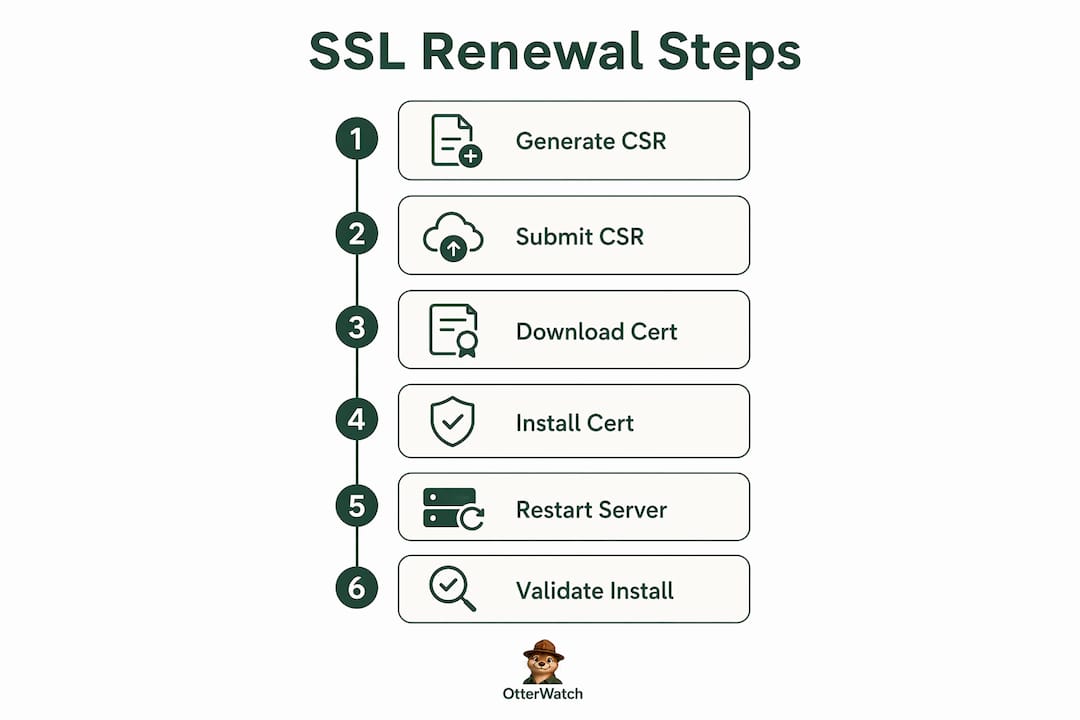
Step 1: Generate or retrieve your CSR. If you ran the OpenSSL command above, you have a fresh .csr file ready. If your hosting panel (cPanel, Plesk) has a built-in CSR generator, use that. The CSR encodes your domain details and public key for the CA.
Step 2: Submit the CSR to your CA and complete domain validation. Log into your CA account (Let’s Encrypt via Certbot, DigiCert, Sectigo, or your hosting provider’s managed SSL). Paste the CSR, select your validation method, and complete the challenge. DNS validation is the most reliable for avoiding HTTP file path issues.
Step 3: Download the new certificate and verify the full chain. Your CA provides a certificate file and one or more intermediate certificates. Renewal requires CSR, validation, installation, and a service restart. Download all files and confirm the chain is complete before uploading anything to your server.
Step 4: Install the certificate on your web server, load balancer, or CDN. For Nginx, update the ssl_certificate and ssl_certificate_key directives. For Apache, update SSLCertificateFile, SSLCertificateKeyFile, and SSLCertificateChainFile. For a CDN like Cloudflare, upload via the SSL/TLS dashboard.
Step 5: Restart or reload the service. For Nginx: sudo nginx -t && sudo systemctl reload nginx. For Apache: sudo apachectl configtest && sudo systemctl reload apache2. The config test step catches syntax errors before they take the site down.
Step 6: Validate the installation. Run the OpenSSL check again or use Otterwatch’s SSL certificate checker to confirm the new expiry date, chain completeness, and hostname match.
Pro Tip: If your site uses SNI (Server Name Indication) to serve multiple domains from one IP, test each domain separately after installation. A cert that validates on the primary domain may still fail on secondary domains if the SNI configuration is off.
What common challenges arise when fixing SSL certificate errors?
Even with the right steps, a few things trip people up consistently.
- Broken certificate chains: Incomplete chain installations cause connectivity failures for some clients, particularly older Android devices. Always install the intermediate certificate alongside the server certificate. Concatenate them in the correct order: server cert first, then intermediates.
- Private key mismatches: If the installed certificate does not match the private key on the server, the TLS handshake fails immediately. Verify with:
openssl x509 -noout -modulus -in cert.pem | md5sumandopenssl rsa -noout -modulus -in key.pem | md5sum. Both hashes must match. - Service reload failures: A reload that silently fails leaves the old expired cert in memory. Always check
systemctl status nginxorsystemctl status apache2after reloading to confirm the new cert loaded. - Multiple deployment locations missed: A cert renewed on the origin server but not on the CDN or load balancer still shows errors. Maintain a written inventory of every location where the cert is deployed.
If automated renewal fails and you have no standby certificate, pre-issued standby certificates with overlapping SANs can be deployed in emergencies, restoring SSL within minutes. Keep one ready in your incident toolkit.
For internal services where a public CA is not practical, a self-signed certificate stops the hard failure while you sort out the proper renewal. Browsers will still warn, but internal tools and APIs can often be configured to trust self-signed certs temporarily.
How can you prevent future SSL certificate expiration emergencies?
The best fix is the one you never have to make in a hurry. Managed SSL services automate provisioning, monitoring, and renewal without manual cron jobs, eliminating the most common cause of expiration incidents.
| Approach | Best for | Renewal effort |
|---|---|---|
| Certbot with systemd timer | DV certs on self-managed servers | Near zero |
| Managed SSL via hosting panel | Shared hosting, small sites | Zero |
| Enterprise certificate management platform | Large fleets, OV/EV certs | Low with setup |
| Manual renewal with calendar reminders | Legacy or air-gapped systems | High |
Continuous monitoring with sensible alert thresholds converts SSL expiration from a crisis into routine maintenance. Set alerts at 30 days, 14 days, and 7 days before expiry. That gives you three chances to act before anything breaks.
HSTS deserves special attention. A long max-age value in your HSTS header means browsers will refuse to connect over HTTP for the entire duration after the cert expires. That is a good security posture when your cert is valid. When it is not, it amplifies the outage. Pair HSTS with reliable monitoring so you never find yourself in that position.
Pro Tip: Integrate SSL monitoring into your CI/CD pipeline so certificate expiry checks run alongside every deployment. Catching a cert that is about to expire during a deploy is far better than catching it at 2 a.m. on a Saturday.
Key Takeaways
Fixing an expired SSL certificate quickly requires confirming expiration first, then working through CSR generation, domain validation, installation, and service reload in a tested sequence.
| Point | Details |
|---|---|
| Confirm before you act | Use OpenSSL or an online checker to verify expiration and distinguish it from chain or hostname errors. |
| Know your cert type | DV certs renew in under a minute via automation; OV and EV certs take 1–5 business days. |
| Install the full chain | Always include intermediate certificates to avoid partial client failures after renewal. |
| Validate every deployment location | Check load balancers, CDN nodes, and reverse proxies, not just the origin server. |
| Automate to prevent recurrence | Certbot with systemd timers or a managed SSL service eliminates manual renewal entirely. |
The mistake I see most often with expired SSL certs
The single biggest delay I see is people skipping the diagnosis step and going straight to renewal. They generate a new CSR, complete validation, install the cert, and then discover the error is still there because the problem was a broken chain or a missed CDN deployment, not the expiration itself. Five minutes of proper diagnosis with OpenSSL saves an hour of confused troubleshooting.
The second mistake is treating automation as a set-and-forget solution without any monitoring behind it. Certbot is reliable, but cron jobs get disabled during server migrations. Systemd timers get overlooked after an OS upgrade. I have seen sites expire on servers where Certbot was installed and everyone assumed it was running. Automation without monitoring is just a slower way to get surprised.
The third thing I would push back on is the instinct to always go for EV certificates on every public-facing domain. EV certs take days to renew manually. If your site goes down on a Friday afternoon, you are looking at a weekend outage. For most sites, a DV cert renewed automatically is the right call. Reserve OV or EV for domains where the extended validation genuinely matters to your users.
The practical wisdom here is simple: document your cert inventory, automate what you can, and monitor everything else. The sites that never have SSL emergencies are not the ones with the most sophisticated setups. They are the ones where someone took an hour to set up alerts and write down where every cert lives.
— Nick Phillips
Otterwatch keeps SSL expiry off your incident list
SSL certificate expiry is one of those problems that feels sudden but is never actually a surprise. The expiry date is right there in the certificate. The only reason it catches people off guard is that nobody was watching.

Otterwatch watches your SSL certificates and sends you a plain, friendly heads up well before anything expires. No dashboards to configure, no walls of alerts to sort through. Otis, Otterwatch’s park ranger otter, checks your certs around the clock and notifies you at the right time, not after the damage is done. You can check any certificate’s status right now for free, and monitor up to five sites at no cost to start. The next expiry emergency is the one you prevent before it starts.
FAQ
How long does it take to fix an expired SSL certificate?
A DV certificate can be renewed and installed in under 10 minutes with the right preparation. OV and EV certificates require 1–5 business days for CA verification.
What causes an SSL certificate to expire?
SSL certificates have a fixed validity period set by the CA at issuance. Browsers and operating systems enforce this limit to ensure cryptographic standards stay current.
Can I renew an SSL certificate before it expires?
Yes, and you should. Most CAs allow renewal up to 90 days before expiry, and the new certificate’s validity period starts from the original expiry date, not the renewal date.
What is the difference between an expired cert and a broken cert chain?
An expired certificate has passed its notAfter date. A broken chain means one or more intermediate certificates are missing from the installation. Both cause browser errors but require different fixes.
Does HSTS make an expired SSL certificate worse?
Yes. HSTS with a long max-age prevents browsers from bypassing the security warning, meaning users cannot access the site at all until the certificate is renewed and installed correctly.
Recommended
- How to Avoid SSL Expiration Warnings: 2026 Guide · Otterwatch
- Blog · Otterwatch
- SSL Expiration Consequences Explained for Site Managers · Otterwatch
- SSL Expiry Notification Setup: A Practical Guide · Otterwatch
Catch the next cert expiry before your users do.
Otterwatch checks your SSL certificates daily and emails you 30 days before they expire. Five sites free.
Start watching →