Why SSL Matters for Trust on Your Website
By Nick Phillips, Founder
Why SSL Matters for Trust on Your Website
TL;DR:
- SSL certificates secure data transit and verify website authenticity, building user trust through browser indicators like the padlock.
- Choosing the appropriate validation level—DV, OV, or EV—significantly influences the perceived credibility and trustworthiness of your site.
An SSL certificate is a digital authentication and encryption technology that secures the connection between a user’s browser and your web server, and why SSL matters for trust is straightforward: without it, browsers flag your site as “Not Secure” and visitors leave. The term “SSL” (Secure Sockets Layer) is now technically outdated. Modern web encryption runs on TLS 1.2 and TLS 1.3 exclusively; SSL 2.0 and 3.0 were deprecated years ago. The industry still uses “SSL certificate” as shorthand, so you’ll see both terms throughout this article. What matters practically is that your site runs HTTPS, your certificate is valid, and your visitors see the padlock.
Why SSL matters for trust: the core mechanics
SSL certificates do two distinct jobs. First, they encrypt data in transit so that anything a user types, credit card numbers, passwords, form submissions, cannot be read if intercepted. Second, they authenticate your server’s identity through a chain of trust that starts at a root Certificate Authority (CA), passes through intermediate CAs, and ends at the certificate installed on your site. That chain of trust is what tells a browser it can trust your server is who it claims to be.

The visible result of that process is the padlock icon and the HTTPS prefix in the browser address bar. Consumers rely on these visual indicators to judge website credibility before they interact or buy. That judgment happens in seconds, often before a visitor reads a single word of your content.
When a valid certificate is missing, the consequences are immediate and concrete:
- Chrome, Firefox, and Safari display a full-page “Not Secure” or “Your connection is not private” warning that most users do not click past.
- Missing SSL directly reduces trial registrations, signups, and e-commerce sales.
- Google has used HTTPS as a search ranking signal since 2014, so sites without valid SSL lose organic traffic to competitors who have it.
- Self-signed certificates trigger the same browser warnings as no certificate at all. If you want to understand exactly what that warning screen means, the Otterwatch explainer on browser security warnings walks through it clearly.
Pro Tip: After installing or renewing your certificate, open your site in an incognito window and check the padlock manually. Browsers cache old states, and a fresh session shows you exactly what a new visitor sees.
What are the different SSL certificate types?
Not all SSL certificates carry the same weight. The three main validation levels are Domain Validated (DV), Organization Validated (OV), and Extended Validation (EV), and choosing the right one affects how much trust you signal to customers.
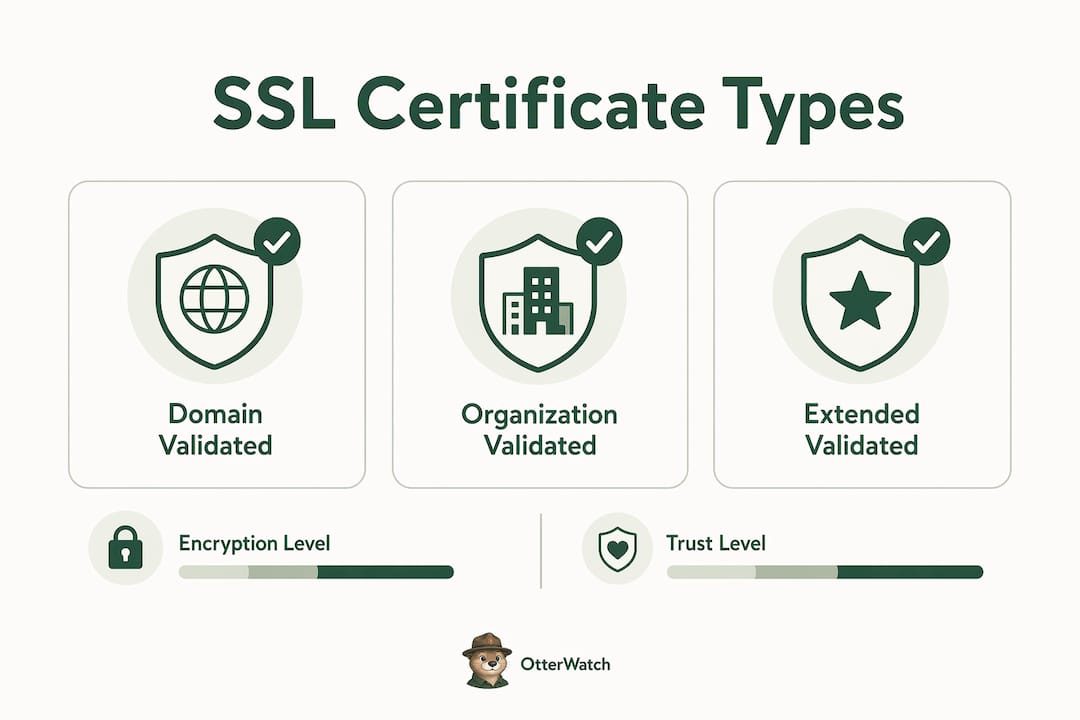
DV certificates confirm only that the applicant controls the domain. Let’s Encrypt issues DV certificates automatically and for free. The encryption strength is identical to paid certificates. RSA 2048+ and ECDSA P-256 algorithms used in free or paid certs offer the same cryptographic security. What DV certificates do not do is verify anything about the organization behind the domain.
OV and EV certificates go further. They require a CA to verify the company’s legal identity, physical address, and operational status. OV and EV certificates provide stronger validation and convey higher levels of trust than basic DV certs, especially in B2B contexts where buyers scrutinize vendor credibility. Business-focused OV certificates significantly boost online reputation and professional credibility for companies prioritizing strong customer trust.
Here is a direct comparison of the three types:
| Certificate type | Validation level | Best for | Approximate cost |
|---|---|---|---|
| DV (Domain Validated) | Domain control only | Blogs, personal sites, small apps | Free (Let’s Encrypt) to ~$10/yr |
| OV (Organization Validated) | Company identity verified | Business websites, SaaS products | ~$50–$200/yr |
| EV (Extended Validation) | Full legal entity verification | E-commerce, financial services, B2B | ~$100–$400/yr |
A few notes that trip people up when choosing:
- Wildcard certificates cover a domain and all its subdomains (e.g.,
*.yourdomain.com), which saves you from managing separate certs forapp.,mail., andshop.. - Multi-domain (SAN) certificates cover multiple distinct domains under one cert, useful if you run several properties.
- For a deeper breakdown of each type and what they actually protect, the Otterwatch guide on SSL certificate types is worth reading before you buy.
How does SSL support fraud prevention and compliance?
SSL certificates prevent impersonation by binding a domain name to a verified server. Without that binding, an attacker can set up a lookalike site at a similar domain, serve it over HTTPS with a free DV cert, and fool visitors into thinking they are on your site. The certificate itself does not stop phishing, but OV and EV certificates make impersonation harder because they require verified company identity that a fraudster cannot easily fake.
Beyond fraud prevention, SSL is a hard compliance requirement across multiple regulatory frameworks:
- PCI DSS requires TLS for any system that transmits cardholder data. No valid cert means no compliant payment processing.
- HIPAA mandates encryption of protected health information in transit. An expired or misconfigured cert is a direct HIPAA violation.
- GDPR treats inadequate encryption as a failure to implement appropriate technical measures, which carries financial penalties.
- SOC 2 audits treat properly maintained certificates as a baseline audit requirement for data protection controls.
Expired or misconfigured SSL certificates can cause audit failures, degrade user trust, and expose websites to interception risks. Browsers block access to sites with expired certs, which means your compliance failure becomes visible to every visitor at the worst possible moment. The risks compound: a lapsed cert during an audit cycle can delay certification, trigger remediation costs, and damage relationships with enterprise customers who run their own vendor security checks.
The role of SSL in data protection extends past encryption. A valid, properly configured cert chain signals to auditors, partners, and customers that your organization takes security seriously as an operational discipline, not just a checkbox.
How do you implement and manage SSL certificates correctly?
Getting SSL installed is straightforward. Keeping it working without gaps is where most small teams slip up.
-
Choose your certificate type. For most small business sites and blogs, a free DV certificate from Let’s Encrypt is the right call. For customer-facing SaaS products or any site handling payments, an OV certificate from a CA like DigiCert, Sectigo, or GlobalSign adds the identity validation that enterprise buyers expect.
-
Install using Certbot or your host’s built-in tool. Certbot automates Let’s Encrypt certificate issuance and renewal on Apache and Nginx servers. Most managed hosting platforms (Cloudflare, WP Engine, Kinsta) handle issuance automatically. If you are on a VPS or dedicated server, the Otterwatch guide on SSL certificate installation covers the process step by step.
-
Verify the full cert chain. After installation, check that your intermediate certificates are served correctly. A broken chain causes browser warnings even when your end-entity cert is valid. Tools like SSL Labs’ server test grade your configuration and flag chain issues immediately.
-
Automate renewals. Let’s Encrypt certificates expire every 90 days. Manual renewal is a process that will eventually fail at the worst time. Certbot’s cron job or systemd timer handles this automatically. Paid certificates typically last one year and require a manual renewal workflow, which is where calendar reminders and monitoring tools earn their keep.
-
Redirect HTTP to HTTPS. A valid cert does nothing if visitors can still reach your site over plain HTTP. Set up a server-level 301 redirect and add an HSTS header to tell browsers to always use HTTPS going forward.
Pro Tip: Run your domain through Otterwatch’s free SSL checker after any installation or renewal. It shows your certificate’s expiration date, issuer, and chain status in one plain view, no command line required.
Key takeaways
SSL certificates are the foundation of online trust because they encrypt data in transit, authenticate server identity, satisfy compliance requirements, and directly influence whether visitors stay or leave.
| Point | Details |
|---|---|
| SSL encrypts and authenticates | Every valid certificate protects data in transit and verifies your server’s identity to browsers. |
| Certificate type affects trust level | DV covers encryption only; OV and EV add verified company identity for stronger credibility. |
| Compliance requires valid SSL | PCI DSS, HIPAA, GDPR, and SOC 2 all treat a valid, configured certificate as a baseline requirement. |
| Expired certs cause immediate damage | Browsers block access and warn visitors, killing conversions and triggering compliance failures. |
| Automation prevents lapses | Certbot or a monitoring service removes the human error that causes most certificate expiration incidents. |
SSL is a conversion asset, not just a security formality
I’ve watched business owners treat SSL as a one-time setup task, something you do when you launch and then forget. That’s the wrong mental model, and it costs real money.
The psychological impact of a “Not Secure” browser warning is not subtle. Visitors do not think “the certificate expired.” They think “this site is sketchy.” That snap judgment happens before they read your headline, your pricing, or your testimonials. SSL has evolved into a core conversion asset because customers make security judgments instantaneously based on browser signals. A lapsed cert on a checkout page does not just fail a compliance audit. It actively tells your best customers to leave.
The other misconception I see constantly is treating SSL as a complete security solution. SSL only secures data in transit. It does not protect against malware on your server, phishing attacks that use their own valid certs, or data breaches at rest. A site can be fully HTTPS and still be compromised. SSL is one layer in a stack that also needs a web application firewall, strong authentication, and regular vulnerability scanning.
What I’d push you toward is treating SSL management as an ongoing operational priority, not a launch task. That means knowing your expiration dates, automating renewals where possible, and getting a heads-up before anything lapses. The sites that handle this well are the ones that never think about it because they have a system. The sites that handle it badly are the ones that find out their cert expired from an angry customer email on a Saturday morning.
— Nick Phillips
Keep your SSL certificates healthy with Otterwatch
SSL certificates protect your visitors and your reputation, but only when they’re valid and properly configured. One expired cert can trigger browser warnings across your entire site and undo months of customer trust.

Otterwatch watches your SSL certificates around the clock and sends you a plain, friendly heads-up well before anything expires. No dashboards to dig through, no alarm-language alerts. Otis, Otterwatch’s park ranger otter, keeps an eye on your certs and your uptime so you don’t have to. You can check any domain’s SSL status for free right now, or start monitoring up to five sites at no cost to get ahead of expiration before it becomes a problem.
FAQ
What does SSL actually do for website trust?
SSL encrypts data between a visitor’s browser and your server, and authenticates your server’s identity through a trusted Certificate Authority. Browsers display the padlock icon and HTTPS prefix as visible trust signals that visitors use to judge whether a site is safe to use.
Does a free Let’s Encrypt certificate build the same trust as a paid one?
For encryption strength, yes. Free Let’s Encrypt DV certificates use the same RSA 2048+ and ECDSA P-256 algorithms as paid certificates. Paid OV and EV certificates add verified company identity, which matters more for B2B sites and e-commerce than for blogs or informational pages.
What happens when an SSL certificate expires?
Browsers immediately display a full-page warning blocking access to the site, which destroys conversions and can trigger compliance failures under PCI DSS, HIPAA, and GDPR. The consequences of an expired cert go beyond a browser warning and can affect audit status and customer relationships.
Is SSL enough to keep my website secure?
No. SSL secures data in transit but does not protect against malware, phishing attacks, or data breaches at rest. A layered security approach that includes a web application firewall, strong authentication, and regular vulnerability scanning is necessary alongside a valid SSL certificate.
Does SSL affect my Google search rankings?
Yes. Google has used HTTPS as a search ranking signal since 2014, giving sites with valid SSL certificates a measurable SEO advantage over non-secure competitors in organic search results.
Recommended
- What actually happens when your SSL certificate expires · Otterwatch
- SSL Expiration Consequences Explained for Site Managers · Otterwatch
- SSL Certificate Types Explained for Website Owners · Otterwatch
- Free SSL certificate checker · Otterwatch
Catch the next cert expiry before your users do.
Otterwatch checks your SSL certificates daily and emails you 30 days before they expire. Five sites free.
Start watching →