Stop Certificate Outages: HTTPS Uptime Monitoring for Small Teams
By Nick Phillips, Founder
Stop Certificate Outages: HTTPS Uptime Monitoring for Small Teams
HTTPS uptime monitoring is the practice of automatically checking that a website or API responds correctly over HTTPS while its TLS/SSL certificate stays valid and unexpired. Done right, it catches three failure modes before your users do: full downtime, broken or expiring certificates, and slow response times that quietly erode trust. Certificate expiry warnings are the part most teams skip, and the part that causes the most preventable outages.
TL;DR:
- Most HTTPS monitors should check both the site’s response status and the TLS certificate’s expiration and validity to prevent preventable outages.
- Using multi-location checks and setting SSL expiry alerts at 30 days with a critical warning at 7 days helps small teams catch issues early without excessive noise.
- Proper setup involves testing endpoint configurations, following redirect chains carefully, and including subdomains and SANs to avoid masking failures.
- Certificates’ expiration and revocation delays are common false alarms, so filters based on multi-region agreement, retries, and short timeouts are necessary.
- Small teams benefit from simple, certificate-focused monitoring tools that prioritize SSL expiry alerts over complex dashboards to reduce alert fatigue.
Table of Contents
- What Does HTTPS Uptime Monitoring Actually Check?
- What Features Should You Look For in an HTTPS Monitor?
- How Do TLS Checks Work, and Where Do False Alarms Come From?
- What Check Intervals and Thresholds Actually Work for Small Teams?
- How Do You Set Up HTTPS Monitoring for a Small Site?
- Does HTTPS Uptime Actually Affect SEO and User Trust?
- How Does HTTPS Monitoring Fit Into Incident Management?
- What Goes Wrong With HTTPS Monitoring Setups, and How Do You Fix It?
- Why a Certificate-First, Low-Noise Approach Suits Small Teams
- Try Certificate-First Monitoring Without the Setup Overhead
- Sources
- FAQ
What Does HTTPS Uptime Monitoring Actually Check?
An HTTPS monitor runs two overlapping jobs at once: it confirms your site or endpoint answers requests correctly, and it confirms the TLS handshake behind that “https://” is sound. Skip either half and you’re only half covered. A site can return a perfect 200 status code with a certificate that expires tomorrow, and a lot of monitoring setups never notice until the browser warning shows up in a customer’s inbox.
Here’s what a properly configured monitor is actually looking at:
- HTTP(S) checks: status codes, expected response body content, and header assertions, run continuously at your configured interval
- TLS/SSL checks: certificate chain validation, hostname matching, and expiry date, typically run on a daily cadence
- Response time: tracked separately from pass/fail status, because a “200 OK” that takes nine seconds is still a problem worth flagging
That last point trips people up. Uptime and speed aren’t the same signal. A monitor that only reports “up” or “down” misses the slow bleed of degraded performance that Uptime Monitor’s HTTP/HTTPS documentation describes as core to how these checks assert both status and content, not just connectivity.
What Features Should You Look For in an HTTPS Monitor?
Not all uptime tools treat certificates and availability with the same seriousness. If you’re choosing a service or auditing the one you already run, here’s the checklist that actually matters:
- Multi-location checks. A single check node in one data center can’t tell you if an outage is global or just a regional network hiccup. Pingdom’s synthetic monitoring approach checks from more than 100 locations for exactly this reason: it separates “the internet is broken near Frankfurt” from “your server is actually down.”
- Configurable SSL expiry thresholds. You want a warning at a comfortable lead time and a louder alert closer to the deadline, not a single binary alert three days before your certificate dies.
- Flexible intervals, timeouts, and retry windows. These control how fast you find out about a problem versus how many false alarms you tolerate along the way.
- Alert channels with escalation. Email is the baseline; webhooks, Slack, and PagerDuty matter once more than one person needs to know.
- Status pages, API access, and history. Useful for SLA conversations, and useful for your own sanity when a client asks, “Was the site actually down last Tuesday?”
Pro Tip: If a monitoring tool only offers one SSL alert threshold, set it earlier than feels necessary. Certificate renewals get stuck behind DNS propagation, billing holds, and forgotten calendar invites more often than they get stuck behind anything technical.
How Do TLS Checks Work, and Where Do False Alarms Come From?
Every HTTPS check starts with a TLS handshake. The monitor connects, the server presents its certificate chain, and the client verifies three things: the certificate is signed by a trusted authority, the hostname on the cert matches the domain being checked (including any SAN entries), and the expiry date hasn’t passed. Only after that handshake succeeds does the actual HTTP request go through.
Certificate expiry checks typically run once a day, since certificate lifetimes are measured in months, not minutes, according to Uptrends’ documentation on website monitoring. HTTP availability checks run far more often, often every one to five minutes, because outages happen in seconds and get expensive fast.
Why do monitors sometimes cry wolf? A few recurring culprits:
- DNS flaps that resolve a domain to the wrong IP for a few seconds
- Corporate middleboxes or proxies that intercept TLS and confuse the handshake
- Misconfigured redirects that send HTTPS traffic to an HTTP endpoint (or vice versa)
- OCSP or CRL revocation-check delays that slow down validation without indicating a real problem
Multi-location verification with a short retry window filters most of this noise out. If three regions agree the site is down, it’s down. If only one does, you probably just found a bad DNS resolver in Singapore.
What Check Intervals and Thresholds Actually Work for Small Teams?
Defaults that work for an enterprise ops team with a dedicated on-call rotation will drown a two-person shop in noise. Here’s what tends to hold up in practice:
- APIs: check every one to five minutes. If your API breaks, customers notice fast, and so should you.
- Public marketing sites and blogs: every five to fifteen minutes is usually plenty, since a short blip rarely costs you anything measurable.
- SSL expiry warnings: set the first alert around 30 days out, with a critical escalation around 7 days. That gap gives you time to actually renew, not just panic.
- Timeouts and retries: give a check a reasonable timeout window and require two failed attempts across locations before firing an alert, not one.
That 30/7 day split isn’t arbitrary. It matches the renewal cycle most certificate authorities and DNS providers expect, and it’s echoed across uptime monitoring configuration guides as the standard recommendation. Otterwatch’s own guidance on SSL certificate expiry alert types breaks down when to escalate beyond that baseline for higher-stakes domains.
Pro Tip: Route your critical alerts (7-day certificate warnings, full outages) through a channel someone actually checks on weekends. A perfect alert nobody sees at 2:00 AM on a Saturday is worse than no alert at all, because you assumed it worked.
Automate the boring part where you can. A webhook that kicks off a certificate renewal job or opens an incident ticket the moment a warning fires beats a human remembering to do it manually.
How Do You Set Up HTTPS Monitoring for a Small Site?
Getting a working setup doesn’t require a weekend. Here’s the order that avoids most rookie mistakes:
- Pick your endpoints. Monitor the root domain, any critical pages (checkout, login), and a dedicated health-check endpoint if your app has one.
- Configure the check method. Set the interval, decide whether to follow redirects, and define the expected status code and any body or header text that confirms a real success (not just a generic error page returning 200).
- Turn on SSL expiry monitoring. Set your warning and critical day thresholds, discussed above.
- Add alert channels. Email at minimum; add Slack or webhooks if more than one person needs visibility.
- Run a controlled test. Temporarily point a check at a dead endpoint, or use a certificate you know is expiring soon, and confirm the alert actually lands where you expect.
Skipping that last step is the single most common reason monitoring setups fail silently. You don’t want to discover your alert channel misconfiguration during a real outage.
Does HTTPS Uptime Actually Affect SEO and User Trust?
Yes, on both fronts, though the mechanisms are different. Search engines have treated HTTPS as a ranking signal for years, and a site that goes down during a crawl, or serves a broken TLS handshake, risks a temporarily degraded crawl status or a dip in indexed pages if the pattern repeats. Downtime during a crawl window doesn’t erase your rankings overnight, but repeated failures compound.
User trust is the more immediate cost. Every major browser throws a full-page interstitial warning when a certificate expires or fails validation, and that warning doesn’t say “minor technical issue.” It says the connection isn’t private, in red, before the page loads. Most visitors bounce immediately. There’s no click-through option that feels safe to an average user, and for e-commerce or login pages, that bounce often means a lost sale or a support ticket, not just a lost pageview.
The two problems compound each other. An expired certificate causes an immediate uptime failure from every monitoring check that validates TLS, which means your uptime dashboard and your SEO exposure degrade at the same moment, from the same root cause. This is exactly why certificate monitoring deserves equal billing with pure availability checks, not a footnote. A site that’s “up” from a plain HTTP status check but failing TLS validation is, from a real user’s perspective, indistinguishable from a site that’s down.
How Does HTTPS Monitoring Fit Into Incident Management?
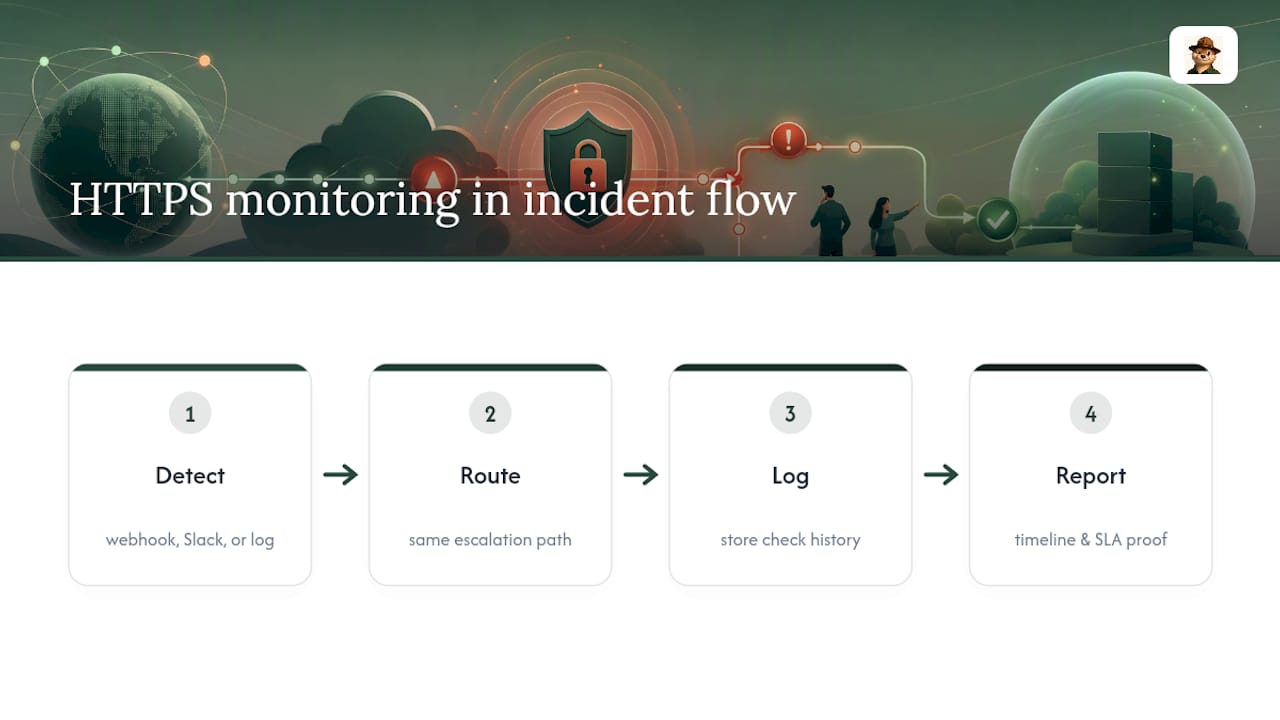
A monitoring alert that only reaches an inbox is monitoring with a ceiling. The real value shows up when an alert triggers a workflow: a webhook that opens a ticket, a Slack message that pages the right person, or a log entry that lands next to your application’s other error data so you’re not correlating timestamps across four different tools by hand.
For teams already running an incident management platform, HTTPS monitors should feed into it the same way your application error tracker does. A certificate expiry warning and an application 500 error are both signals your on-call process should treat with the same urgency logic, even though the root causes are completely different. Routing both through one escalation path avoids the common failure where uptime alerts live in a separate silo that nobody checks with the same discipline as the “real” incident channel.
Logging matters here too. Keeping a history of check results and response times gives you the timeline you need after an incident: not just “it went down” but “it went down at 3:14 AM, recovered at 3:19, and the certificate warning had fired six days earlier.” That kind of trail is also what you hand a client or stakeholder when they ask for SLA evidence, which is part of why status pages and check history are treated as standard reporting features rather than nice-to-haves. If your team already tracks security incidents formally, the same discipline behind continuous threat monitoring for reducing detection and response time applies directly to uptime and certificate alerting.
What Goes Wrong With HTTPS Monitoring Setups, and How Do You Fix It?
The most common failure isn’t a bug in the monitoring tool. It’s a gap in what got configured.
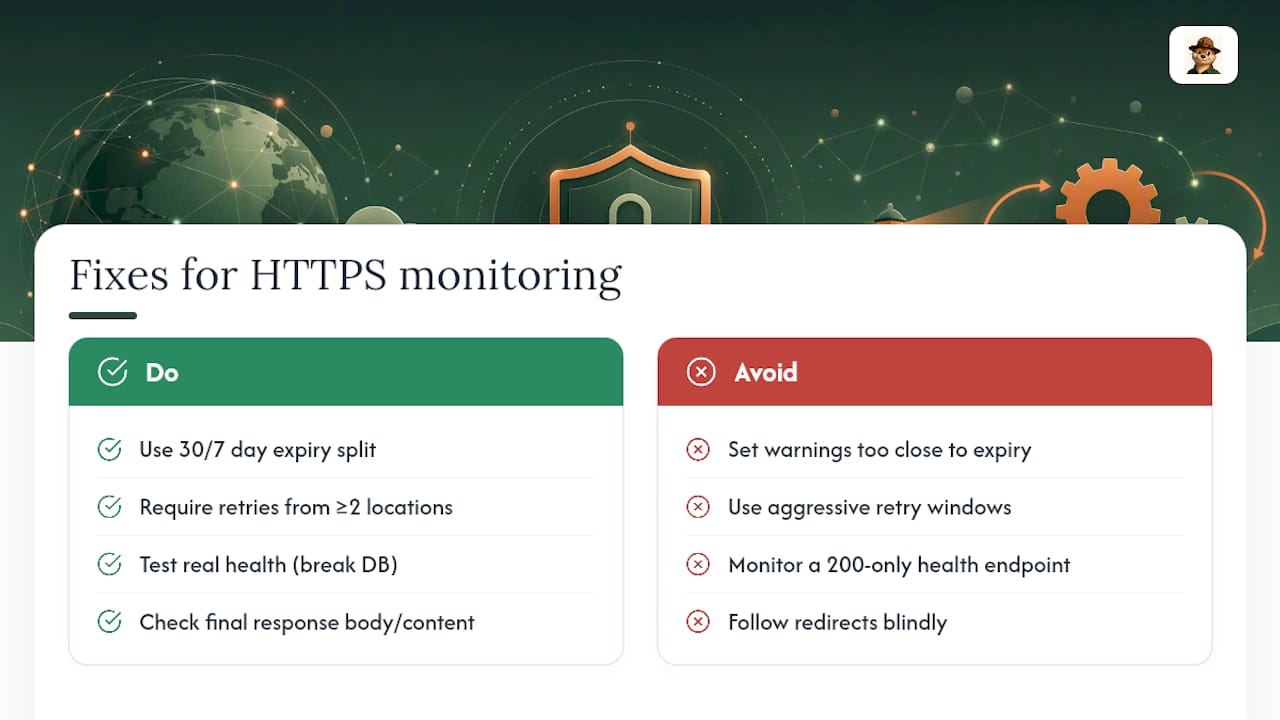
Alert fatigue from bad thresholds. Set your SSL warning too close to the expiry date, or your retry window too aggressive, and you’ll start ignoring alerts entirely. The fix is the 30/7 day split covered earlier, paired with a retry requirement across at least two check locations before anything fires.
Monitoring the wrong endpoint. A health-check endpoint that always returns 200 regardless of actual application state tells you nothing. Test it: if you can break your database connection and the health check still passes, it’s not really checking health.
Redirect chains that mask real failures. If your monitor follows redirects blindly, an HTTPS site that’s quietly redirecting to an HTTP fallback (or looping) can report “success” while serving something broken. Check what the final response actually contains, not just the final status code.
Forgetting subdomains and SANs. A wildcard certificate covers what it covers. A monitor checking example.com doesn’t automatically catch an expiring cert on api.example.com unless you add it as a separate target.
Ignoring OCSP and revocation delays. Occasionally a certificate is valid but a revocation check times out, causing a false failure. If you see a one-off failure that resolves itself on the next check with no configuration changes, this is often the cause, not a real outage.
Most of these get caught the first time you deliberately test a failure, which is why that controlled test step earlier isn’t optional.
Why a Certificate-First, Low-Noise Approach Suits Small Teams
Most monitoring tools are built for ops teams running dashboards nobody outside the team ever opens. Otterwatch takes the opposite bet: certificates come first, uptime is the calm bonus layered on top. The reasoning is simple. The single most preventable outage a small team causes itself is a forgotten certificate renewal, not a server crash.
Fewer dashboards means fewer decisions to make under stress. A plain warning that says your certificate expires in nine days beats a graph you have to interpret at 11:00 PM. The trade-off is real: you give up granular performance charts in exchange for alerts you’ll actually read. For a solo founder or a five-person shop, that trade is usually the right one. Dashboards you check are worth more than dashboards you own.
— Nick Phillips
Try Certificate-First Monitoring Without the Setup Overhead
Otterwatch is built for exactly the gap this article just walked through: a monitor that treats certificate expiry as the main event, not an afterthought buried in a settings menu. You get SSL expiry alerts, uptime checks, and plain-language email warnings, with a free plan covering a limited number of monitored sites at no cost.

If you’re a solo maintainer or a small team tired of dashboards you never open, this is built for you specifically. Run your domain through the Free SSL Certificate Checker right now to see exactly when your current certificate expires, then set up ongoing monitoring in a few minutes. Need more than five domains or deeper certificate change-detection down the line? The Pro plan runs $15 per month, detailed on the Otterwatch pricing page.
Sources
For deeper technical grounding, Uptime Monitor’s documentation covers HTTP(S) check mechanics in detail, and Upptime’s open-source project shows how a self-hosted alternative works if you’d rather build your own. Otterwatch’s guide on monitoring uptime without chasing false alerts and its comparison of SSL monitoring tools go further into setup specifics.
FAQ
How Do I Monitor the Uptime of a Website?
Set up an automated check that requests your site at a regular interval and verifies the response status, body content, and TLS certificate validity all at once. Most services check every one to fifteen minutes depending on how fast you need to know, and alert you by email or another channel the moment a check fails from multiple locations.
What Is Uptime Monitoring?
Uptime monitoring is the automated, repeated checking of whether a website or service responds correctly, usually paired with response-time tracking and, for HTTPS sites, TLS/SSL certificate validation. The goal is catching outages and certificate problems before customers notice them.
What Is the Best Tool for Monitoring Uptime?
The right tool depends on whether you want a fully managed service or a self-hosted setup you maintain yourself, since options like Upptime trade convenience for control. For teams that want certificate expiry treated as the primary signal rather than an add-on, Otterwatch offers a free tier covering five domains with plain-language SSL and uptime alerts.
How Do I Check My Uptime?
Run a manual check anytime with a browser or command-line tool to confirm your site responds, then set up an automated monitor so you don’t have to check manually. An automated HTTPS monitor also confirms your certificate is valid, which a manual glance at the page usually won’t catch until the browser throws a warning.
Recommended
- SSL certificate monitoring tools, honestly compared
- Stop Chasing False Alerts: Small Team Uptime Monitoring That Puts SSL First
- 200 Days of Renewals: Track Certificate Issuers for Small Teams
- Why Short-Lived Certificates Need Monitoring in 2026
Catch the next cert expiry before your users do.
Otterwatch checks your SSL certificates daily and emails you 30 days before they expire. Five sites free.
Start watching →