200 Day Cap Starts March 15, 2026: SSL Renewal Window Tactics for Ops
By Nick Phillips, Founder
200 Day Cap Starts March 15, 2026: SSL Renewal Window Tactics for Ops
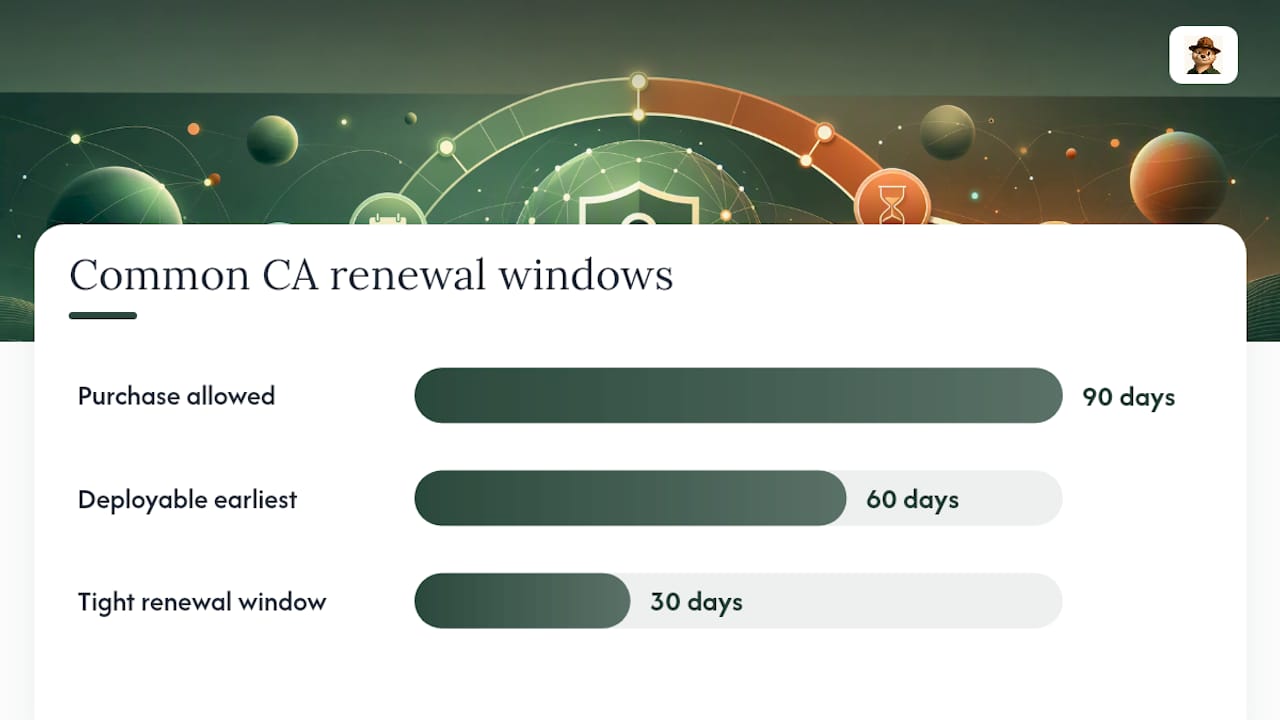
Renewal windows vary by certificate authority, but expect an allowed period beginning somewhere between 90, 60, or 30 days before expiry, with auto-renew often kicking off around the 60 to 30 day mark. A few vendors permit limited action shortly after expiry, but don’t lean on that. With certificate lifetimes shrinking, your safest move is to treat the window as compressed and automate the whole renewal path now.
TL;DR:
- Renewal windows are typically between 30 and 90 days before expiry, with auto-renewal attempts often starting earlier than the actual renewal date.
- The ability to purchase renewal credits does not guarantee the deployment of a usable certificate, as domain validation can delay actual issuance.
- Automated clients using ACME with ARI support adjust renewal timing based on CA suggestions, reducing the risk of missing renewal windows.
- Expired certificates require immediate action to verify the served certificate, identify renewal failures, and restart the issuance process swiftly.
- Shorter certificate lifetimes planned for 2026 and beyond will force tighter renewal schedules, making proactive monitoring and frequent testing essential.
Table of Contents
- Typical CA Renewal Windows and What They Actually Mean
- How Auto-Renew and ACME ARI Decide When to Act
- Your Certificate Already Expired. Now What?
- Shorter Certificate Lifetimes Are Squeezing Your Margin
- A Copy-Ready Checklist for Renewal Monitoring
- Why Watching the Window Beats Counting Days
- Keep an Eye on Your Certificates Without the Noise
- Where to Verify Your CA’s Exact Renewal Window
- Sources
- FAQ
Typical CA Renewal Windows and What They Actually Mean
Every certificate authority (CA) draws its own line for when you’re allowed to renew, and the ranges people run into most often look like this:
- The 90/60/30 pattern. Some CAs let you purchase or apply a renewal credit up to 90 days before expiry but won’t let the new certificate become active until you’re inside 60 or even 30 days of the old one expiring.
- The tight 30-day window. Other vendors, especially on shorter-lived certificates, only allow renewal starting 30 days before expiry, with a short grace period (sometimes just a few days) after.
- Auto-renew starts earlier than you think. Managed platforms often trigger their first renewal attempt well before the deadline. Cloudflare, for instance, starts auto-renew attempts well in advance of expiry on short-duration certificates, and falls back to alternate validation methods if the first few tries fail.
Here’s the detail that trips people up: being able to purchase a renewal credit is not the same as having a deployable certificate. A CA might let you buy the renewal 90 days out, but the actual cert you install still needs to pass domain validation, and that validation step is what determines when the new certificate is actually issued and usable.
The practical takeaway is to stop assuming a single universal number. Check your CA’s actual support documentation for your certificate type, and then build your monitoring around the earliest, most conservative estimate rather than the latest one. If your CA’s renewal window opens at 60 days but you only start paying attention at 20, you’ve quietly erased two-thirds of your safety margin. This is exactly why ssl certificate management shouldn’t run on memory or a sticky note on someone’s monitor.
How Auto-Renew and ACME ARI Decide When to Act
If you’re running an automated ACME client (Certbot, acme.sh, or similar), the renewal timing isn’t just a calendar guess anymore. The IETF’s ACME Renewal Information extension, known as ARI, lets a CA publish a suggested renewal window with a start and end timestamp, plus an explanation URL if something about your certificate needs attention. An ARI-aware client queries that renewalInfo endpoint and picks a random time inside the suggested window rather than firing at the same fixed hour every day.
That randomization matters more than it sounds. It’s designed to keep every server on the internet from hammering a CA’s infrastructure at the exact same moment.
Three renewal behaviors show up in practice:
- Fixed-interval schedules (“renew every 60 days”) that ignore the actual issued expiry and can drift out of sync over time.
- Expiry-relative schedules that parse the real expiry date and renew a set number of days before it, which is safer but still rigid.
- ARI-aware clients that ask the CA directly what window it recommends and adjust automatically, including reacting faster if the CA flags an early revocation need.
Before trusting any of this in production, run a quick test: query renewalInfo in staging, watch how your client handles a Retry-After response, and confirm the certificate actually deploys and clears the old expiry in your monitoring.
Pro Tip: If ARI isn’t supported by your CA yet, don’t hardcode a schedule. Base your renewal trigger on the actual remaining life of the issued certificate, not a guess about when it was issued.
Your Certificate Already Expired. Now What?
An expired certificate is a “fix it in the next hour” problem, not a “schedule a ticket” problem. Work through this in order:
- Confirm what’s actually being served. Check the live certificate on the endpoint (not the one in your repo or vault) to see exactly how long it’s been expired and which service is affected.
- Check your validation and issuance logs. Find out where the automated renewal failed. Was it a DNS challenge timeout, an expired API token, or a deployment step that never ran?
- Recover fast. Attempt a fresh issuance through your existing ACME client first. If that’s stuck, swap in a backup valid certificate if you have one, or fall back to a manual emergency issuance if your CA’s policy allows it.
- Document and prevent recurrence. Once service is restored, identify the certificate’s owner, tighten your alert thresholds, and write down exactly what broke.
Skipping step four is how the same outage happens again in four months.
Shorter Certificate Lifetimes Are Squeezing Your Margin
The industry is moving fast toward shorter validity periods, and it changes the math on every renewal window you’ve relied on. A 200-day maximum validity takes effect March 15, 2026, with further staged reductions toward 100-day and eventually 47-day certificates planned in the years after.
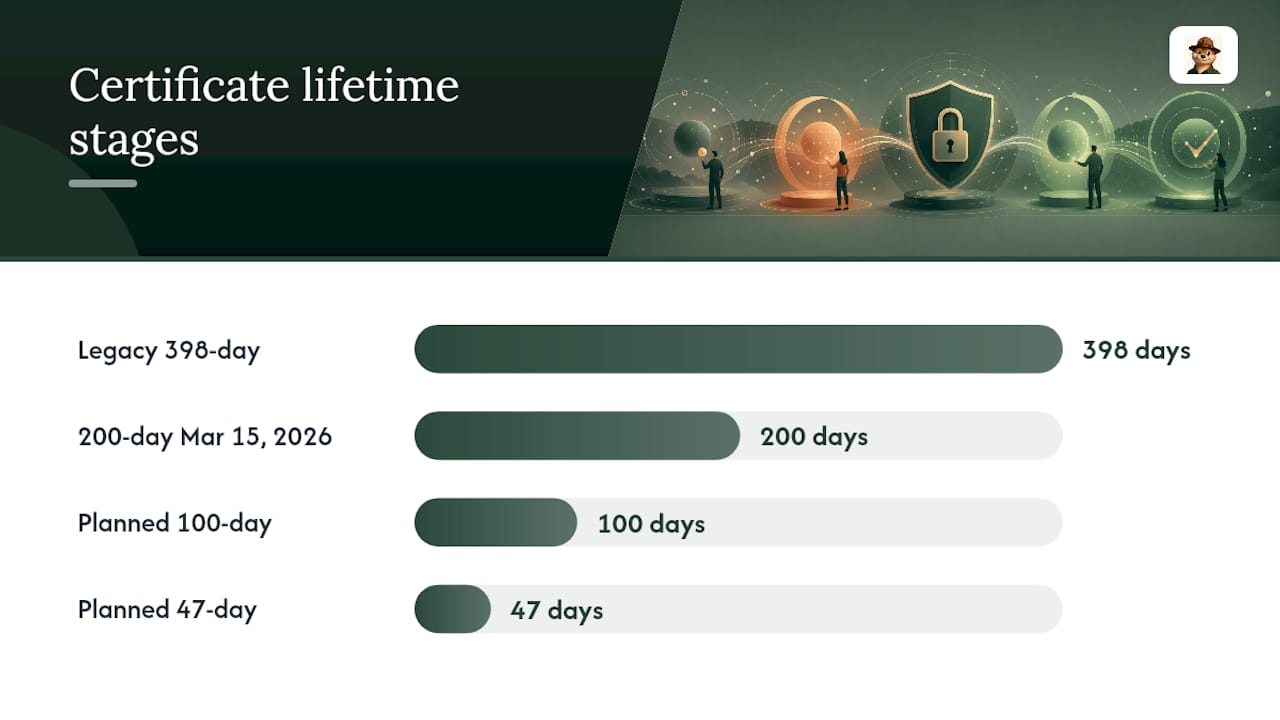
Why this matters operationally: a very short certificate lifetime increases renewal cycles per year significantly compared to longer-lived certificates. A cron job that quietly failed last month and went unnoticed for six weeks was survivable on a 398-day certificate. On a 47-day certificate, that same six-week gap is the entire remaining lifetime of the cert, and then some.
Three changes to make now, before shorter lifetimes force your hand:
- Audit every ACME client you run and confirm which ones support ARI.
- Increase how often you run dry-run renewals, not just how often you check expiry dates.
- Lower your alert thresholds to match your shortest-lived certificate, not your longest.
A Copy-Ready Checklist for Renewal Monitoring
Treat this as your working runbook, not a one-time audit.
Checklist:
- Inventory every certificate, its issuing CA, and its validation method (DNS, HTTP, or otherwise).
- Confirm whether your client supports ARI, and if so, that it’s actually querying renewalInfo.
- Run a staging renewal on a schedule, not just when something looks wrong.
- Verify the deployment step and confirm your monitoring shows the new expiry date, not the old one.
For alert thresholds, scale to your shortest certificate lifetime rather than a single fixed number. A common approach is a first alert around one-third of the remaining lifetime (or two-thirds elapsed), then a critical alert at 14 days out, tightening that critical window further if you’re running certificates shorter than 47 days.
Build in retries with exponential backoff for renewal jobs, log every success and failure as a metric you can graph, and route the alert to a named owner, not a shared inbox nobody checks on weekends.
Pro Tip: The single most useful monitoring signal isn’t “days until expiry.” It’s the combination of days remaining plus whether your last renewal job actually succeeded. Either signal alone can hide a failure.
Why Watching the Window Beats Counting Days
Counting down to a single “renew by” date feels reassuring, but it’s the wrong mental model. Renewal is a chain: decision, validation, deployment, then confirmation through monitoring. Any single break in that chain turns a routine renewal into an outage, no matter how early you started the countdown.
This is the philosophy behind how Otterwatch alerts you. Instead of a loud, red-alarm countdown, you get a calm, early heads up that gives your automation time to actually finish the job. If you want one change that prevents most expiry incidents, add a weekly dry-run renewal job and watch whether it actually completes.
— Nick Phillips
Keep an Eye on Your Certificates Without the Noise
Some monitoring services watch your SSL certificates and give warnings before problems occur, using plain language instead of alarming alerts. Some offer free tiers covering multiple sites with expiry alerts and uptime checks included, allowing you to track renewal windows without setting up your own monitoring stack.

If your certificates renew on a shrinking lifetime like the ones discussed above, having an early, calm signal matters more than ever. Run your first check on the free SSL certificate checker to see your current expiry dates, then set up ongoing monitoring on the Otterwatch dashboard so Otis can keep watch while your automation does the rest.
Where to Verify Your CA’s Exact Renewal Window
Always confirm the canonical window with your CA’s own support pages. Review the ACME ARI specification directly if you’re building automation, and see how shorter certificate lifetimes are reshaping renewal practice industrywide.
Sources
- What Is Certificate Renewal Window? Definition & Examples
- Shorter TLS Certificates Need a Renewal Window Audit
- Certificate Expiration Risk: 200 Day Validity Starts March 15 | Sectigo® Official
- Validity periods and renewal · Cloudflare SSL/TLS docs
FAQ
What is the new renewal period for SSL certificates?
There’s no single new universal period. CAs are moving toward shorter maximum validity, with a 200-day cap starting March 15, 2026 and further reductions planned toward 100 and 47 days, which shrinks how much buffer you have between renewal windows.
My SSL certificate is expired. How do I renew it?
Check what’s actually being served on the endpoint, review your issuance and validation logs to find where the automated renewal failed, then attempt a fresh issuance through your ACME client or fall back to a manual emergency renewal if needed.
What will the validity period of an SSL certificate be in 2026?
Starting March 15, 2026, the industry maximum drops to 200 days, with staged plans to shorten further to 100 days and eventually 47 days in later phases.
What happens if I don’t renew my SSL certificate?
Browsers and clients will refuse the connection or show a security warning, which typically means your site or API goes down for visitors until a valid certificate is deployed. Tools like Otterwatch exist specifically to alert you well before that happens.
Recommended
- 90-day SSL certificates are coming — here’s what that actually means for you
- SSL Certificate Renewal Explained: 2026 Guide
- How to Avoid SSL Expiration Warnings: 2026 Guide
- SSL Certificate Expiry Alert Types: 2026 Guide
Catch the next cert expiry before your users do.
Otterwatch checks your SSL certificates daily and emails you 30 days before they expire. Five sites free.
Start watching →