Why E-Commerce Needs Certificate Monitoring in 2026
By Nick Phillips, Founder

Certificate monitoring is the practice of continuously tracking the validity, deployment, and trust chain of SSL/TLS certificates to prevent site outages and protect customer access. For e-commerce businesses, why certificate monitoring matters comes down to one hard fact: a single expired or misconfigured certificate can block every customer from reaching your checkout. The UK National Cyber Security Centre confirms that certificate mismanagement causes browsers to block connections entirely, displaying TLS errors that send shoppers straight to a competitor. Tools like Certbot, AWS ACM, and dedicated monitoring services exist precisely because certificate failures are common, costly, and almost entirely preventable.
Why e-commerce needs certificate monitoring more than most
Certificate Lifecycle Management (CLM) is the industry term for the full process of issuing, deploying, renewing, and retiring certificates. IBM’s CLM framework identifies monitoring as core to preventing outages, certificate fraud, and policy violations. For e-commerce specifically, the stakes are higher than for a brochure site. Customers enter payment details, create accounts, and trust that the padlock in their browser means something real. When it disappears, so do they.
The importance of certificate monitoring for online stores goes beyond security optics. A checkout that throws a browser warning at 2 a.m. on a Saturday will bleed revenue for hours before anyone notices. That is not a hypothetical. It is the standard failure mode when monitoring is absent.

What causes SSL certificate failures in e-commerce?
Certificate failures in e-commerce fall into four distinct categories, and expiry is only one of them.
- Expiry without renewal. The certificate reaches its end date and the server stops serving a valid cert. Browsers block access immediately.
- Broken intermediate chains. The certificate itself may be valid, but if the intermediate CA certificate is missing or misconfigured, the browser cannot build a trusted path to the root. Customers see the same scary warning either way.
- Wrong certificate deployed. After a renewal, the old certificate stays on the load balancer or CDN edge node while the new one sits on the origin server. The renewed cert never reaches the customer.
- Partial CDN or load balancer propagation. In distributed infrastructure, one node gets updated and others do not. Some customers get a valid cert; others get an error. This is one of the hardest failures to catch manually.
A real incident documented on dev.to shows exactly how this plays out: an expired cert took down checkout for six hours because the monitoring in place only watched uptime, not the certificate itself. The site returned HTTP 200 responses throughout. No alarm fired. Revenue stopped anyway.
The reputational damage from these events compounds the direct revenue loss. Customers who encounter a security warning rarely return the same day, and some never return at all. Google Search Console can also flag certificate errors, which affects crawl behavior and organic visibility.
Pro Tip: After any infrastructure change (new CDN, load balancer swap, server migration), manually verify the certificate served at each endpoint before considering the deployment complete. Do not rely on the deployment script to confirm what the client actually receives.
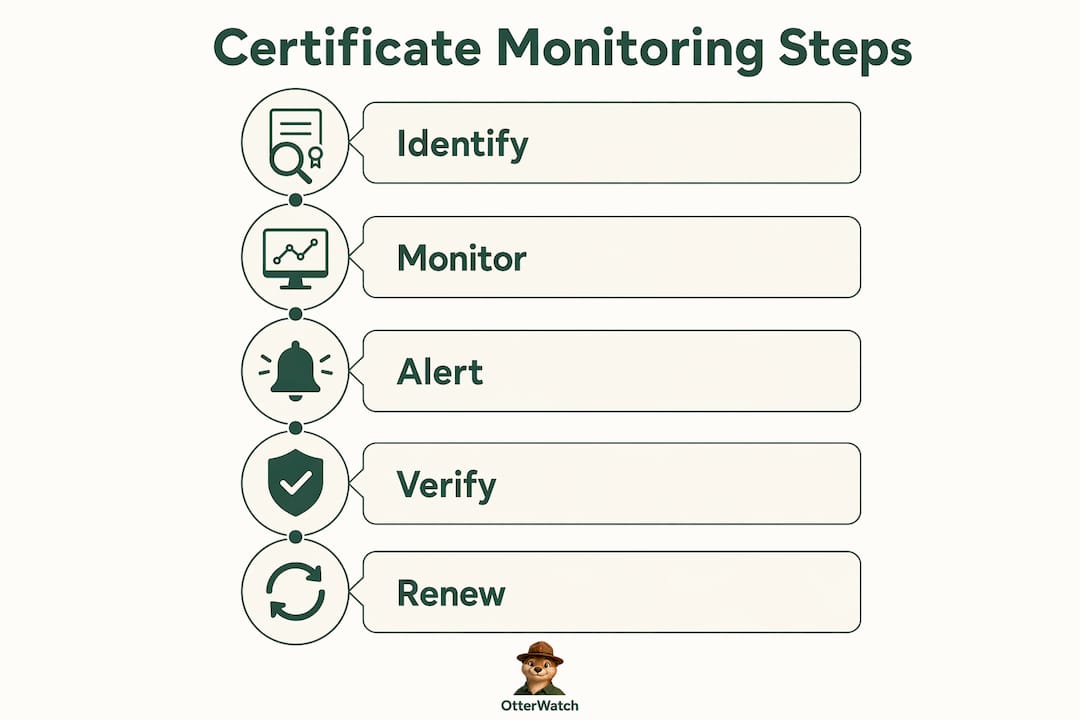
Why expiry-date monitoring alone is not enough
Checking when a certificate expires is the starting point, not the finish line. Mature certificate monitoring uses three distinct checks, and skipping any one of them creates blind spots that cause real outages.
-
Expiry date validation. The baseline check. Confirms the certificate has not expired and flags it ahead of the renewal window. Every monitoring setup should have this. It catches the obvious case but nothing else.
-
TLS handshake validation. This check connects to your domain the way a browser does and verifies the full certificate chain, not just the expiry date. It catches broken intermediate chains, self-signed certificates served by mistake, and mismatched domain names (SAN mismatches). A standard uptime monitor that checks for HTTP 200 will miss all of these. TLS handshake checks are required to verify actual client trust, not just server availability.
-
Deployment verification across endpoints. After renewal, the new certificate must be confirmed as live on every load balancer, CDN node, and ingress controller in your stack. Post-renewal verification is critical because infrastructure can still serve the old certificate until a reload is triggered and confirmed. This check closes the gap between “renewed” and “deployed.”
Complex e-commerce environments often have multiple certificate instances spread across CDNs, load balancers, and ingress controllers. IBM’s CLM guidance notes that carefully maintained inventories across all these components are required to minimize the blast radius when something goes wrong. Without a full inventory, you cannot monitor what you do not know exists.
Pro Tip: Map every domain and subdomain in your store, including staging environments, API endpoints, and third-party integrations that use your certificates. Staging sites with expired certs are a common source of confusion and accidental customer exposure.
How shorter certificate lifetimes are changing the monitoring game
Certificate lifetimes are getting shorter, and that changes the math on monitoring urgency. Let’s Encrypt has announced plans to reduce certificate lifetimes from 90 days to 45 days by 2028, with opt-in early adoption available by mid-2026. This cuts the renewal window in half, which means any manual process or late-alert setup that worked before will not be reliable going forward.
| Scenario | 90-day cert | 45-day cert |
|---|---|---|
| Alert at 30 days remaining | 60 days of buffer before alert | 15 days of buffer before alert |
| Alert at 14 days remaining | 76 days of buffer | 31 days of buffer |
| Manual renewal process (3 days) | Comfortable margin | Tight, especially with weekends |
| Automation pipeline failure window | Wide enough to catch manually | Narrow enough to miss entirely |
The table makes the risk concrete. With 45-day certificates, shorter lifetimes increase outage risk significantly if your renewal process depends on late alerts and manual steps. The buffer that used to feel generous disappears.
Automation tools like AWS ACM and Certbot handle renewal without human input, which sounds like the problem is solved. It is not. AWS ACM environments still require alerting on certificates that approach expiration without confirmed auto-renewal, because automation pipelines break. A misconfigured IAM role, a DNS validation record that was accidentally deleted, or a domain transfer that disrupts ownership verification can all silently kill an auto-renewal. The pipeline fails, no one notices, and the certificate expires anyway.
The right approach combines automation with monitoring that watches the automation itself. Treat your renewal pipeline as infrastructure that can fail, and monitor it accordingly.
How to set up effective certificate monitoring for your store
Getting certificate monitoring right for an e-commerce operation takes a few deliberate steps. Here is a practical sequence that covers the bases without overcomplicating things.
-
Build a certificate inventory. List every domain, subdomain, API endpoint, and third-party integration that uses a certificate you own or manage. Assign an owner to each one. Without this list, monitoring has gaps by default.
-
Set tiered alert thresholds. SSL monitoring best practices recommend staged notifications at 30, 14, and 7 days before expiry. The 30-day alert is your normal renewal trigger. The 14-day alert means something went wrong with the first attempt. The 7-day alert is urgent and should wake someone up regardless of the time.
-
Validate renewal success and deployment. After every renewal, confirm the new certificate is live on all endpoints, not just the origin server. Run a TLS handshake check against your load balancer IP and each CDN edge node you can reach. Check the SSL certificate status directly if you want a quick read on what clients actually see.
-
Route alerts to the right people. Integrate certificate alerts into your existing operational workflow. Tools like PagerDuty handle escalation for urgent alerts. Slack works well for the 30-day heads-up that does not need to wake anyone up. The goal is that the right person sees the alert at the right time, not that everyone gets every alert.
-
Review your inventory quarterly. Certificates get added during projects and forgotten when those projects end. A quarterly review catches orphaned certificates on subdomains that are still publicly accessible but no longer actively managed.
For a detailed look at how different monitoring tools compare on these capabilities, the SSL monitoring tools comparison from Otterwatch covers the practical tradeoffs clearly. And if you want to understand the mechanics behind why certificates expire in the first place, why SSL certificates expire is worth a read before you set up your alerting windows.
Key takeaways
Effective certificate monitoring for e-commerce requires three validation layers, tiered alerts, and post-renewal deployment checks across every endpoint in your infrastructure.
| Point | Details |
|---|---|
| Three checks, not one | Expiry, TLS handshake, and deployment verification together prevent the failures that expiry-only monitoring misses. |
| Shorter lifetimes raise the stakes | Let’s Encrypt’s move to 45-day certs by 2028 cuts renewal buffers in half, making late alerts and manual processes unreliable. |
| Automation is not a substitute | AWS ACM and Certbot can fail silently; monitoring the renewal pipeline itself is required to catch those failures. |
| Tiered alerts matter | Alerts at 30, 14, and 7 days give you a normal window, a warning window, and an emergency window for the same certificate. |
| Inventory is the foundation | You cannot monitor certificates you do not know exist. A maintained inventory is the prerequisite for everything else. |
The thing most store owners get wrong about certificate monitoring
I have watched a lot of e-commerce teams discover their certificate monitoring gap the hard way. The pattern is almost always the same: they set up a basic uptime check, see green, and assume everything is fine. Then a cert expires on a CDN node that the uptime check never touches, and checkout goes down for hours before a customer complaint surfaces it.
The uncomfortable truth is that uptime monitoring and certificate monitoring are not the same thing. A server can return HTTP 200 while serving an expired certificate to every browser that connects. Your uptime dashboard stays green. Your customers see a security warning and leave. These are two different failure modes, and they need two different checks.
What I have found actually works is treating certificate monitoring as its own discipline, separate from uptime, with its own inventory, its own alert routing, and its own post-renewal verification step. The teams that do this well are not necessarily the most technical ones. They are the ones who have assigned ownership clearly and built the habit of checking after every change, not just before expiry.
The evolving certificate landscape, particularly the shift toward 45-day lifetimes, is going to expose every team that has been coasting on wide renewal windows. The good news is that setting this up properly is not complicated. It just requires doing it deliberately rather than assuming the automation has it covered.
— Otis
Keep your store’s certificates covered with Otterwatch

Otterwatch watches your SSL certificates and sends you a calm, plain-language heads-up well before anything expires. No dashboards to configure, no walls of red alerts. You add your sites, set your alert preferences, and Otis keeps an eye on things quietly in the background. Certificate monitoring comes first; uptime monitoring runs alongside it at no extra cost. Start with the free SSL certificate checker to see exactly what your certificates look like right now, then move to continuous monitoring when you are ready. Five sites are monitored free, with no credit card required to get started.
FAQ
What is certificate monitoring for e-commerce?
Certificate monitoring is the continuous tracking of SSL/TLS certificate validity, chain integrity, and deployment status across all endpoints of a website. For e-commerce sites, it prevents the browser security warnings that block customers from completing purchases.
How often should SSL certificates be checked?
Certificates should be checked at least daily, with tiered alerts set at 30, 14, and 7 days before expiry. Daily checks catch deployment failures and chain errors that appear between scheduled renewal windows.
Does automation replace the need for certificate monitoring?
No. Tools like AWS ACM and Certbot automate renewal but can fail silently due to DNS misconfigurations or permission errors. Monitoring the renewal pipeline itself is required to confirm that automation succeeded and the new certificate is actually deployed.
What happens when an SSL certificate expires on an e-commerce site?
Browsers display a security warning and block access to the site. Customers cannot proceed to checkout, and most will not return the same session. The NCSC confirms that certificate mismanagement leads to browsers blocking connections entirely.
How do shorter certificate lifetimes affect e-commerce operations?
Let’s Encrypt’s planned move to 45-day certificates by 2028 cuts the renewal buffer in half compared to 90-day certificates. This makes late-alert setups and manual renewal processes significantly riskier, requiring earlier alerts and more reliable automation.
Recommended
- 90-day SSL certificates are coming — here’s what that actually means for you · Otterwatch
- SSL certificate monitoring tools, honestly compared · Otterwatch
- Why do SSL certificates expire? · Otterwatch
- Free SSL certificate checker · Otterwatch
Catch the next cert expiry before your users do.
Otterwatch checks your SSL certificates daily and emails you 30 days before they expire. Five sites free.
Start watching →