Fast DNS to CA Troubleshooting for SSL Breaks with curl and openssl
By Nick Phillips, Founder
Fast DNS to CA Troubleshooting for SSL Breaks with curl and openssl
A DNS change often breaks HTTPS because the new answer points visitors at a server that doesn’t present a valid certificate for that hostname. The destination might lack a cert entirely, present a self-signed placeholder, or fail CA validation because DNS hasn’t fully settled. Check the current DNS answer from authoritative nameservers, then run dig and curl -v -H 'Host: <name>' https://<ip> against the new endpoint before you touch anything else.
TL;DR:
- DNS propagation issues can cause intermittent SSL failures, especially if authoritative responses and cached answers disagree or TTLs are high.
- DNSSEC misconfigurations or stale CAA records can silently block certificate issuance or validation without obvious errors.
- Using proxy services like Cloudflare in SSL proxy mode often results in mismatched certificates or SNI errors if origin SSL is not properly set up.
- Automated SSL provisioning can get stuck if DNS changes haven’t fully propagated, if validation records are inconsistent, or if existing DNSSEC or CAA restrictions are overlooked.
- Verifying DNS, TLS configuration, and certificate chain directly from authoritative sources and outside networks is crucial before making DNS or configuration changes.
Table of Contents
- Diagnosing DNS Change Broke SSL: Where to Start
- Can DNS Policy Records Block Your SSL Certificate?
- Why Does Cloudflare Break My SSL After a DNS Change?
- Why Is My Certificate Stuck “Provisioning” After a DNS Change?
- What Commands Fix an SSL Error After a DNS Change?
- How Do You Prevent SSL Downtime During DNS Changes?
- What We’ve Learned From Watching Certificates Break
- A Calmer Way to Catch This Before It Happens
- Where to Verify Your Fixes
- FAQ
Diagnosing DNS Change Broke SSL: Where to Start
Before you touch a single record, figure out which hostname is actually failing and what it currently resolves to. Most “DNS change broke SSL” incidents boil down to one of four layers: the DNS answer itself, a proxy or CDN in front of the origin, the origin server’s TLS setup, or the certificate authority’s validation step. Chasing the wrong layer wastes the most time.
Work through this order:
- Pin down the exact hostname. Apex domain (
example.com),www, and a subdomain likeapi.example.comare separate DNS records and can behave completely differently. Confirm which one throws the error in the browser or curl output. - Query authoritative nameservers directly, not just your laptop’s resolver. Run
dig @<authoritative-ns> example.com Aand compare it against a public resolver likedig @8.8.8.8 example.com A. If they disagree, you’re mid-propagation or a resolver cached a stale answer. - Check TTLs and look for leftover records. An old AAAA record pointing to a decommissioned IPv6 host is a classic culprit; browsers that prefer IPv6 will happily connect to a dead server and throw a generic SSL error.
- Test what the public actually sees. Run
openssl s_client -connect <ip>:443 -servername example.comand compare the certificate’s Common Name and Subject Alternative Names against what you expect. This tells you immediately whether the server on the other end even knows it’s supposed to beexample.com.
Windows admins troubleshooting resolver behavior specifically should also lean on Resolve-DnsName and packet captures, since Microsoft’s own guidance treats DNS resolution failures as originating from client config, server config, or an intermediate device, three very different fixes.
Watch for mixed A/AAAA answers across resolvers and mismatched CNAME chains pointing at a decommissioned load balancer. Both produce intermittent failures that look random but aren’t.
Pro Tip: Run your dig and curl checks from a network you don’t control, like a phone on cellular data or a cloud shell. Your office network’s resolver may have cached the old answer for hours after everyone else has already moved on.
Can DNS Policy Records Block Your SSL Certificate?
Yes, and this catches more people than it should. Two DNS-layer settings can silently stop a certificate from ever issuing, even when everything else looks fine.
- CAA records restrict which certificate authorities can issue for your domain. If you switched providers and a CAA record still only allows the old CA, every new issuance attempt fails silently. Check it with
dig CAA example.comor a free tool like Dnschecker, and update it to include the CA your new host actually uses. - DNSSEC chain breaks look exactly like SSL failures but aren’t. A stale DS record at the registrar after a nameserver change causes validating resolvers to reject the domain outright. DNSViz will show you the full chain and flag exactly where it breaks.
- Nameserver and registrar mismatches during cutover create negative caching problems. Once a resolver caches an NXDOMAIN response, some resolvers will keep serving that empty answer for the duration set by the zone’s SOA MINIMUM value, per Microsoft’s DNS troubleshooting guidance, well after the record actually exists.
Cloudflare’s own documentation lists DNSSEC misconfiguration and negative caching among the most common causes of resolution errors that get misdiagnosed as certificate problems, when the domain never actually resolved correctly in the first place.
Why Does Cloudflare Break My SSL After a DNS Change?
Proxying a record through a CDN means the browser’s TLS handshake terminates at the CDN’s edge, not your origin server. That single fact explains most of the “it worked before I proxied it” tickets.
The SSL mode setting decides what happens next. Flexible mode encrypts browser to edge but talks plain HTTP to your origin, which breaks anything expecting HTTPS end to end. Full mode requires any cert on the origin, even a self-signed one. Full (strict) mode requires a valid, trusted cert on the origin and will fail hard if it doesn’t find one.
- SNI mismatches on multi-tenant origins are a separate trap: the origin might host several domains and serve the wrong certificate if it doesn’t recognize the incoming hostname. Test with
openssl s_client -connect <ip>:443 -servername example.comto see exactly which cert the origin hands back. - If you’re mid-migration, toggle the record to DNS-only (gray cloud) temporarily so you’re testing the origin directly, without the proxy layer in the picture.
- Confirm the origin has a valid cert installed and that the SSL mode matches what that cert actually supports.
Pro Tip: A mismatched SNI response often looks identical to a DNS propagation issue in the browser. If curl -v and openssl -servername show two different certificates for the same hostname, that’s proxy or origin config, not DNS.
Why Is My Certificate Stuck “Provisioning” After a DNS Change?
Automated certificate authorities validate domain ownership through DNS or HTTP challenges, and a fresh DNS change can leave that validation stuck for reasons that aren’t always obvious from the error message alone.
Common messages and what they actually mean:
- “DNS verification failed” usually means the CA queried a record that doesn’t match what it expects yet, often because propagation hasn’t finished or a CAA record is blocking that CA specifically.
- “Waiting on DNS propagation” is often just a timing message, but if it persists past your platform’s normal retry window, leftover AAAA records, duplicate A records, or DNSSEC conflicts are frequently the real cause, not propagation itself.
- “Could not provision certificate” after several retries usually points to a configuration problem, not a time lag. Re-trigger issuance manually once you’ve fixed the underlying record, and check your platform’s SSL logs or run the domain through Let’s Debug for a plain-language diagnosis.
What Commands Fix an SSL Error After a DNS Change?
Run these in order and read the output carefully. Each one rules something specific in or out.
dig @<auth-ns> example.com A AAAA CNAME— confirms what the authoritative source actually says, bypassing cached answers.dig +trace example.com— walks the full resolution path from root servers down, useful for spotting a broken delegation.curl -v -H 'Host: example.com' https://<ip>— hits a specific IP directly while sending the right Host header, isolating DNS from the TLS handshake.openssl s_client -connect <ip>:443 -servername example.com— shows exactly which certificate the server presents for that SNI value.
Reading the output tells you where to act:
- CN/SAN mismatch in the openssl output means the wrong certificate is being served. Fix the origin’s virtual host mapping or reissue for the correct name.
- Incomplete chain (browser trusts it, curl doesn’t) means you installed the leaf certificate without the intermediate. Reinstall the full chain file and reload the web server.
- Connection timeout on curl means DNS resolved but nothing’s listening on 443 at that IP, often a firewall or security group issue, not SSL at all.
- Self-signed cert appearing unexpectedly usually means SNI routing failed or the real cert never installed.
Pro Tip: If the CAA record is the culprit, don’t just delete it. A missing CAA record technically allows any CA to issue, which is fine short term but worth revisiting once things stabilize, since a properly scoped CAA record is good practice, not just red tape.
How Do You Prevent SSL Downtime During DNS Changes?
Most DNS-induced SSL outages are avoidable with a bit of sequencing discipline before you touch a single record.
- Provision and verify the TLS certificate on the new destination before cutting DNS over, not after. Test it directly by IP with the Host header set correctly.
- Keep the old endpoint running until caches genuinely clear. Lowering TTL a day or two ahead of a migration shortens the window where old and new answers coexist.
- Audit A, AAAA, and CNAME records for conflicts. A stray AAAA pointing to a dead host will get picked by IPv6-preferring clients even if the A record is perfect.
- Set conservative TTLs during the migration window, then raise them back once the cutover is confirmed stable.
- Document any CAA or DNSSEC changes and keep a rollback plan for DS records specifically, since those are the ones most likely to lock you out if something goes wrong.
| Risk during migration | Prevention step |
|---|---|
| Stale AAAA serving dead host | Remove conflicting records before cutover |
| CA can’t issue for new host | Verify CAA allows your CA in advance |
| DNSSEC chain break | Keep DS record rollback plan ready |
| Long cache windows | Lower TTL ahead of the change, restore after |
External monitoring for certificate expiry and served-certificate checks catches the cases where a change quietly breaks something days later, well after everyone’s stopped watching the migration closely. Otterwatch’s guide on SSL certificate best practices for small business sites covers this in more depth if you’re setting up a migration checklist for the first time.
What We’ve Learned From Watching Certificates Break
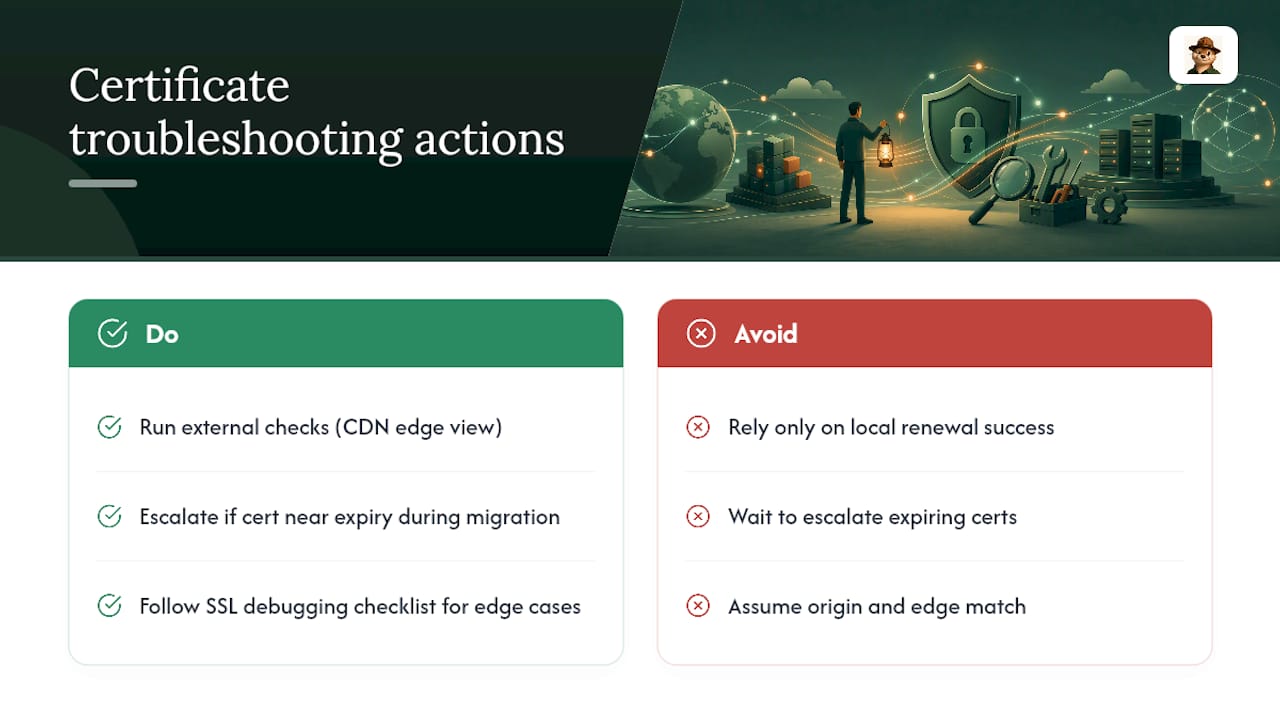
Local renewal success tells you nothing about what the public actually sees. We’ve watched teams confirm a cert renewed fine on the origin server, only to have visitors hit a stale, mismatched cert served by a CDN edge that never picked up the change. External checks catch that gap; local checks can’t.
If you want deeper debugging steps beyond this checklist, our SSL debugging checklist for developers walks through edge cases we didn’t cover here. And if a cert is genuinely close to expiring during a migration, that’s worth escalating immediately, not waiting on.
— Nick Phillips
A Calmer Way to Catch This Before It Happens
Otterwatch is the alternative to babysitting openssl commands after every DNS change: it watches your certificate expiry and reachability from outside your network and tells you, plainly, the moment something looks wrong, before a customer files a support ticket about a broken padlock icon.

Certificates come first with Otterwatch, uptime is the calm bonus, and Otis (the otter behind the alerts) sends a friendly heads up instead of a wall of red warnings. It’s free to start with a limited number of sites monitored at no cost and no credit card required. Run your current setup through the free SSL certificate checker right now to see exactly what’s being served, or check the Pro plan if you’re managing certificates across more than five domains and want deeper change detection.
Where to Verify Your Fixes
Keep these open in a tab while you’re debugging: Netlify’s SSL and HTTPS troubleshooting docs, Cloudflare’s DNS issues guide, and Microsoft’s DNS client resolution troubleshooting reference. For hands-on checks, DNSViz, DNSChecker.org, Let’s Debug, and SSL Labs’ server test all give you a second, outside-your-network opinion on the same problem. For broader cloud infrastructure hygiene while you’re in there, Rioton’s piece on cloud security best practices is worth a read too.
FAQ
Is It Risky to Change DNS?
Changing DNS isn’t inherently risky, but doing it without preparing the destination’s TLS certificate first commonly causes SSL errors during the transition. The safest approach provisions and verifies the new certificate before the DNS record ever points there.
What Is the SSL Error Code 526?
An error indicating that a proxy like Cloudflare couldn’t validate the origin’s SSL certificate usually means it’s expired, self-signed, or issued for the wrong hostname. This is distinct from a DNS resolution failure since DNS successfully pointed traffic at the origin; the origin’s certificate itself failed validation.
How Do You Fix Broken DNS?
Start by confirming the record at the authoritative nameserver with dig @<auth-ns>, then compare that against what public resolvers return. Mismatches usually mean propagation is still in progress or a stale record needs removing, while consistent wrong answers point to a misconfigured record at the source.
Is Changing DNS to 8.8.8.8 Safe?
Switching your resolver to Google’s 8.8.8.8 is safe and widely used; it changes which server answers your DNS queries, not the actual DNS records for any domain. It’s a useful diagnostic step for confirming whether a resolution problem is specific to your default resolver or genuinely affects the record itself.
Why Does My Certificate Show as Invalid Right After a DNS Change?
The new DNS answer is likely pointing at a server that either lacks a certificate for that hostname or presents the wrong one due to SNI misconfiguration. Testing directly against the destination IP with curl -v and openssl s_client -servername will show you exactly which certificate is being served.
Recommended
- Reading an SSL certificate with openssl — a tactical reference
- SSL Debugging Checklist for Developers: 2026 Guide
- Domain Certificate Mismatch Causes: 2026 Fix Guide
- Signs Your SSL Certificate Is Failing: 8 Clear Warnings
Catch the next cert expiry before your users do.
Otterwatch checks your SSL certificates daily and emails you 30 days before they expire. Five sites free.
Start watching →